Sound check - raising/adjusting the output level
There are two ways to adjust the output level: directly on the front panel Interactive
Display, or using the iConfig software’s Audio Mixer.
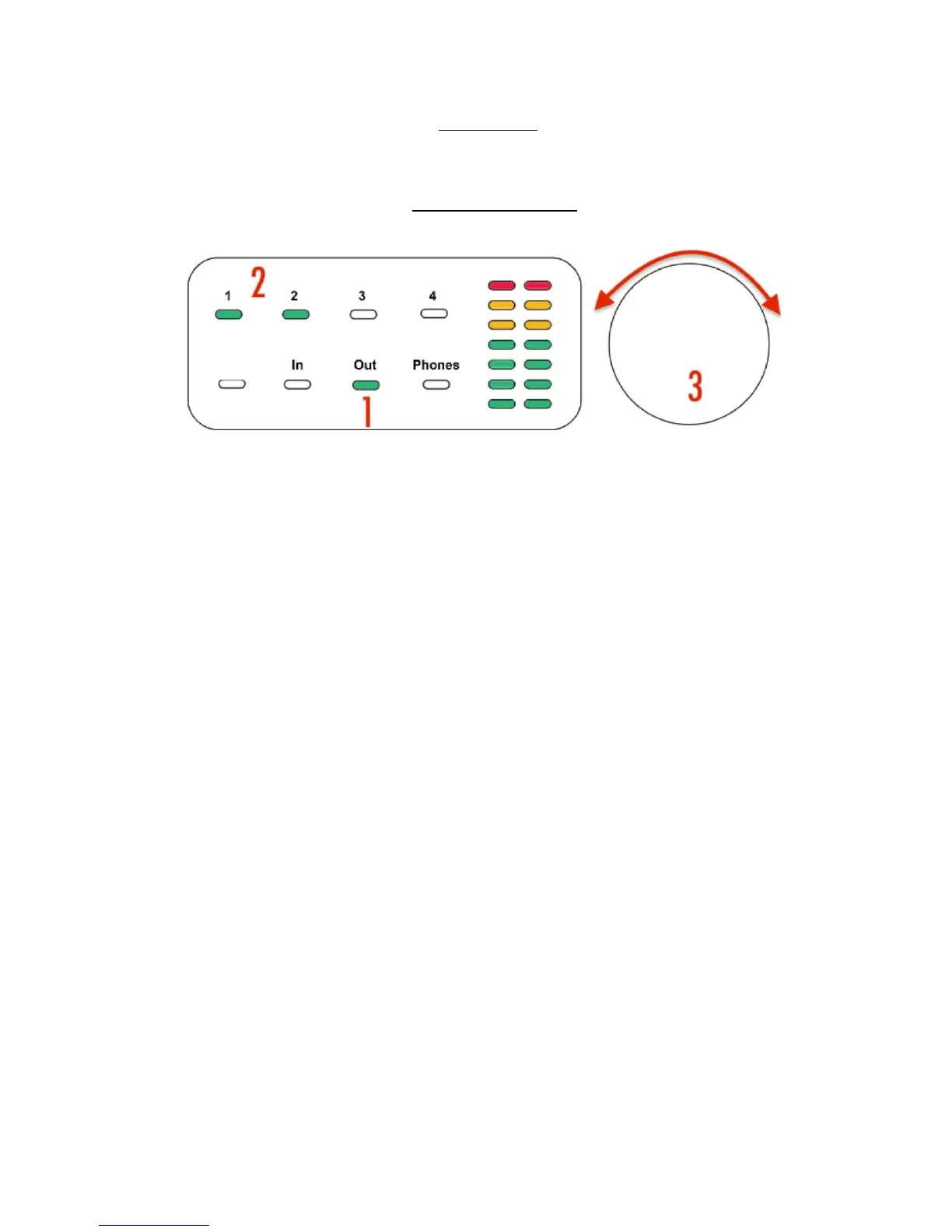
Adjusting output levels using the Interactive Display:
Simply touch Out (#1) (selecting the Outputs for adjustment), then 1 and 2 (#2) to
select Analog Outputs 1&2, which are linked for stereo in the default setup. Then
turn the Rotary control knob (#3) to raise or lower the monitor speaker level.
To adjust the headphones level, follow the same procedure, selection Phones instead of
Out.
The first time you touch Out or Phones, the LED will turn green, indicating the meters
are in Signal Level viewing mode . Touch a second time and the LED will turn red,
indicating the meters are in Gain Set viewing mode, which shows the position of the
Rotary Control rather than the audio signal level.


 To Next Page