ELECTRIC BICYCLE METER KT—LCD3 Product User Manual
- 22 -
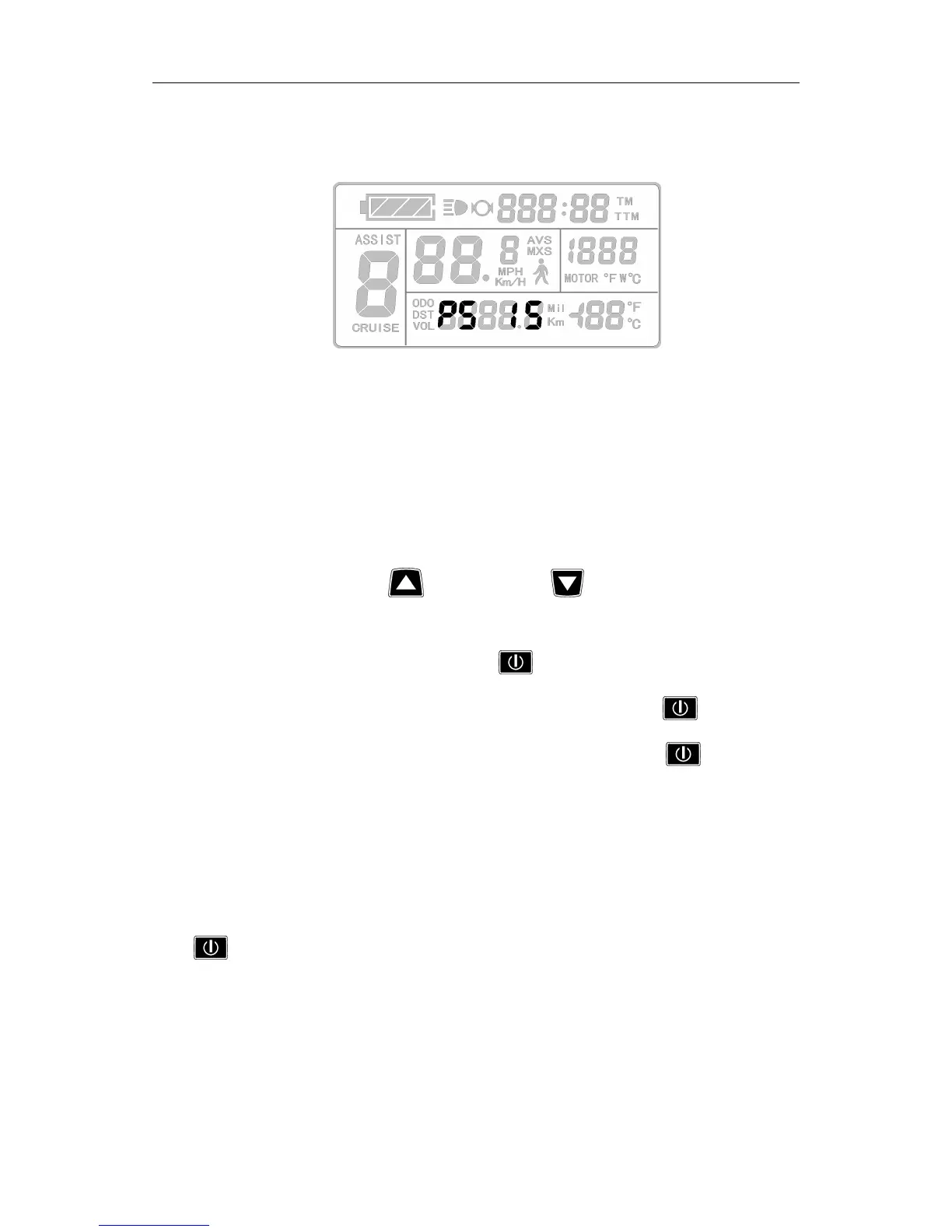
Enter P5 parameter setting interface after P4 parameter setting is finished, P5
parameter column flashes.
P5 parameter setting interface
P5 is power monitoring mode, when P5 setting is 0, the power monitoring is the
"real-time voltage" mode. Namely, it is the method to determine the battery capacity
based on real-time battery voltage. When P5 equals to a specified parameter, the power
monitoring is the "smart power" mode (this parameter is determined by the battery
characteristics, ordinary 24V lithium is generally is 4-11, 36V lithium is between 5_15). P5
setting ranges from 0-40, hold button (UP) or button (DOWN) shortly for
selection. P 5 parameter setting method is the same to that of P2.
After finishing P5 parameter setting, hold button (SW) shortly to save current
set the values, and then P5 parameter column stops flashing. Hold button (SW)
shortly again, the meter re-enter P1 parameter setting interface. Or hold button (SW)
long for about 2 seconds to exit P parameter setting environment and return to the display
1.
○ Exit P Parameter Setting
Among the five P parameter settings, when each parameter setting is completed, if
held button (SW) long for about 2 seconds, all can exit the setting environment and
return to display 1, meanwhile, the current set parameters would be saved.
Under each parameter setting interface, if there’s no button operation on the meter for
more than 1 minute, and then the meter will automatically return to display 1, and the
original set parameters will be saved.
if
T *=a¢wQtT%W@WM
_
I
K
V,
Y‘
@@%HwT
JW,TJ
\ \
1‘\”\“»
"
J
\‘
TL
'1
_<
r
,
*
,
‘
é,
\
\‘
\‘
J
Q
x‘
J
‘
\
1
U
u
E
_
1%
J
\
I
“\
I‘,
C
I
\
J
‘\‘\‘
*1
"\
/a*"\
/af
\
“
‘
‘ ‘
‘
L‘
\‘
{
J
/_a‘
J
J‘j_,U
U_M
Q‘-:,*“TQ:
J
‘Hr
?;.fv_I€~
.
_
/‘C1
Y‘
_
I
i
f
F
THY
‘1C\1,;::U
_!'|
\
I
'*
HW?1*’H
'\
if
B~<i_m,.-/‘H
H<L&flA<.L;\i\T\i@1~F;
+1»,
\i§L1.1
[11
@133»
[P
Féfl
V/\
\‘
fi
1‘
M
1]
fl
x
w
!,L»‘1
x
@
q
\
j
.7_
V’
‘
D
WK
fy
\
l%_"i;‘Y'
‘Z!
L_;<_
Iii
|:|
|i|
_\
L
Q
|:\\
|:_\
\ \
M
1:.
‘.»
~
\._
'
1»
Y"
\k:I..
mil
‘
Q.‘
‘
I
r
\
7
\
[
\ \ \ \ \ \ \
ik
y
L
721+}:
_1
\
*1;
*1
—
"1
1'
\
:
_
\
M
?*T\
\
‘
,
I
\_A
n
I I
if
‘L


 To Next Page