User Guide
8
USER
YES
NO HOT WATER
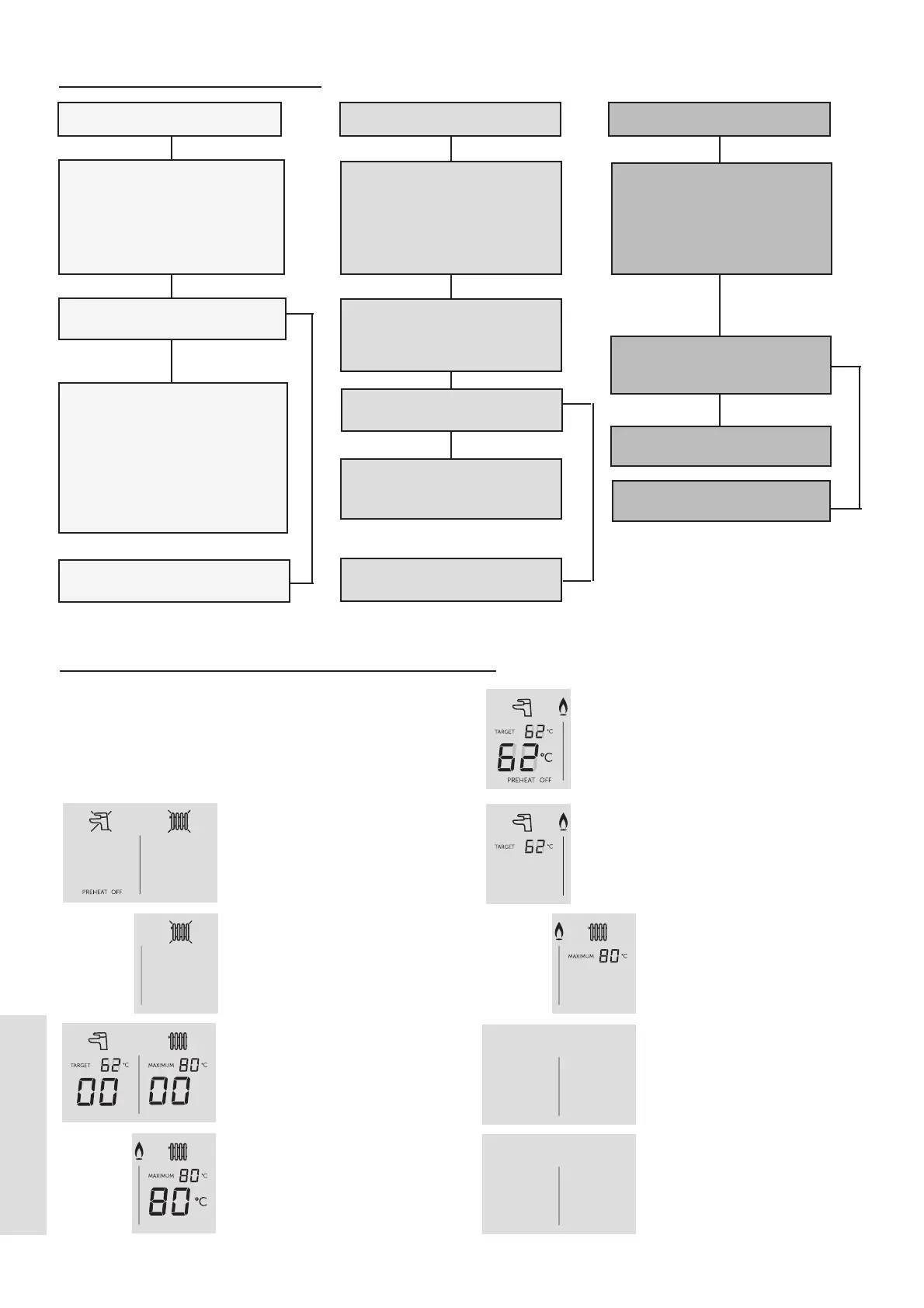
Check the mains power is
switched on and that there is
no a cross through the radiator
symbol (in which case press the
mode button until no cross is
shown)
Is water coming out of the hot
water tap when turned on?
NO CENTRAL HEATING
Check that the mains power is
turned on and that there is not
a cross through the radiator
symbol. If there is a cross
through the radiator symbol
press mode until it disappears.
Does the boiler operate and
provide central heating?
Check the time settings on the
programmer are as you require
and adjust if necessary
Check that the programmable
room stat or Timer and room stat
are calling for heat.
NO HOT WATER OR CENTRAL
HEATING
Check that the mains power is
turned on and that there is not a
cross through the tap symbol. If
there is a cross through the tap
symbol press the mode button
until no crosses are shown.
See boiler “Display Functions”
section
Does the boiler have a display
showing on the front control
panel?
If the fault persists see boiler
“Display Functions” section. If
“Boiler o” is displayed then
contact Ideal Customer Services
Helpline if your appliance is
under warranty or a Gas Safe
Registered Engineer, if out of
warranty
YES
NO
Contact a Gas Safe Registered
Engineer
1.7 TROUBLESHOOTING
Contact a Gas Safe Registered
Engineer
Contact a Gas Safe Registered
Engineer
NO
YES
NO
1.8 NORMAL OPERATION DISPLAY CODES
The user control has one display to inform the user about the
status of the boiler. The display shows the status of the ame.
If no ame is detected then ame symbol will not be visible.
When the ame is detected the ame symbol will be visible
permanently.
Below is a list with display function.
Boiler O Mode
Press the Mode button once to
enable DHW or twice to enable
CH.
CH O
Press the Mode button until the
cross disappears to enable CH.
Winter Mode, no heat demand
Boiler is active for Central
Heating
Boiler is active for Domestic
Hot Water
Boiler is heating up the
Plate Heat Exchanger
Boiler is in Lockout for a
specic error. Display will
show a number after the
“L” to indicate which error is
detected
Boiler has a fault for a
specic error. Display will
show a number after the
“F” to indicate which error is
detected.
Boiler is active for boiler
frost protection: operates
if the ambient temperature
is below 5°C until it reaches
19°C.
PH
PREHEAT ON
FP
L 01
F 01





 To Next Page