8 Thermostatic cartridge replacement
16
1
2
3
+
4
2,5
1
2
3
The thermostatic cartridge seldom fails and the possibility of blocked lters should be investigated be-
fore contemplating replacing it. Small particles of water borne debris may still nd their way onto the lter
screens on the thermostatic cartridge. These should be cleaned and re-tted.
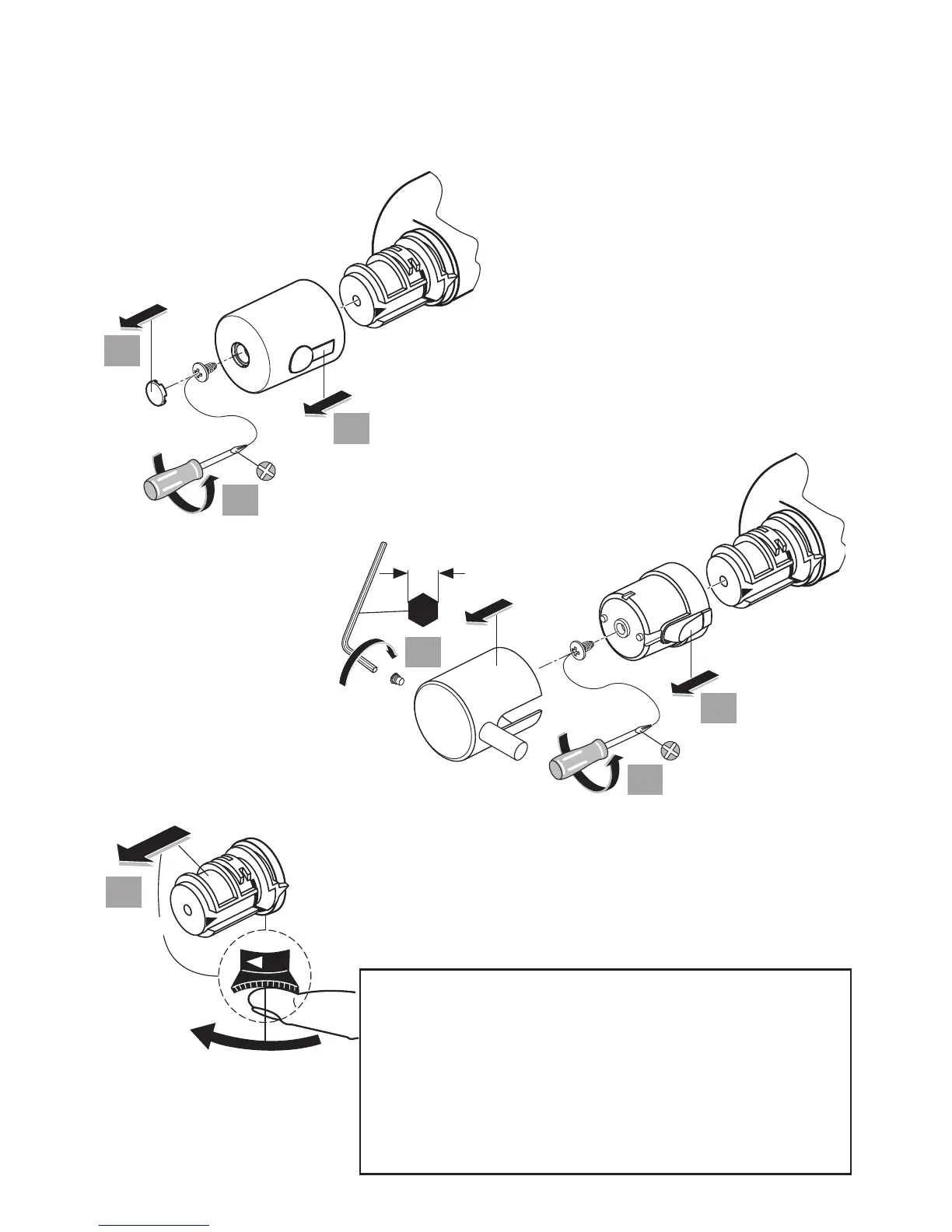
To replace the thermostatic cartridge:
1. Prise out the index button.
2. Remove handle screw.
3. Pull off the temperature control handle.
4. To remove the temperature handle carrier (grey
plastic moulding), slide the black serrated lever
clockwise and pull off. This will expose the
thermostatic cartridge.
FOR LEVER HANDLE VERSIONS:
1. Unscrew dog point screw and pull
off temperature control handle.
2. Remove handle insert screw.
3. Pull off the handle insert.
GENERAL MAINTENANCE TIPS:
• Isolate both water supplies rst.
• Drain down the pipe work & product as much as possible:
fully open ow handle & unscrew shower hose.
• Use the correct size tools.
• Expect some trapped water to escape from the mixer.
• Ensure parts are re-assembled in the correct ‘reverse’ sequence.
• Observe torque settings - where specied.
• Restore both water supplies.
• Check all joints for leaks upon completion.


 To Next Page
 Loading...