4
Getting Started
Introduction
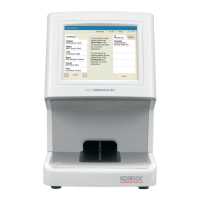
The SNAP Pro* Analyzer helps you to increase efficiency and improve work flow:
• Automatically activate SNAP* tests and display results to streamline your work flow.
• Send SNAP test results to the patient record.
• Electronically capture SNAP test invoice charges to reduce lost revenue and improve profits.
• Display results and add them to the patient record instantly for customized, client-friendly
reports with IDEXX VetConnect* PLUS.
The SNAP Pro Analyzer is for veterinary use only.
IDEXX VetLab* Station Connectivity
The SNAP Pro Analyzer can be connected to the IDEXX VetLab* Station (the IDEXX laboratory
information management system). Connecting multiple analyzers to the IDEXX VetLab Station helps
you attain a comprehensive picture of your patient’s health, with the ability to view test results from
multiple analyzers on a single report, determine disease progression with
parameter-trending capabilities, and more.
By connecting the SNAP Pro Analyzer to the IDEXX VetLab Station, you can:
• Automatically review patients’ prior results on every printout for easy comparison.
• Improve client communications with illustrated diagnostic or treatment progress printouts.
• Link to expert descriptions and common causes of abnormal values.
• Print information to help explain the significance of results to your clients.
• Allow new staff to train independently.
• View educational on-screen guides and videos, such as how to properly prepare a plasma sample.
SNAP Pro Components
USB ports
Ethernet port
Touch screen
SNAP port
Power button
Battery
compartment
Status light
Power port



 To Next Page