

EasyManua.ls Logo

iFixit Mac Mini Model A1347 - User Manual

iFixit Mac Mini Model A1347
13 pages
Print Icon
To Next Page IconTo Next Page
Loading...
Mac Mini Model A1347 Teardown
Step 1 -
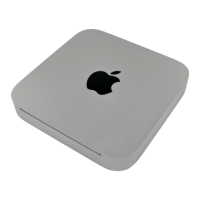
Well folks, after much clamor, it seems the engineers at
Apple have finally included an HDMI port in an actual
Apple product.
Notable Tech Specs:
2.4 or 2.66 GHz Intel Core 2 Duo processor
2 GB of RAM (expandable up to 8 GB)
NVIDIA GeForce 320M graphics processor with
256MB of shared DDR3 SDRAM (the same as
the most recent MacBook)
HDMI port with support for up to 1920-by-1200
resolution
AirPort Extreme 802.11n Wi-Fi wireless
networking
SD card slot
Mac Mini Model A1347 Teardown
© 2010 iFixit — CC BY-NC-SA www.iFixit.com Page 1 of 13
Question and Answer IconNeed help?

Do you have a question about the iFixit Mac Mini Model A1347 and is the answer not in the manual?

Summary

Mac Mini A1347 Teardown: Step 1 - Initial Overview and Specs

Notable Tech Specs

Lists key technical specifications including processor, RAM, graphics, and connectivity.

Mac Mini A1347 Teardown: Step 3 - Physical Design and Identification

Aluminum Unibody Design and Dimensions

Details the unibody aluminum construction, dimensions, and weight.

Mac Mini A1347 Teardown: Step 4 - Port Layout Analysis

New Port Configuration

Describes the surprising new port layout on the Mac Mini.

Mac Mini A1347 Teardown: Step 6 - Accessing Internals

Mac Mini A1347 Teardown: Step 7 - RAM Configuration

Mac Mini A1347 Teardown: Step 8 - Fan Removal and Details

Fan Removal and Dampers

Describes removing the fan and notes rubber dampers for noise reduction.

Mac Mini A1347 Teardown: Step 9 - Cooling System

Mac Mini A1347 Teardown: Step 10 - Wi-Fi Antenna Plate

Mac Mini A1347 Teardown: Step 11 - Wi-Fi Antenna Connector

Mac Mini A1347 Teardown: Step 12 - Logic Board Connectors

Mac Mini A1347 Teardown: Step 14 - Logic Board Assembly Removal

Mac Mini A1347 Teardown: Step 15 - Logic Board and I;O Frame

Logic Board Assembly and Antennas

Shows the logic board/I/O frame and explains auxiliary antenna placement.

Mac Mini A1347 Teardown: Step 16 - Speaker Assembly

Mac Mini A1347 Teardown: Step 17 - AirPort Extreme Card

AirPort Card Location and Specs

Locates the AirPort card and details its Wi-Fi and Bluetooth capabilities.

Mac Mini A1347 Teardown: Step 18 - Heat Sink Removal

Mac Mini A1347 Teardown: Step 19 - I;O Frame and Antennas

I;O Bezel Antennas

Explains the visibility and grounding of I/O bezel antennas.

Mac Mini A1347 Teardown: Step 20 - Logic Board Components

Processor, Graphics, and Chipset

Identifies the main processor, graphics, and other notable chips on the logic board.

Mac Mini A1347 Teardown: Step 21 - Hard Drive Options

Mac Mini A1347 Teardown: Step 22 - Power Supply and AC Adapter

Mac Mini A1347 Teardown: Step 23 - Optical Drive Bay

Optical Drive Model and Removal

Describes the removal of the Hitachi-LG DVD Rewriter and its specifications.
Mac Mini A1347 Teardown: Step 24 - IR Sensor;Receiver

iFixit Mac Mini Model A1347 Specifications

General IconGeneral
BrandiFixit
ModelMac Mini Model A1347
CategoryDesktop
LanguageEnglish