7
Remote Control
1. Open the remote controller rear cover and insert a CR2032 battery; then the remote controller
can be used. It has the same function keys as the control panel
2. The effective distance for the remote controller is 6 meters.
Ice Box
The ice box can absorb the heat in the water, which can lower the temperature of the water tank.
It can make the air ow cooler.
1. Take out the ice box and put it into the freezer, until the ice box is totally frozen.
2. Put the frozen ice box into the water tank.
CLEANING & MAINTENANCE
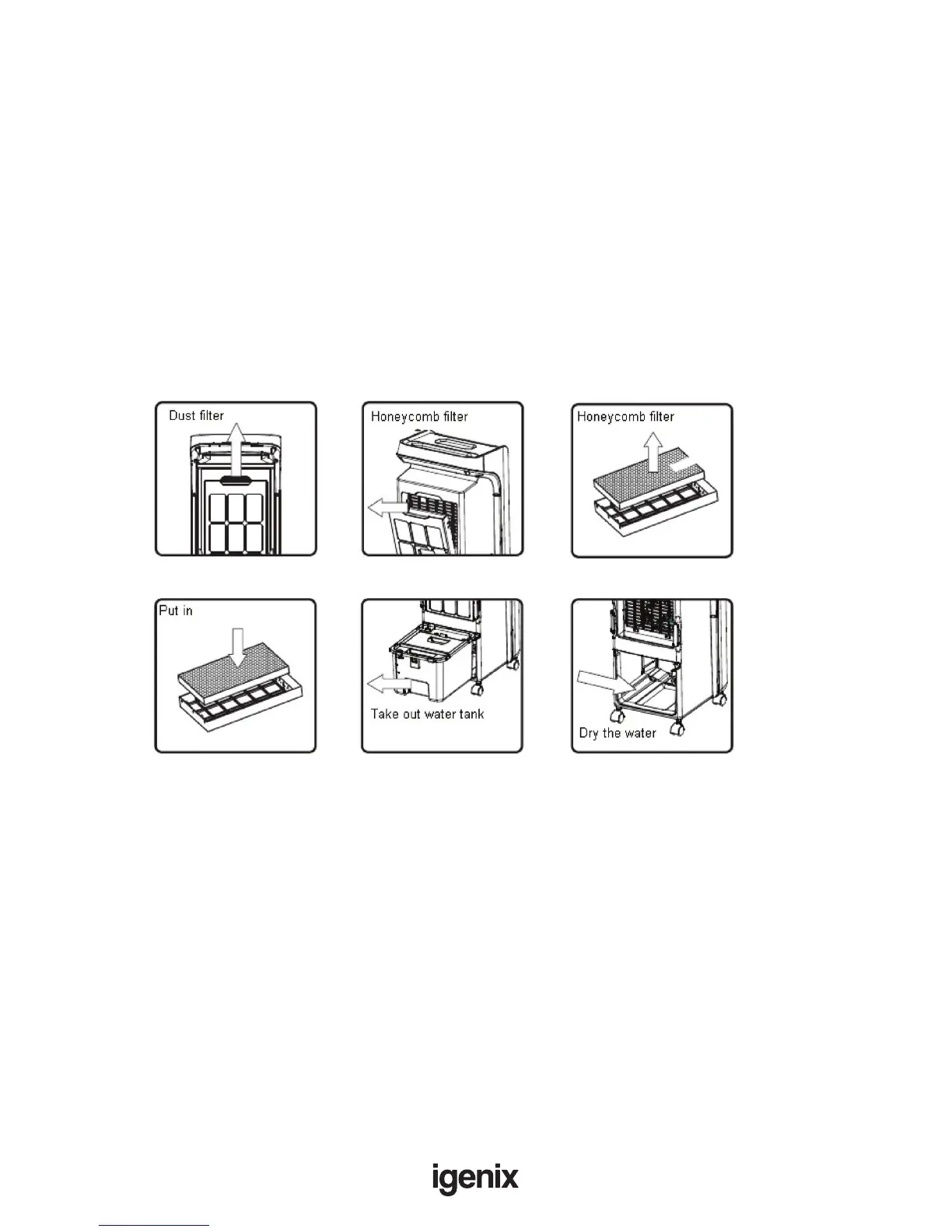
• Unplug the power cord, rst remove the Dust Filter. With a mild detergent and a soft brush, scrub
the honeycomb lter, clean with clear water and dry, and then replace it to the unit. (Picture 1)
• After cleaning the Dust lter, remove the Honeycomb lter. With a mild detergent and a soft brush,
scrub the honeycomb lter, clean with clear water and dry, and then replace it to the unit.
(Picture 2~4)
• Unplug the power cord, and then remove the water tank. With a towel dipped with little detergent,
wipe away the scale in the water tank, clean with clear water, and then replace it to the unit.
(Picture 5)
• Clean the cover with a mild detergent and a soft cloth.
Note:
• Due to high voltage in the unit, be sure to unplug the power cord before cleaning
• No part of the control panel should contact water
1. 2. 3.
4. 5. 6.



 To Next Page