10
OPERATING INSTRUCTIONS – MODEL: IG9904
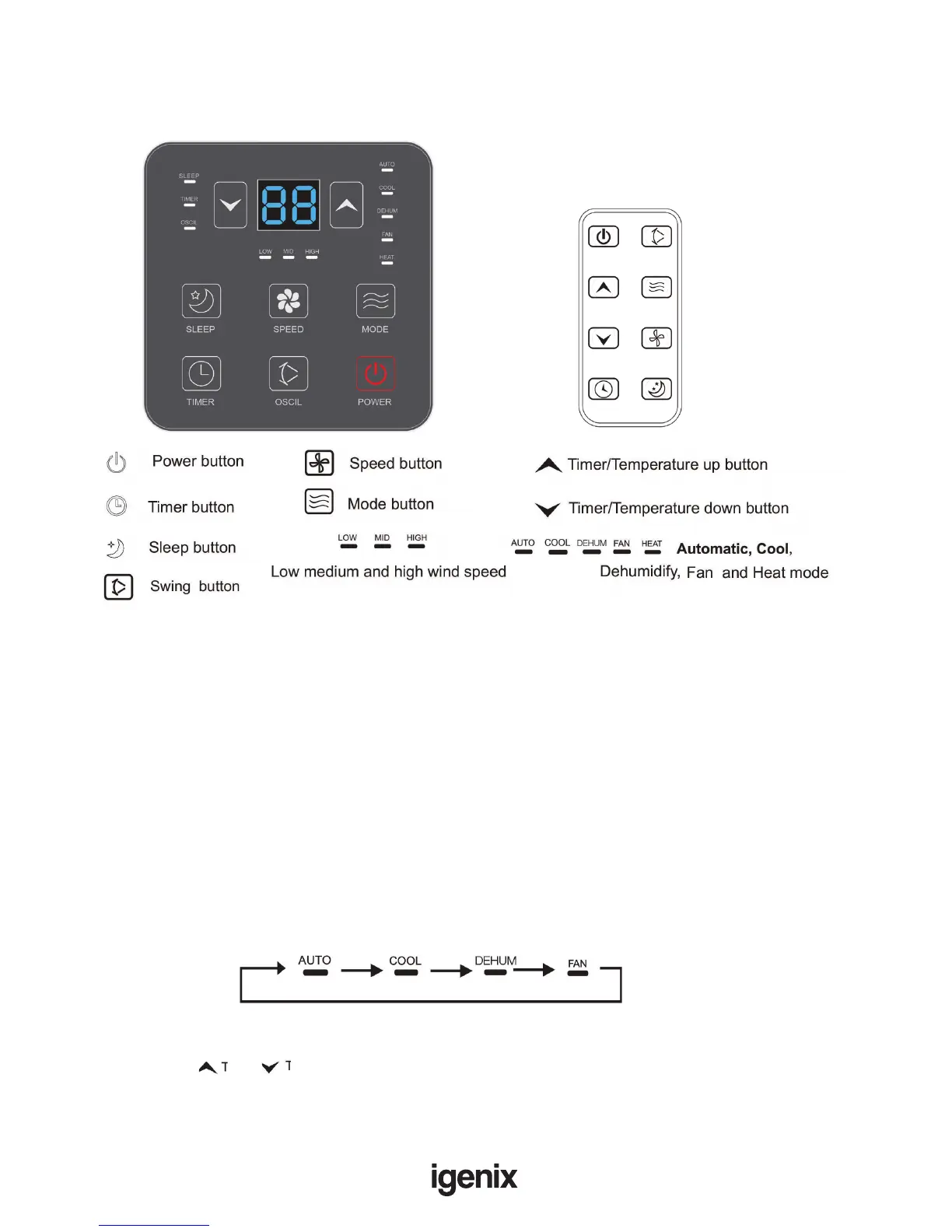
Control Panel
The IG9904 features 4 main functions: Cooling, Fan, Dehumidier and Heating as well as an Automatic
function.
Important: The compressor will start approximately 3 minutes after the unit is turned on (this will
help prolong the life of the compressor). After switching the unit off, please wait at least 3 minutes before
turning the unit back on.
Note: The main control board has a memory function, meaning that after the unit has been switched
off, it will memorise the last operating function and mode.
Turning On
• Once the appliance has been installed correctly, plug into a wall socket - the appliance will beep once
• Press the “On/Off” button to switch on the appliance, the LED Display will illuminate showing the
ambient room temperature, the louvers will open and it will operate in Automatic mode
Select Operating Mode
• Press the “Mode” button to select the desired mode shown below:
Adjust Temperature
The temperature can be set (Auto and Cooling mode only) between 15°C to 31°C by increments of 1°C
• Press the “ ” or “ ” button once to increase or decrease the temperature by 1°C
• The LED Display will show the target temperature for 5 seconds and will then revert back to the
ambient room temperature



 To Next Page