en
17
User manual Jamajka W, Marta Wwww.igloo.pl
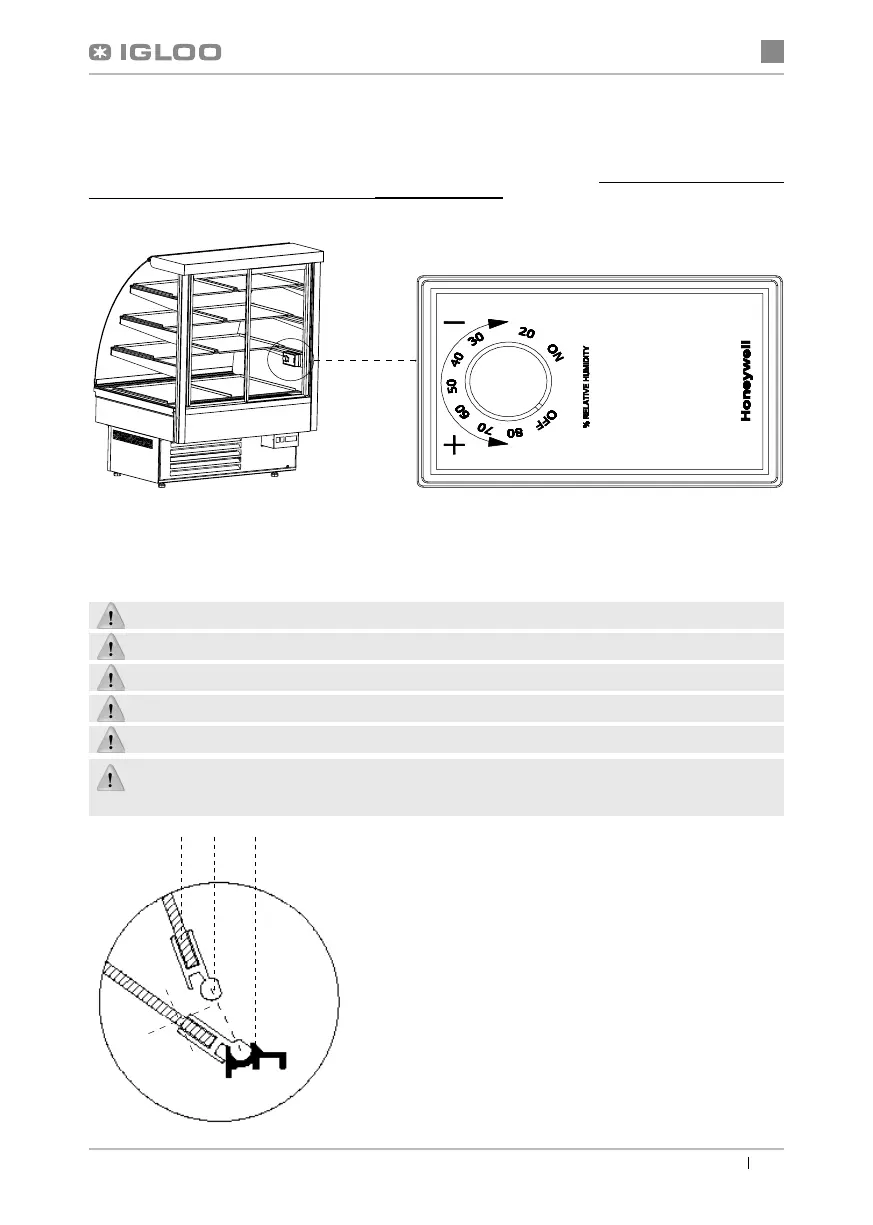
Fig.8 Disassembly of the front glass
1- Front glass
2- Upper aluminium profi le (lifted guide) of the glass
3- Lower aluminium profi le (hinge) of the glass
4.2. Humidity regulation
Hygrostat is used to control humidity, when the temperature within the display cabinet shall fall between 10ºC and 15ºC.
We may adjust the desired air humidity in the display cabinet, with the help of hygrostat knob, within the range between
30 and 80% by turning the knob Fig.7 (p.17) and setting it in a proper place. Turning the knob clockwise will decrease the
set air humidity, and turning it in the opposite direction will increase the set air humidity. Turning the knob left to the fi nal
position shall switch off the hygrostat, despite the active power supply.
5. MAINTENANCE
5.1. Cleaning and maintenance
All maintenance services need to be performed after disconnecting the device from power supply!
Protect electric installation against any damage or water spillage
Do not use water stream to clean the device, only a wet cloth
Do not use any sharp objects to remove fi lth!
Devices equipped with wheels cannot be used on uneven surfaces!
When cleaning the inside of the device do not leave the front glass freely lifted within the aluminium profi le. This is
related with the risk of glass damage and is not covered by warranty. The glass and the profi le need to be pulled out
for the period of performing maintenance activities. Fig.8 (p.17).
Fig.7 Hygrostat
123


 To Next Page