en
19
User manual Jamajka W, Marta Wwww.igloo.pl
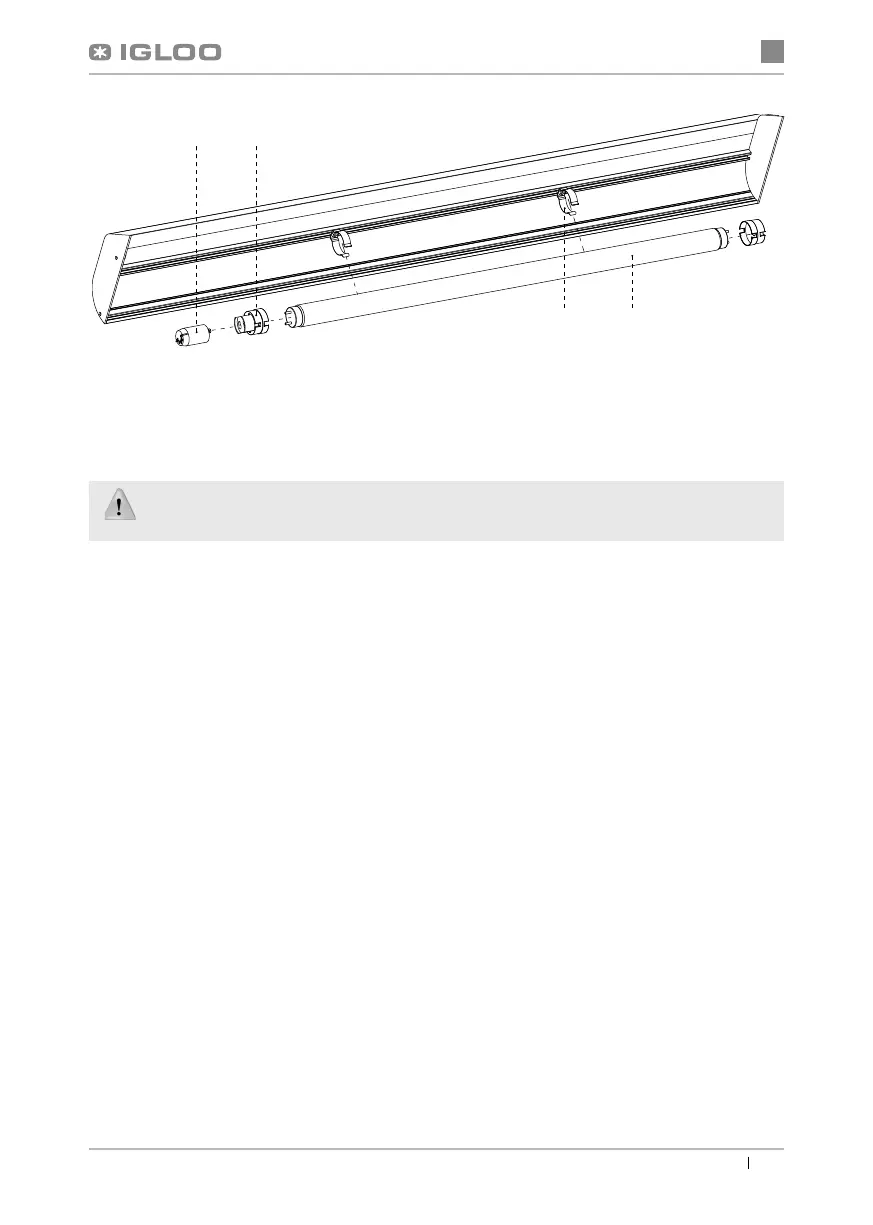
Fig.11 Changing the fl uorescent lamp
1 – Fluorescent lamp handle
2 – Fluorescent lamp
3 – Fluorescent lamp casing
4 – Fluorescent lamp starting switch
During maintenance services it is necessary to pay attention not to damage the data place of
the device Fig.12 (p.20), which contains signifi cant information for servicing organs and waste
removal companies.
6. SERVICE
6.1. Fault identifi cation and repair
In case of any diffi culties during actuation of the device or during its exploitation, please return to these chapters in this
manual, which explain the performed operation. This aims to ensure that the device is properly operated. If you still
experience diffi culties, the following hints will help you solve the problem:
The device is not working... – Make sure that:
• The device is connected to the supply network
• Voltage and frequency in the network are compliant with those recommended by the producer, 230V/50Hz
• The main switch is turned on
• Thermostat is turned on (This concerns the Igloo thermostat – If only two spots are visible on the display – turn on
the thermostat)
The device is operating, but the lighting is off...– Make sure that:
• Lighting switch is turned on
• Fluorescent lamp or starting switch of the device is not burnt
The device does not reach the proper temperature, the lighting is on...– Make sure that:
• The main switch is on
• Temperature setting on the thermostat is properly set
• Thermostat works properly
• The condenser is clean, if necessary – clean the condenser
• Ambient temperature does not exceed 25ºC
• Enough time has passed for products to be cooled
• Ventilation holes of the device are not blocked
34
21


 To Next Page