3
P4
2
1
3
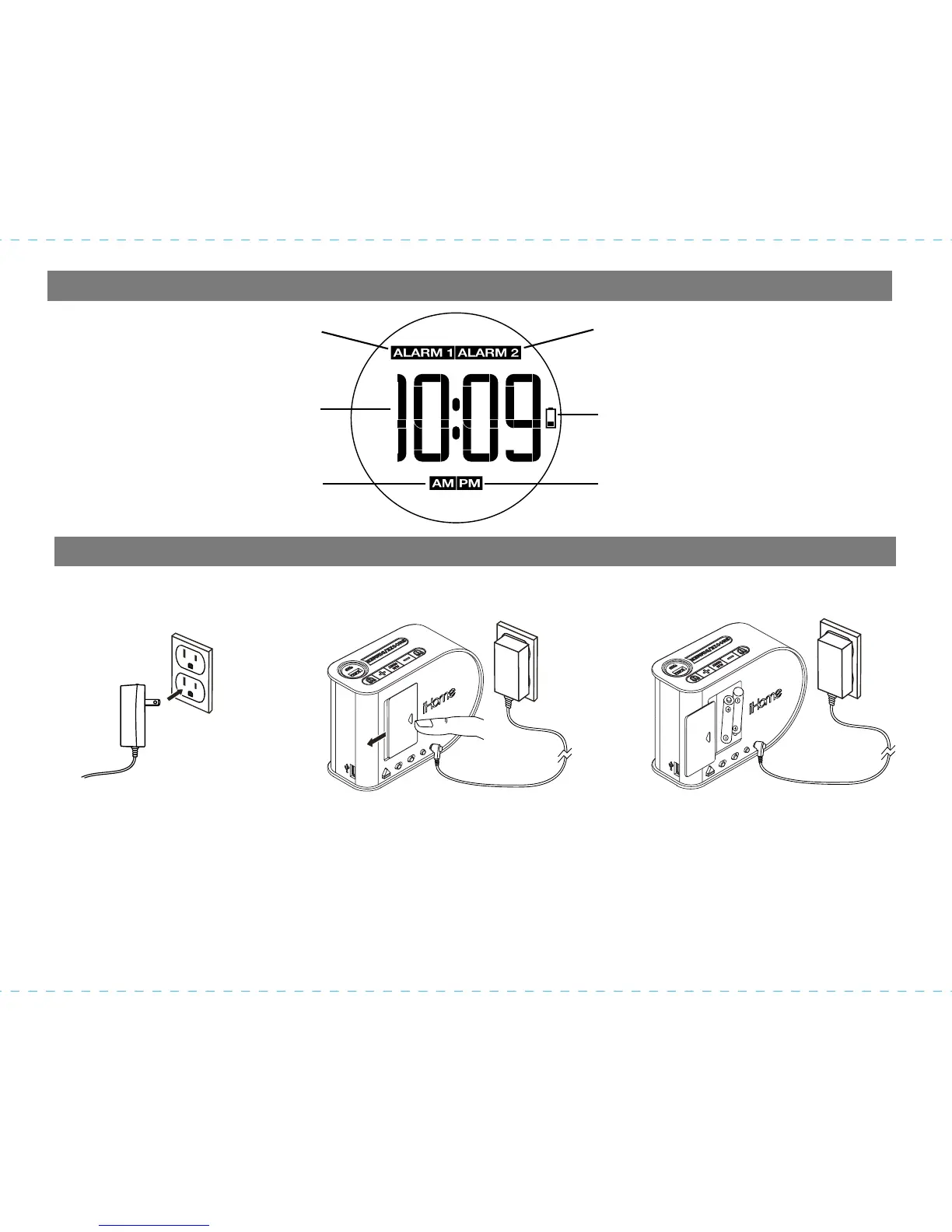
Display
Installing and Replacing Backup Batteries
When lit, indicates Alarm 1
is armed. If not lit,
Alarm 1 is not armed
When lit, indicates Alarm 2
is armed. If not lit,
Alarm 2 is not armed
When lit, indicates PM clock
or alarm time
When lit, indicates AM clock
or alarm time
When flashing, indicates backup
batteries should be replaced
Time display
Your new iHome Clock includes a battery backup system that will maintain the time and alarm
settings during a temporary power interruption.
1. Keep unit connected to AC power when changing batteries to avoid losing your settings.
2. Press on the battery door and slide to open and remove the battery door.
3. Check the correct polarity (+/-) markings in the battery compartment and install two “AA”
batteries (not included) to match the markings.
4. Replace the battery door.
NOTE: With batteries installed, the display backlight will turn off during a power failure but the
clock will
continue to run and maintain your alarm settings.



 To Next Page