maximize the lifetime of the memory card.
2. Please do not remove the card while the camera is recording to
prevent data loss/corruption.
2. What’s in the box?
IIWEY S2 Dash Cam Main Camera
1080P Rear Camera Suction Mount
USB Data Cable User Manual
Warranty Card GPS
Car Charger with Built-in Mini USB Cable
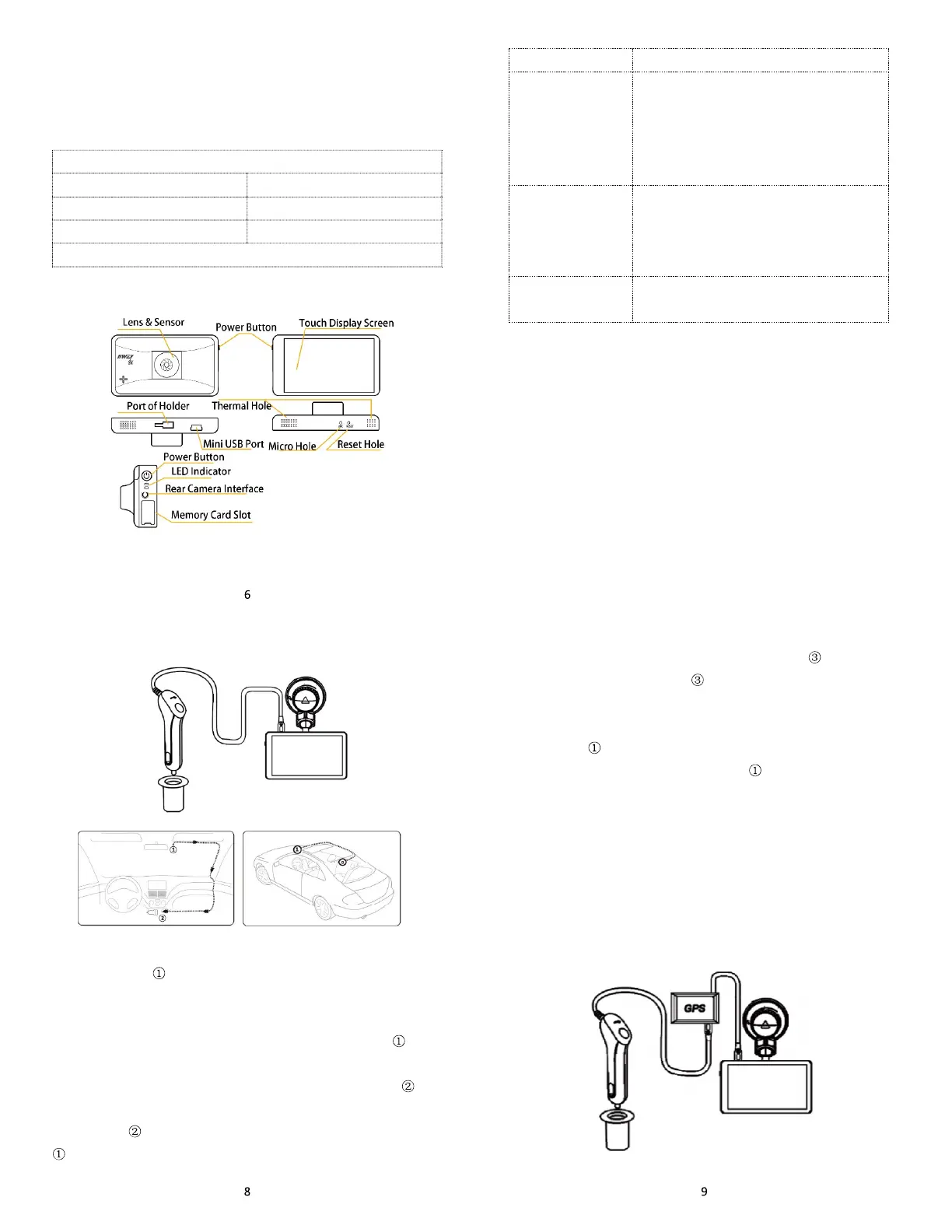
3. Camera overview
Button Function Explanation
7
Name Function Explanation
Power button
1. Short press to power it on
2. Press 3 seconds it powers off when it
powers on
3. Press it a short time to extinguish the
screen and light it up again
Reset button hole
When the device is out of control or
destroyed, please press this button by
reset needle or other tools to restore the
device
Mini USB Port Mini 5pin port
4. LED indicator
Charge Indicator Red light. It always light on when the device is
charged, and it goes off when it is fully charged.
Active Indicator Blue light. Flashes during recording, and always
on when recording stops.
5. Install dash cam
5.1. Install dash cam without GPS
1. Turn off the car engine.
2. Fix the IIWEY Dash Cam onto the suction mount.
3. Stick the car mount onto your car windshield (ideally right in the
middle).
4. Connect the USB cable to the micro USB port of the Dash
Cam. Run the cable along the edge of the windshield, tucking it away
in the seams, and extend it all the way to the USB port of the Car
Charger. Be sure to keep it away from the airbag area.
5. Insert the Car Charger into your cigarette lighter, connect the
Dash Cam to the Car Charger.
6. Plug the rear camera connecting cable into the rear camera
connecting port, and install the rear camera properly.(NOTE: the
rear camera can be installed inside or outside, it is waterproof. We
recommend you install it outside to get a batter video quality)
7. Adjust the Dash Cam to keep the lens level with the ground.
8. Start the car engine to check if the Dash Cam is working
properly.
5.2. Install dash cam with GPS
Stick the GPS on the windshield, then connect to car charger and
main camera. NOTE: GPS symbol will keep flashing if there is no
GPS signal or the dash cam has not received GPS signal. It will
become stable status and stop flashing once it receive GPS signal
(Under normal circumstances, the GPS receiver will detect the GPS
signal within 2 minutes as soon as the car running on the road).
s



 To Next Page