30
FOLDERS
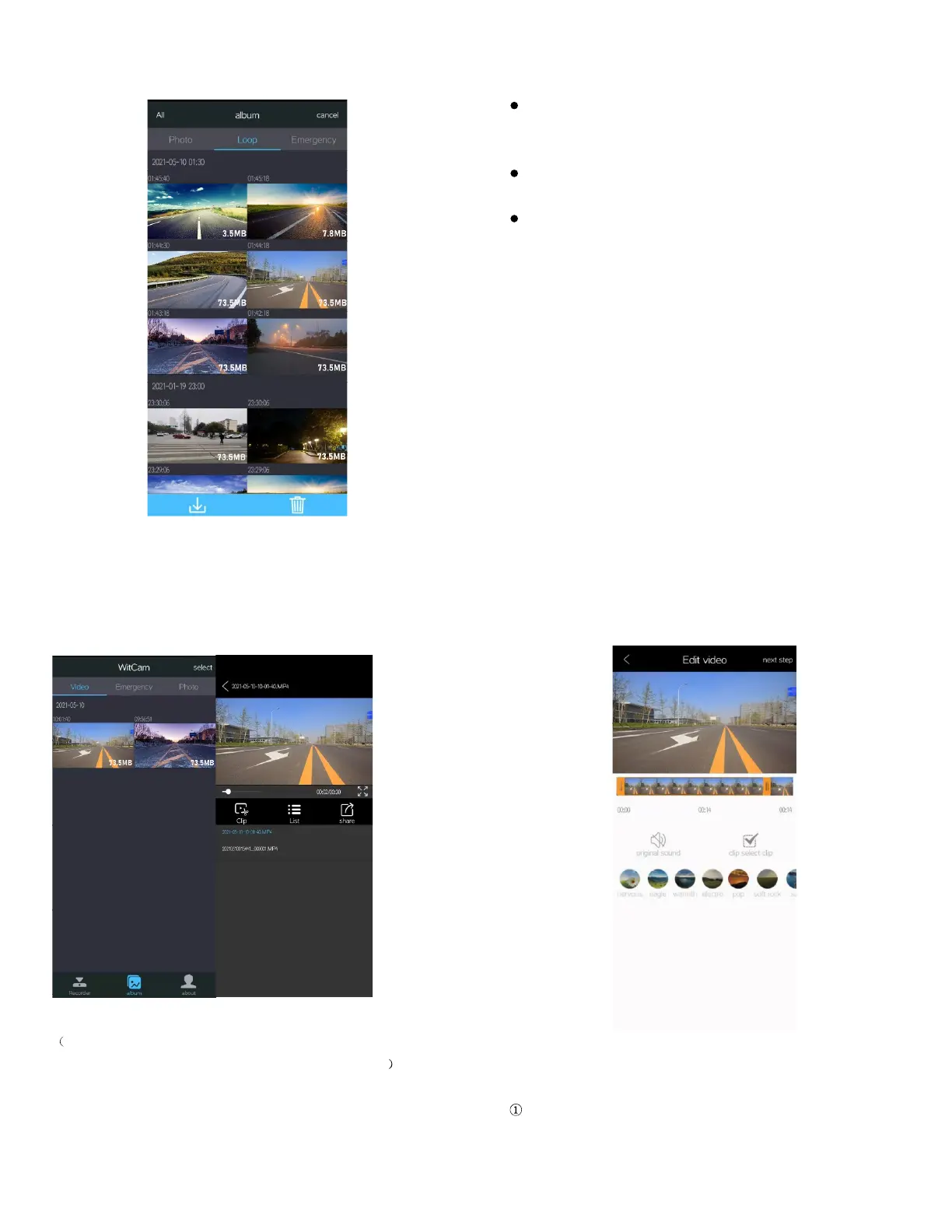
Download and playback the video
Three folders: Photo Loop, and Emergency
Photo: Saved all the photos
31
Loop: Saved all the loop recording videos
Emergency: Saved all the locked videos
When you enter the Loop folder, click the ‘select’ button on the
upper right corner or long-press the video file, you can
download or delete the video you want.
When you enter the Emergency folder, you can only download
the locked video, cannot delete the videos.
You can playback the videos on the folders directly or download
it to your phone, then back to the Home page of App, enter the
Album to playback, edit, or share the videos downloaded.
Edit and share the videos
After you download the video, please return to the Home Page of
the App, enter the Album, click the video to playback AND edit.
You can check the GPS logs and share the video from here.
32
Click the Clip button to enter the Edit page:
This is an extended function, if you are interested you can try it. It
is used to intercept video clips and add background music
When you finish the Edition, click ‘next step’ to share the video.
33
REMINDER: If it stops at 95% progress during the download process,
rectify by the following method:
. Please make sure that your phone is always connected to WIFI.
(Please note: If the phone screen shut down during the
download process, the camera’s WIFI connection may be



 To Next Page