10
Commissioning
Check whether the voltage specified on the type plate
matches the mains voltage available.
The power socket used must be
earthed (protective earthing).
If above conditions are met, the device is ready for opera-
tion after plugging in the mains plug.
If these conditions are not met, safe operation is not guar-
anteed and the device could be damaged.
Observe the ambient conditions (temperature, humidity,
etc.) listed under “Technical Data”.
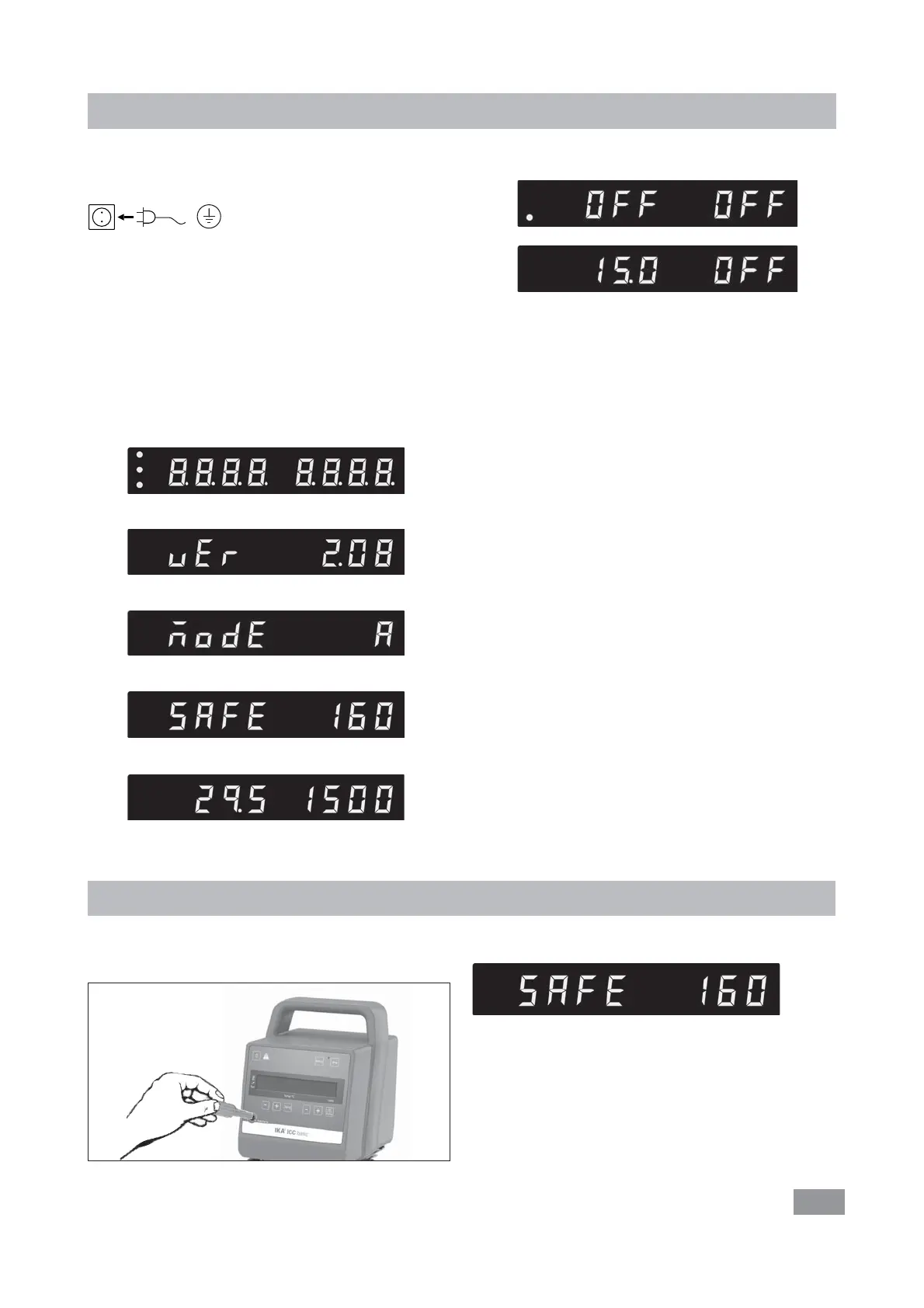
After switching on the mains switch (2) at the back of the
device or pressing the power key (A), all LED segments
light up during the self test.
Setting the safe temperature
Adjust the safe temperature with screwdriver delivered
with the device.
The safe temperature setting will appear on the display.
Factory setting: approximate max. value
Adjustment range: 0 – 160 °C
Warning: The safe temperature must always be set to at
least 25 ºC lower than the flash point of the fluid used.
Fig. 4
c
d
e
f
Software version (ver)
Safety temperature (safe)
Working setting
Starting
Operating mode (mode)
g
Safety temperature (safe)
i
h
After that, following two screens appear alternatively.
Then the device enters standby status and is ready for op-
eration.
Change the temperature setting with “Temp (+)“ button
(E) or “Temp (-)“ button (F).
Change the pump speed setting with “Pump (+)“ button
(H) or “Pump (-)“ button (I).
In standby status, activate the heating function by pressing
the “Temp“ button (D). The device start heating function,
meanwhile the pump start to run.
In working status, press the “OK/Pump“ button (G) to stop
the pump function. The heating function and pump stops.
Note: In running status, the pump speed adjusts auto-
matically according to the load. When the actual speed
doesn’t reach the setting speed, the actual speed and set-
ting speed will appear on the screen alternately.
In standby status, press the “OK/Pump“ button (G) to
start the pump function. The heating function will not be
activated.
In working status, press the “Temp“ button (D) to stop
the heating function, the pump keep running.
The control elements of the device allow to be locked by
pressing the key button (O), so no accidental changes dur-
ing operation are possible (LED (K) lights up).
By pressing the key button (O) again, the controls are re-
leased (LED (K) no longer lights up).








 To Next Page