9
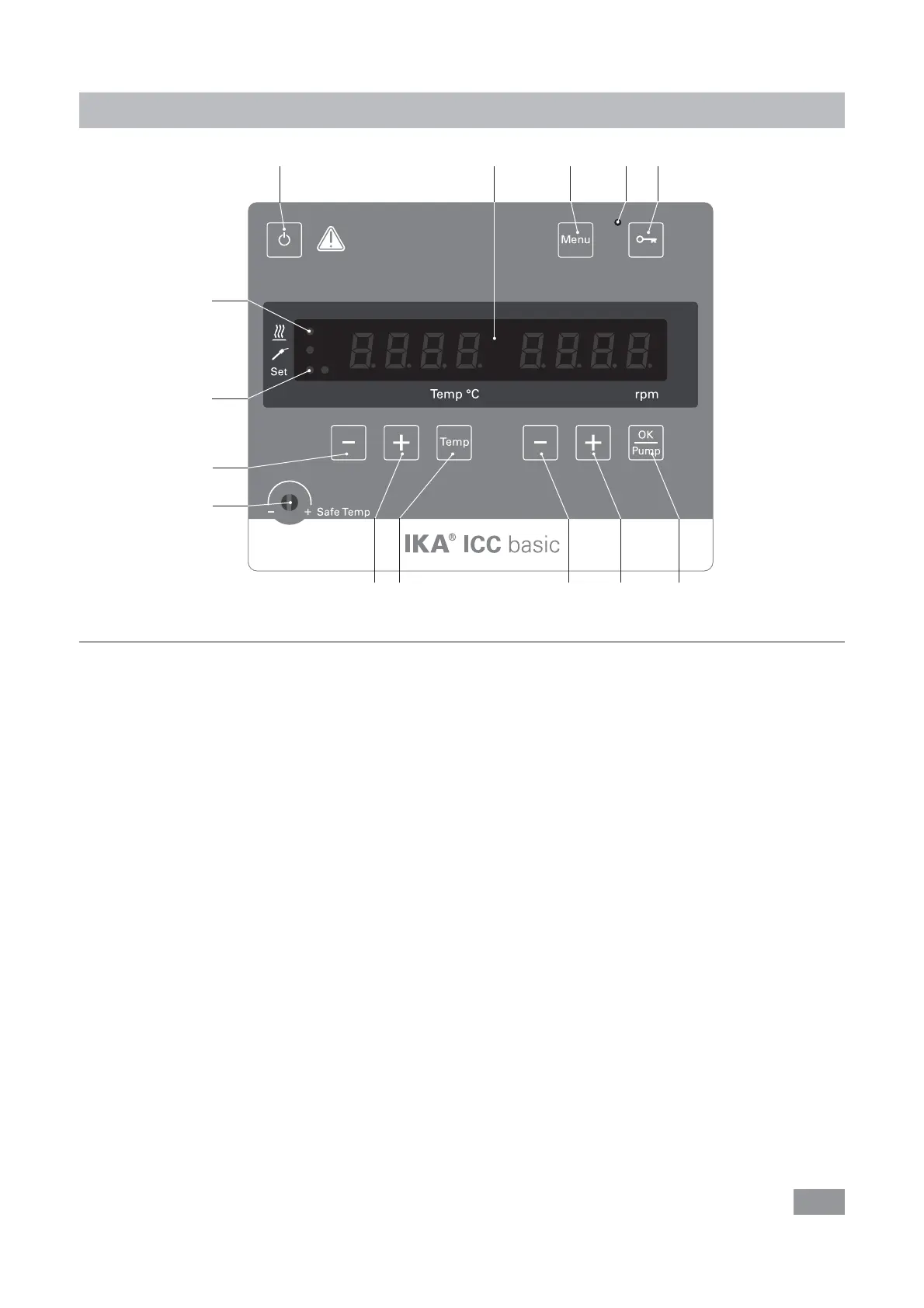
Operator panel and display
Fig. 3
Item Designation Function
A On/Off button: Switch on/off the circulator.
B Adjustable safety circuit: Adjust the safety temperature limit with delivered screwdriver.
C LED display:
Display the settings and actual values.
D “Temp” button:
Start/stop the heating function.
E “Temp (+)” button:
Increase the temperature setting value.
Navigation, selecting the settings in the menu.
F “Temp (-)” button:
Decrease the temperature setting value.
Navigation, selecting the settings in the menu.
G “OK/Pump” button:
Start/stop the pump function.
Confirm the menu settings.
H “Pump (+)” button:
Increase the pump speed setting value.
Change the value setting in the menu.
I “Pump (-)” button:
Decrease the pump speed setting value.
Change the value setting in the menu.
J “Menu“ button:
Press it once: menu option is display.
Press it a second time: back to the working screen.
K
LED, key button: Indicate that the function of keys are deactivated.
L
LED, heater:
Indicate the heating function is activated.
M LED, set: The LED lights up at the same time as the set value is displayed.
O Key button:
Lock/unlock keys.
JKO
A
GHIDE
B
F
M
C
L








 To Next Page