43
Equipment installation and configuration / Advanced settings
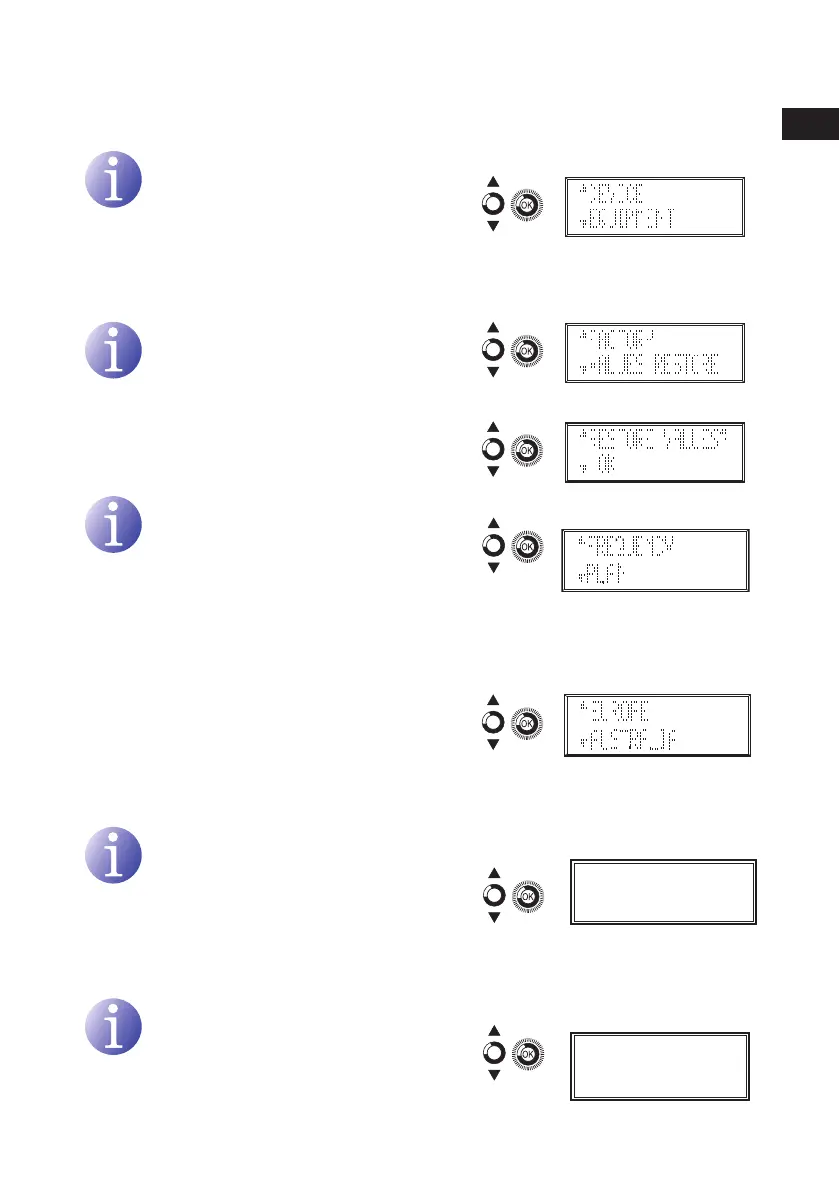
Specific equipment information
NOTE
Information on the equipment, the pro-
gramme version, the manufacturing date,
the number of hours operating, the tem-
perature and the equipment serial number
are displayed on the screen.
Restore factory values
CAUTION
This function will mean that all previous
congurations will be lost and the factory
values will be restored.
1) Select OK to restore factory values.
Frequency plan
NOTE
You can choose between two different
channel allocations for the UHF band.
These allocations depend on the geo-
graphic territory. By default the equip-
ment is configured for the European
allocation.
1) In the advanced menu, located and select
FREQUENCY PLAN.
a) If EUROPE is selected the channel alloca-
tion is for European standards.
b) If AUSTRALIAN is selected the channel
allocation is for Australian standard.
Automatic Gain Control
NOTE
You can choose to activate the automatic
gain control. By default the equipment is
configured in OFF position.
1) Locate and select A.G.C. in ON position.
Elimination of 61 to 69 channels
NOTE
You can choose to activate the the
elimination of the channels 61 to 69. By
default the equipment is configured in
OFF position.
1) Locate and select LTE PROTECTION in ON
position.
LTE PROTECTION
OFF
A.G.C.
OFF
EN


 To Next Page