44
Equipment installation and configuration / Advanced settings
Outputs number configuration
NOTE
You can choose two types of conguration
for Outputs No: TV2 & TV1 or TV1.
By default your equipment is configu-
red for two outputs (TV1 & TV2).
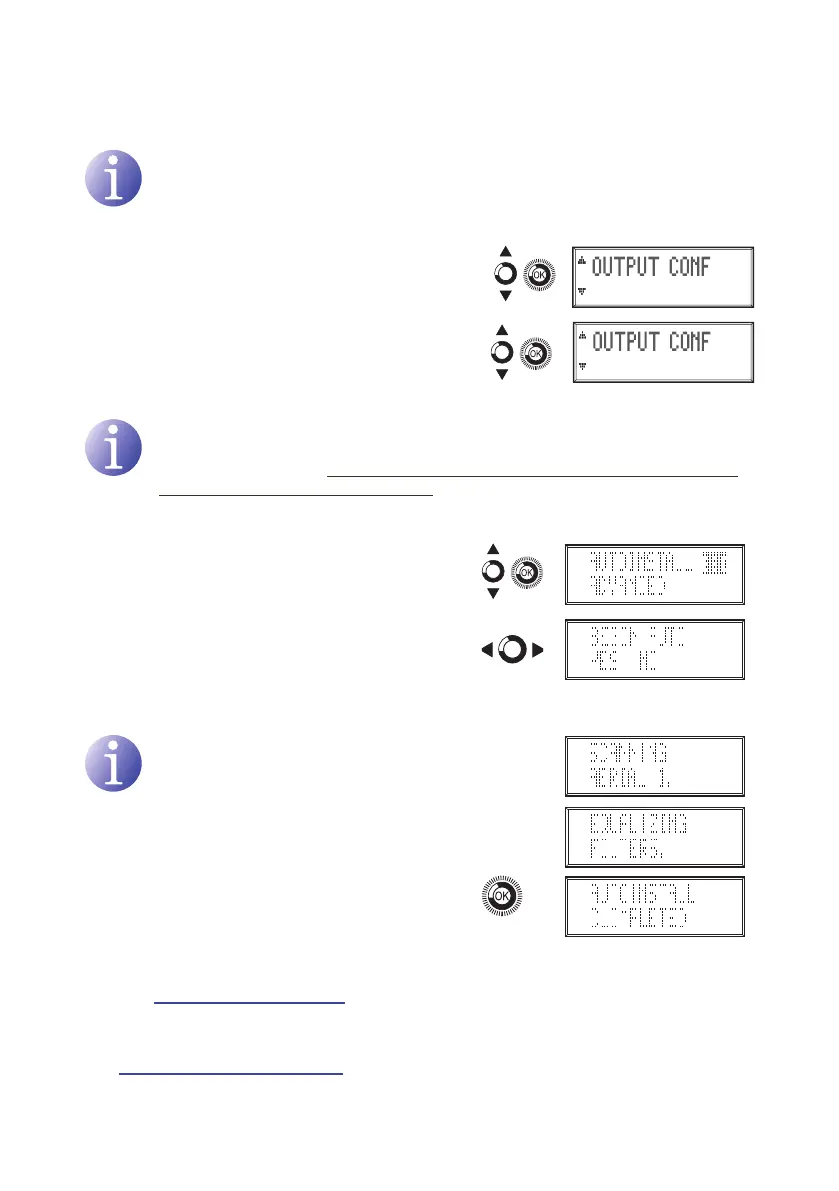
1) In the advanced menu, located and select
OUTPUT CONFIGURATION TV2&TV1.
a) OUTPUT CONF TV2 & TV1 select.
b) OUTPUT CONF TV1 select.
Self-installation
NOTE
The equipment automatically congures the optimum operating frequency and
gain of the UHF lters. The equipment does not automatically configure the
output level of general (band) gains. This is because the output level must be
set by the installer to suit the network you are feeding.
1) In the main menu, locate and select
AUTOINSTALL.
a) If NO is selected: you will return to the
main menu.
b) If YES is selected: self-installation will
begin..
NOTE
The equipment displays information on
the status of self-installation. Please
wait a few seconds until it is completed
and AUTOINSTALL COMPLETED is
displayed.
2) Select OK to complete self-installation. The
unit will now show you the general (band) gain
settings for adjustment.
3) To change the output level of general gains,
see: General gain adjustment section on page
40.
4) To review the allocation of lters to aerials, see:
Allocation of filters to aerials section on Page
38.


 To Next Page