6
A B
1>
Product Operating
1. How to get started
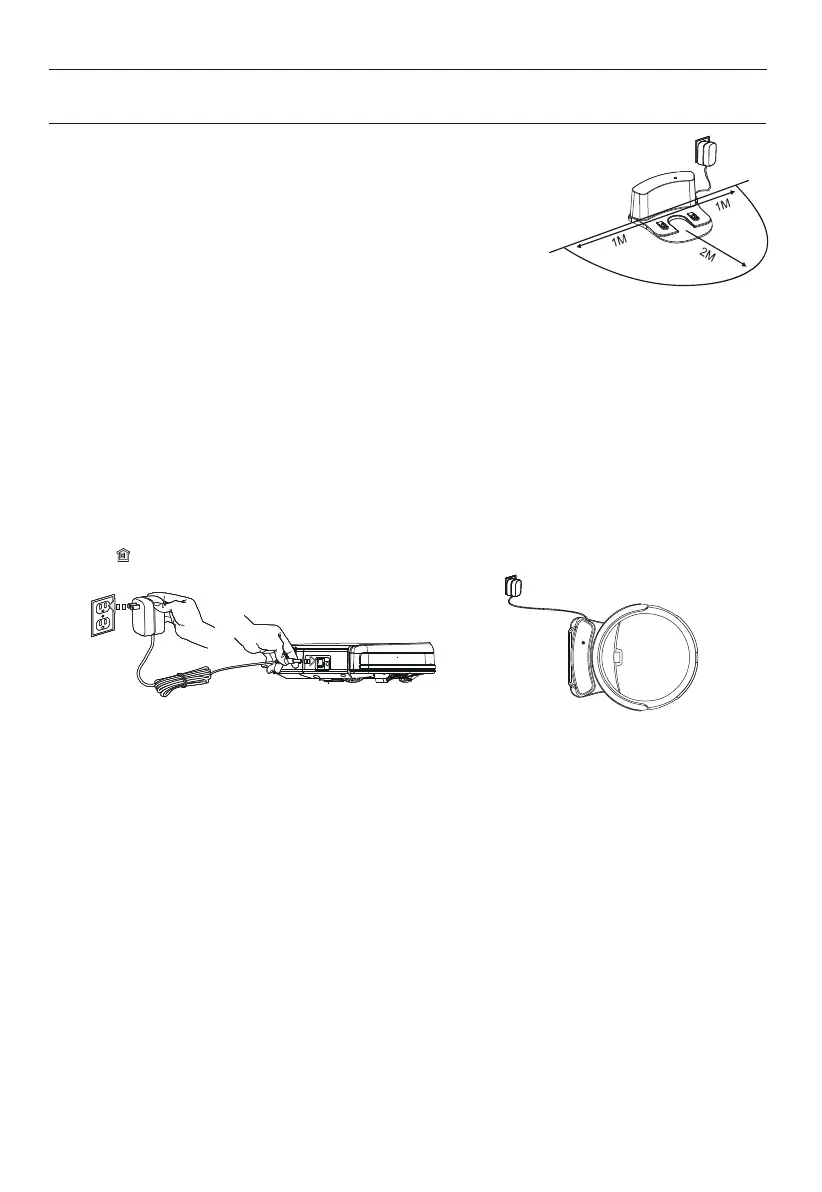
1>. Place charging home base, plug in adapter,
signal light on charging home base will flash.
Note: Put charging home base against the wall and remove
obstacles about 1 meter at two sides and about 2 meters forward.
2>. Turn on the Power Switch around power socket,
then display panel will flash.
(If no command received, the robot will turn to sleeping mode after 45 seconds.)
Note: A. Please always keep the power switch turning on. If not, it is unable to make the robot work.
B. If power switch is turned off, all the scheduling will be lost.
Caution: Before charge the robot, please make sure the power switch is turned on, or else
the robot can not be charged.
3>. Charge the robot in either way as shown below:
A. Plug into an outlet.
B. Press button on remote control to make robot return to charging home base for charging itself.
For better extending battery life:
A. Before first use, charge the robot overnight. When charging is finished, light around the main button will
turn solid green.
B. In normal use, always store the robot on charging home base with base plugged in.
C. If the robot is not used for long time, turn the power switch off, fully charge the robot and
store it in a cool, dry place.
4>. Auto charging
The robot will automatically return to charging home base when battery is low.



 To Next Page