Illuminati Instrument Corp. IM100 User Manual – Android, v1.41 P a g e | 1 5
While the meter trigger circuit is armed, the
meter’s LEDs will glow in a repeating pattern of
blue-purple-cyan. Flash Metering mode ends
automatically after 5 minutes of inactivity. The
default timeout value and can be changed in
the Device Settings screen.
Setting ISO and Shutter Speed
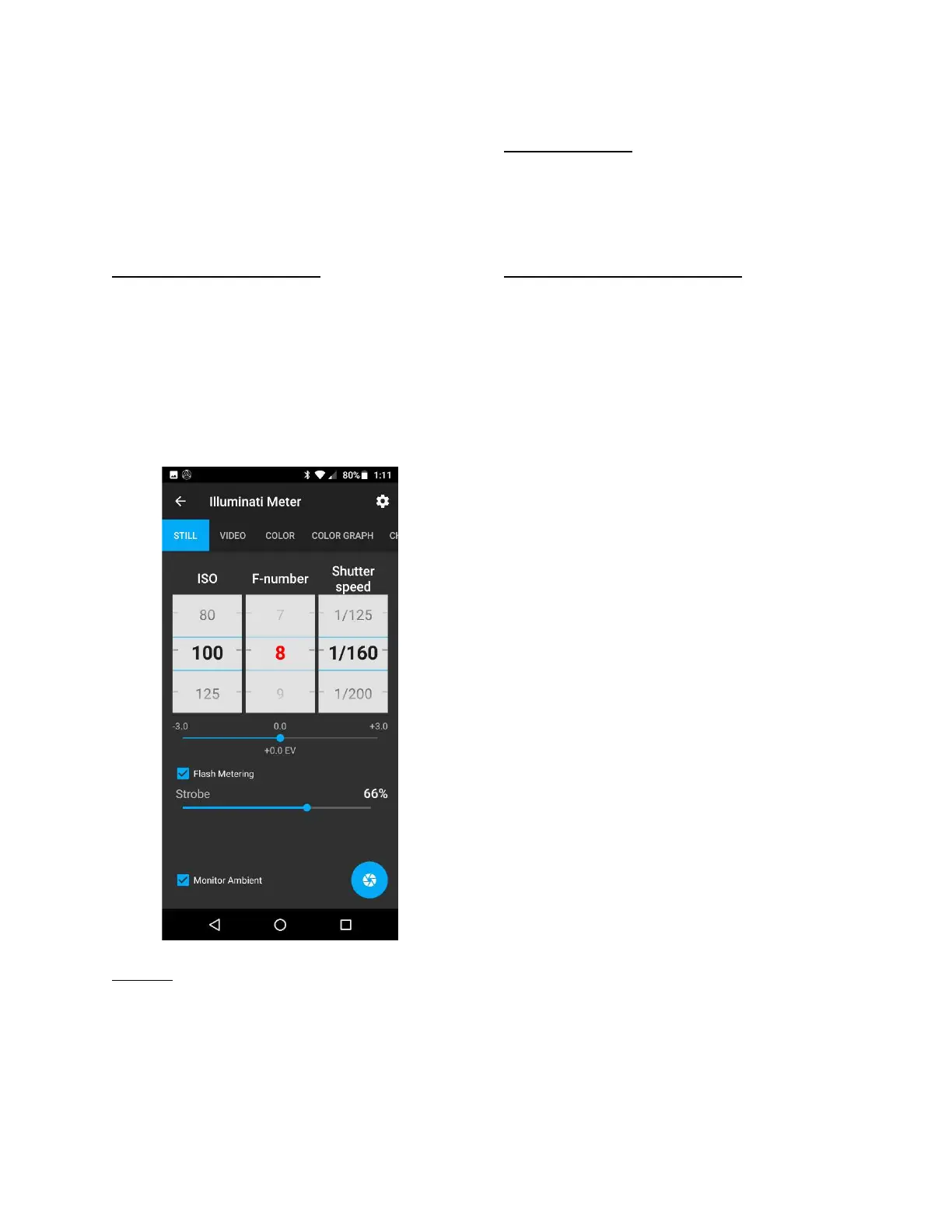
Set the ISO and shutter speed to desired values.
In this case, we used ISO 100 and a shutter
speed suitable for flash sync.
When the strobe is fired, the meter will
automatically detect the light from the flash,
meter the exposure, and report the proper
aperture for the exposure.
Auto ISO
You can also set the desired aperture and
shutter speed in the app and have the meter
range on ISO. This is helpful in situations where
you have a specific aperture that must be
attained, and the ISO can be determined from
the total amount of flash power.
Strobe Percentage
The meter will measure the entire exposure for
your scene – including any ambient light – and
report the percentage of the exposure that is
due to the strobe.
Minimum Light Power for Reading
The minimum power required for a flash
reading is equivalent to an exposure of F1.8 at
ISO 100 and a typical flash sync speed – like
1/160 or 1/200 sec.


 To Next Page