Illuminati Instrument Corp. IM100 User Manual – Android, v1.41 P a g e | 2 7
Identify
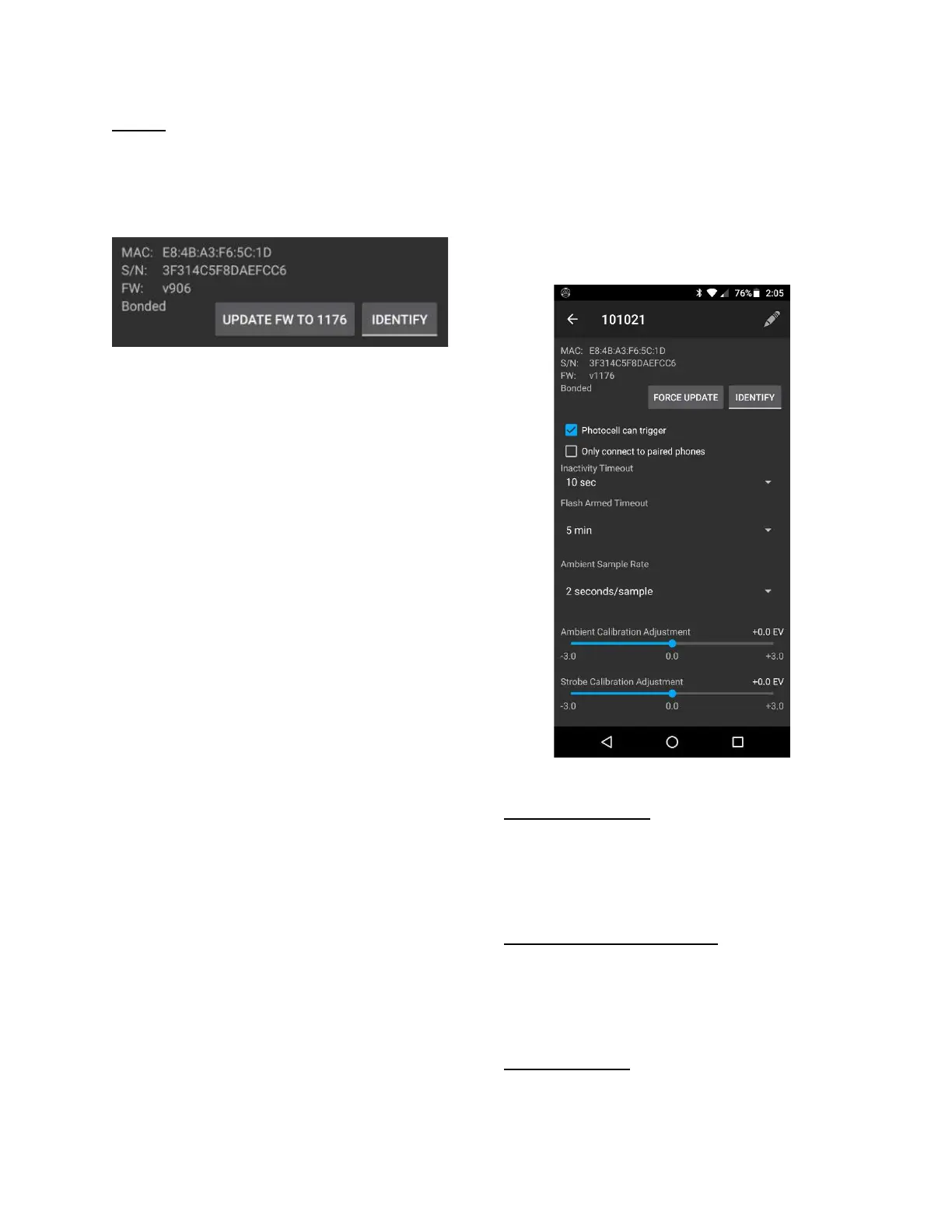
The other button, IDENTIFY, is useful in
situations where multiple meters are used, and
you want to know which meter is which – at a
distance.
Simply press the “Identify” button, and the LEDs
will blink magenta. “Click “Stop Identifying” to
end the identify mode.
Settings for Your Device
In addition to bonding, identifying, and
renaming, there are several settings for your
meter. The screen below will display after you
have updated your firmware to version 1176 or
higher.
Device Settings for firmware v1176 and higher
Photocell can Trigger
When this box is NOT checked, the meter will
only respond to a flash in corded mode. This is
useful if you are in a place where strobes that
are not yours are also firing.
Only connect to paired phones
If you want this meter to only connect to paired
(or bonded) phones, click in this checkbox. For
most users, it is recommended to leave this
unchecked.
Inactivity Timeout
If the meter is inactive for a period of time, it
will automatically power down. The time can be


 To Next Page