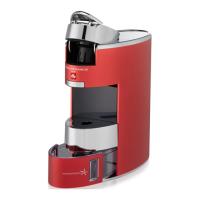
This document is an instruction manual for the Illy X9 Iperespresso coffee machine.
Function Description
The Illy X9 Iperespresso machine is designed for domestic use to prepare espresso coffee using Iperespresso capsules. It features a single dispensing spout for coffee and a control keypad with two buttons for different coffee types: Espresso and Long Coffee. The machine also includes a "Power Save" function, which automatically activates after 30 minutes of inactivity to conserve energy.
Important Technical Specifications
- Machine Material: Aluminum
- Heat Exchange Material: Stainless steel
- Water Tank Capacity: 0.7 liters / 23.7 oz
- Used Capsule Container Capacity: 10 capsules
- Pump: 15 bar
- Weight without packaging: 4 Kg / 141 oz
- Voltage:
- 220-240 V, 50/60 Hz (EU)
- 120 V, 60 Hz (USA)
- Power: 1200 W (EU-USA) - with "Power Save" function
- Size (W x D x H): 123 x 269 x 267 (mm) / 4.8 x 10.6 x 10.5 (inch)
Usage Features
Installation and Start-Up:
- Remove and thoroughly wash the water tank.
- Fill the water tank with fresh drinking water up to the MAX level.
- Insert the water tank completely into the machine.
- Insert the power cord into a grounded power outlet.
- Switch the power button to "I" to turn on the machine.
- The Espresso and Long Coffee buttons will blink, and the machine status indicator light will be steady on for 15 seconds, then turn off, indicating the warming-up phase.
- An acoustic alarm will sound, and the Espresso and Long Coffee buttons will be steady on, indicating the machine is ready for use.
- After 30 minutes of inactivity, the machine enters Power Save mode, and the Espresso and Long Coffee buttons blink slowly. Press either button to reactivate the machine.
- At first start-up or after several days of inactivity, it is recommended to dispense at least half of the water tank without a capsule, using a suitably sized container under the dispensing spout.
Preparing Coffee:
- Ensure the water tank is filled with fresh drinking water up to the MAX level. The water level can be checked through the special windows.
- The water tank can be refilled without complete removal, but it can also be removed for filling.
- The Espresso and Long Coffee buttons will be steady on, and the machine status indicator light will be off, indicating readiness.
- Disengage and lift the capsule compartment open/closed lever.
- Insert an Iperespresso capsule into the compartment. Note: If a capsule is already present, it will be automatically removed when opening the compartment. The capsule should fit easily; if not, remove and reposition it.
- Lower the moving part and lock the lever into place.
- Position an espresso cup or a mug (by lowering the cup holder support) under the coffee dispensing spout.
- Press the Espresso coffee button to brew an espresso, or the Long coffee button to brew a long coffee.
- Ensure the capsule compartment is correctly closed before pressing the brew button.
- Brewing stops automatically.
- Wait until the Espresso and Long Coffee buttons are steady on before preparing the next coffee.
- If the beverage volume is insufficient, press the same button again without changing the capsule to brew more coffee. The brewing process can be stopped by pressing the same button again.
- Brewing will always stop automatically after about 70 seconds. If brewing a long espresso, ensure the cup is large enough to prevent overflow.
Adjusting Coffee Quantity in the Cup:
- Insert a capsule and lock the lever.
- Press and hold either the Espresso or Long Coffee button during the entire brewing process.
- Release the button when the desired quantity of coffee is reached.
- The machine will store this level, and subsequent brews using that button will dispense the memorized quantity.
- The machine is factory preset with standard parameters. For long coffees, using blue Iperespresso capsules is recommended.
Maintenance Features
General Operating Rules:
- Always keep the machine clean by frequently washing the cup holder, drip tray, used capsule tray, water tank, and aluminum cup holder seat.
- All maintenance operations must be carried out when the machine is off.
- Never immerse the machine or its removable components in water or put them in a dishwasher.
- Regularly replace the water in the tank.
- Do not use the coffee machine without water in the tank.
Cleaning and Maintenance:
- Turn off the machine and unplug it.
- Remove and wash the water tank daily, filling it with fresh drinking water.
- Lift and remove the cup holder surface and wash it.
- Remove the used capsule tray and wash it, emptying any residues.
- Clean the body of the machine with a damp cloth and water only.
- Do not use ethyl alcohol, solvents, abrasive sponges, or aggressive chemicals.
- Do not dry the machine or its components in a microwave or conventional oven.
- Clean the machine and its components at least once a week.
Descaling:
- Descaling is recommended at least every 2 months using a descaling product specifically designed for espresso coffee machines.
- Failure to descale may cause malfunctions not covered by the warranty.
- Do not use vinegar, lye, salt, or formic acid, as they can damage the machine.
- Refer to the descaling procedure in the manual for detailed instructions.
- The descaling solution must be disposed of according to local regulations.
Descaling Procedure:
- Turn off the machine and place a container (at least 1 liter capacity) under the dispensing spout.
- Remove and fill the water tank with fresh drinking water up to the MAX level.
- Pour the descaling solution into the tank and stir until completely dissolved.
- Turn on the machine and check that the capsule compartment is empty.
- Within 15 seconds of power on, press and hold the Espresso button until 4 acoustic signals (3 short, 1 long) are emitted. Release the button.
- The machine status indicator light will turn steady yellow, and the Espresso button will blink slowly, indicating the descaling cycle can be activated.
- Press the Espresso button. It will start blinking quickly, and the machine will intermittently dispense water from the brew group for approximately 13 minutes. Warning: the dispensed water is very hot.
- A repeated acoustic signal indicates the end of the descaling phase.
- The icon blinking slowly and the blue indicator light (steady on) indicate the machine is ready for the circuit rinse phase.
- Remove and thoroughly wash the tank with fresh drinking water.
- Fill the tank with fresh drinking water up to the MAX level.
- Place the container back in position.
- Press the Espresso button. An acoustic signal will be emitted, and the Espresso button will start blinking quickly.
- The machine will dispense water from the brew group for approximately 2 minutes.
- A long acoustic signal indicates the end of the rinse phase. The indicator light turns off, and the Espresso and Long Coffee buttons blink.
- Another acoustic signal will sound, and the Espresso and Long Coffee buttons will be steady on, with the indicator light off, signifying the machine is ready to brew coffee.
Warranty Limitations:
- The warranty does not cover damage or malfunctions caused by:
- Failure to carry out periodic descaling.
- Operation with a voltage differing from the rating on the data plate.
- Improper or non-compliant use.
- Internal modifications.
- The warranty does not cover repair costs for machines tampered with by unauthorized service centers.
- It is advisable to keep the original packaging for the warranty period for potential shipping to a service center. Damage from transport without adequate packaging will not be covered.

 Need help?
 General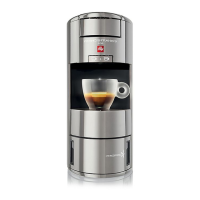


 To Next Page