5
Getting Started
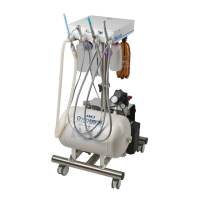
1. Attach all four castor wheels to the stainless steel stand base.
2. Loosen the black stand height adjustment knob and lift the dental control box to working
height. Tighten the stand height adjustment knob to secure.
3. Screw on the high speed handpiece waste collection bottle (small) and suction (large) waste
collection containers under the control panel. (See page 4. K & L)
4. Fill the clear plastic water bottle with distilled water and screw into the black holder with the
blue tubing at the back of the machine, do not over tighten.
5. If using the CLS Enviro System. Fill the amber plastic bottle with the CLS Concentrate
Solution (8.5oz or 250 ml) and dilute with distilled water (25.4oz or 750ml) to make a
33.82 oz or 1 litre solution. Screw the bottle into the holder with the green tubing. Do not
over tighten.
6. Suction. Attach one end of the corrugated tubing to the inlet above the suction waste
container. Fit the suction handpiece and evacuator tip to the corrugated tubing and place in
the suction handpiece holder. Make sure the handpiece suction control lever is in the open
position, pointing down. Page 4. A
7. Place the 3 way air/water syringe in its handpiece holder. (page 4. B)
8. Assemble the handpieces according to the manufacturers instructions. Screw the gray
handpiece air/water line onto the handpiece and place in correctly labeled handpiece holder
on the dental system.
9. Make sure the main air line is connected to the compressor outlet tap. (See page 25),
10. Plug the power cord supplied into the back of the dental machine (page 4. O) and connect to
an electrical outlet and turn ON.
iM3 Dental Systems


 To Next Page
