Imacon Flextight Progression UserÕs Guide
Hardware ReferenceÑFlextight Progression
Front Panel and Drum Loader
8
English
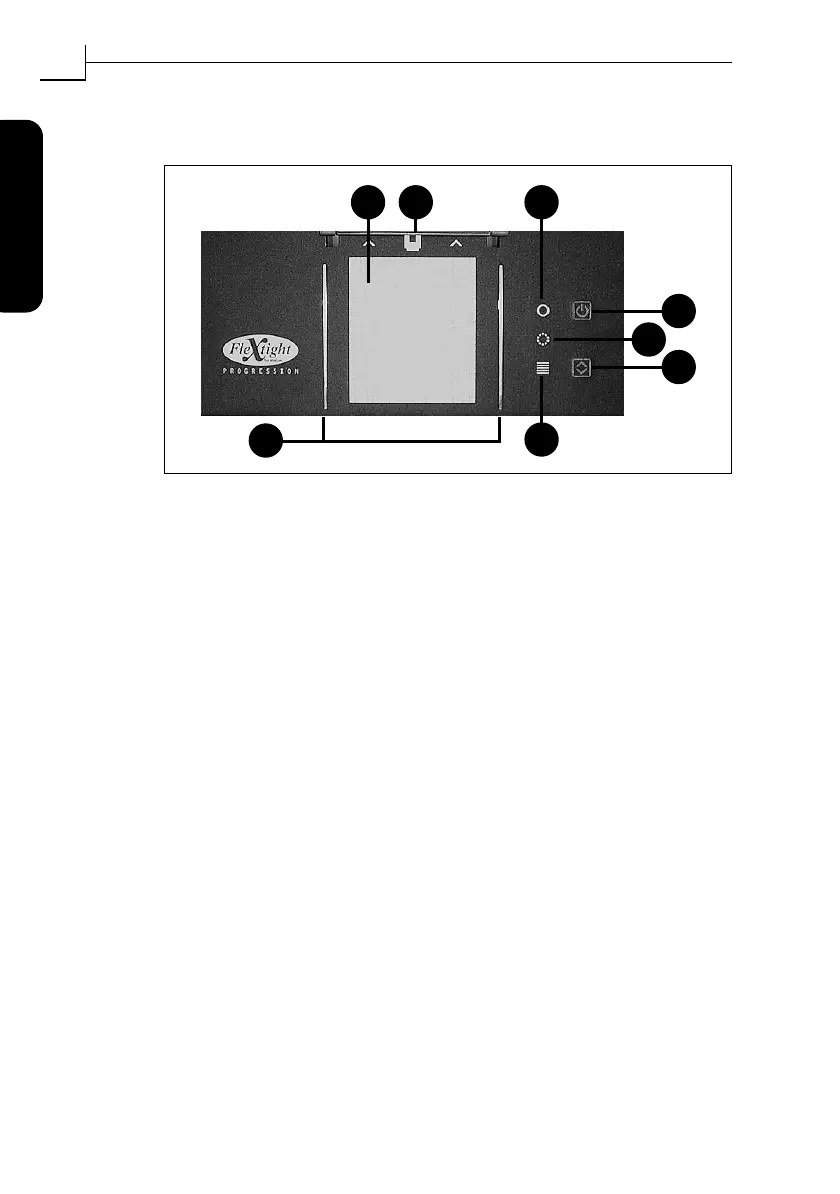
Front Panel and Drum Loader
A Light Table
: helps you to align your originals.
B Original Holder Clasp
: the ßexible original holders slide into a slot
here and are held in place by a magnetic clasp.
C Power Indicator (Green)
: Remains lit when ready to scan. At
power-up, the light blinks to indicate that Þrmware must be loaded
(it will be loaded automatically when you run ColorFlex).
D Power/Cancel/Reset Button:
This button has several functions:
¥ Provided the main power switch on the back panel is switched
on (see ÒBack Panel & ConnectorsÓ on page 10), this button will
turn the scanner on or off.
¥ If the scanner is currently working (making a scan or moving
the ßatbed drawer), this button will cancel the action, but not
turn off the scanner.
¥ If the scanner is not responding, press and hold this button for
three seconds to reset and turn off the scanner.
E Zoom Indicator (Yellow)
: lights while the scanner is repositioning
the optics to scan in a new format.
F Drawer Button:
press here to open and close the ßatbed drawer. If
the drawer is already in motion, this button cancels the action.
G Busy Indicator (Red)
: lights when scanning. If blinking when not
scanning, then an error existsÑplease contact your Flextight dealer
for assistance.
H Flexible Holder Guides
: all ßexible holders Þt between two rails to
keep them straight.
Figure 1: Front panel features
B
F
C
G
A
H
D
E



 To Next Page