Imacon Flextight Progression UserÕs Guide
Hardware ReferenceÑFlextight Progression
Back Panel & Connectors
10
English
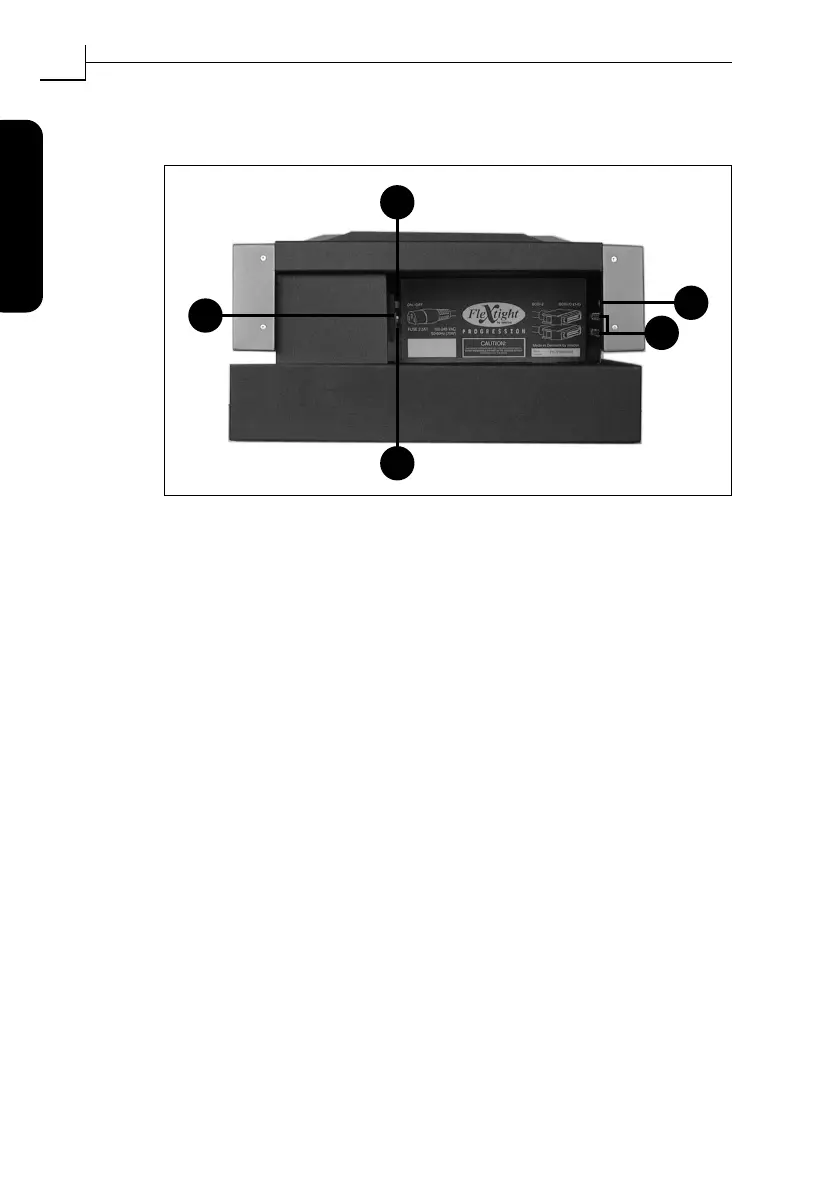
Back Panel & Connectors
A Power Switch
: Use this switch to turn the scanner on or off.
B Power Cable Socket
: plug the power cable into this socket.
C Fuse Drawer
: pull out this drawer to change the fuse, if necessary.
There is space inside the fuse drawer for a spare fuse. A spare fuse
is included in this space when the scanner is delivered. We recom-
mend that you purchase and install a new spare after you use the
existing spare. It is a T2.5A fuse.
D SCSI-2 Connectors
: plug a SCSI cable into one of these sockets and
connect the other end to your computer. As with most SCSI
devices, the scanner includes two identical SCSI connectors. Fit the
last unit in the SCSI chain with a terminator on its free connector.
E SCSI Address Selector
: to assign an address, use a screwdriver to
aim the arrow at an address number.Use only 1, 2, 3, 4, 5, or 6. Do
not use 7, 8, 9, or 0.
Figure 3: Rear panel connectors
E
D
A
B
C



 To Next Page