Imacon Flextight Progression UserÕs Guide
Hardware ReferenceÑFlextight Progression
True Optical Resolutions
21
English
True Optical Resolutions
The chart below shows the true optical resolutions (in dpi) available
with each of the original holders. When you scan at one of the resolu-
tion settings listed, one pixel in the scannerÕs image sensor maps
directly to one pixel in the Þnal image. If you use a resolution setting
other than those listed in Table 1, then interpolation (resizing) must be
applied.
To avoid activating the resizer then select a zoom setting that gives one
of the results listed in Table 1 or Table 2. When resizing is used, the
scans take longer and image quality is reduced slightly. The impact this
has on the image quality will vary according to the amount of interpo-
lation required and the contents of your original.
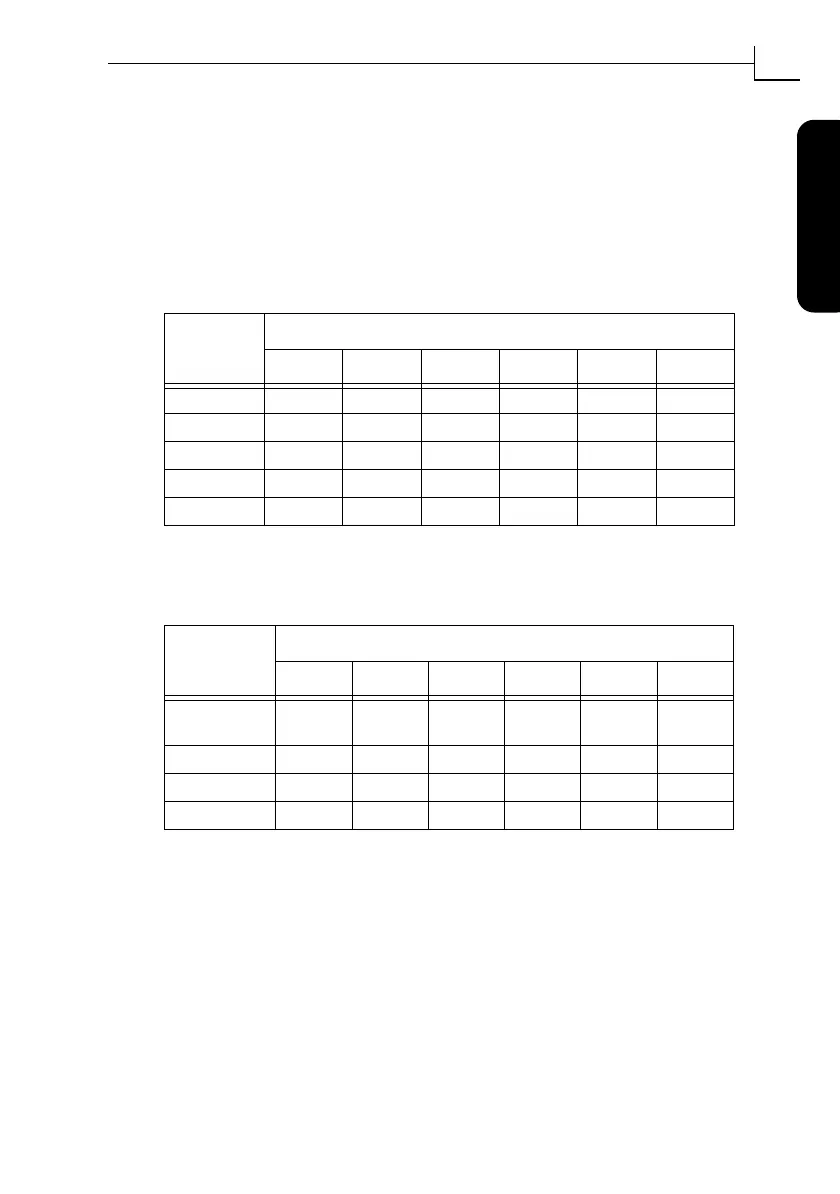
Original
Width
Resolution (DPI)
Max 1/2 1/3 1/4 1/6 1/12
24 mm 5760 2880 1920 1440 960 480
36 mm 3200 1600 1067 800 533 267
60 mm 3200 1600 1067 800 533 267
4" (107 mm) 1800 900 600 450 300 150
120 mm 1440 720 480 360 240 120
Table 1: True optical resolutions when using the drum
Original
Width
Resolution (DPI)
Max 1/2 1/3 1/4 1/6 1/12
60 mm
(trans. only)
3251 1626 1084 813 542 271
4" (110 mm) 1858 929 619 465 310 155
220 mm (A4) 928 464 309 232 155 77
314 mm (A3) 650 325 217 163 108 54
Table 2: True optical resolutions when using the ßatbed



 To Next Page