Imacon Flextight Progression UserÕs Guide
Hardware ReferenceÑFlextight Progression
True Optical Resolutions
22
English
Example: For an output resolution of 300dpi, take the true resolution
shown in Table 1, divide by 300dpi and multiply by 100%. Enter the
result in the Zoom Þeld in the main ColorFlex window.
Original
Width
Zoom Setting
Max
Resolution
1/2
Res.
1/3
Res.
1/4
Res.
1/6
Res.
1/12
Res.
24 mm
= 1920%
960% 640% 480% 320% 160%
36 mm 1067% 533% 356% 267% 178% 89%
60 mm 1067% 533% 356% 267% 178% 89%
4" (107 mm) 600% 300% 200% 150% 100% 50%
120 mm 480% 240% 160% 120% 80% 40%
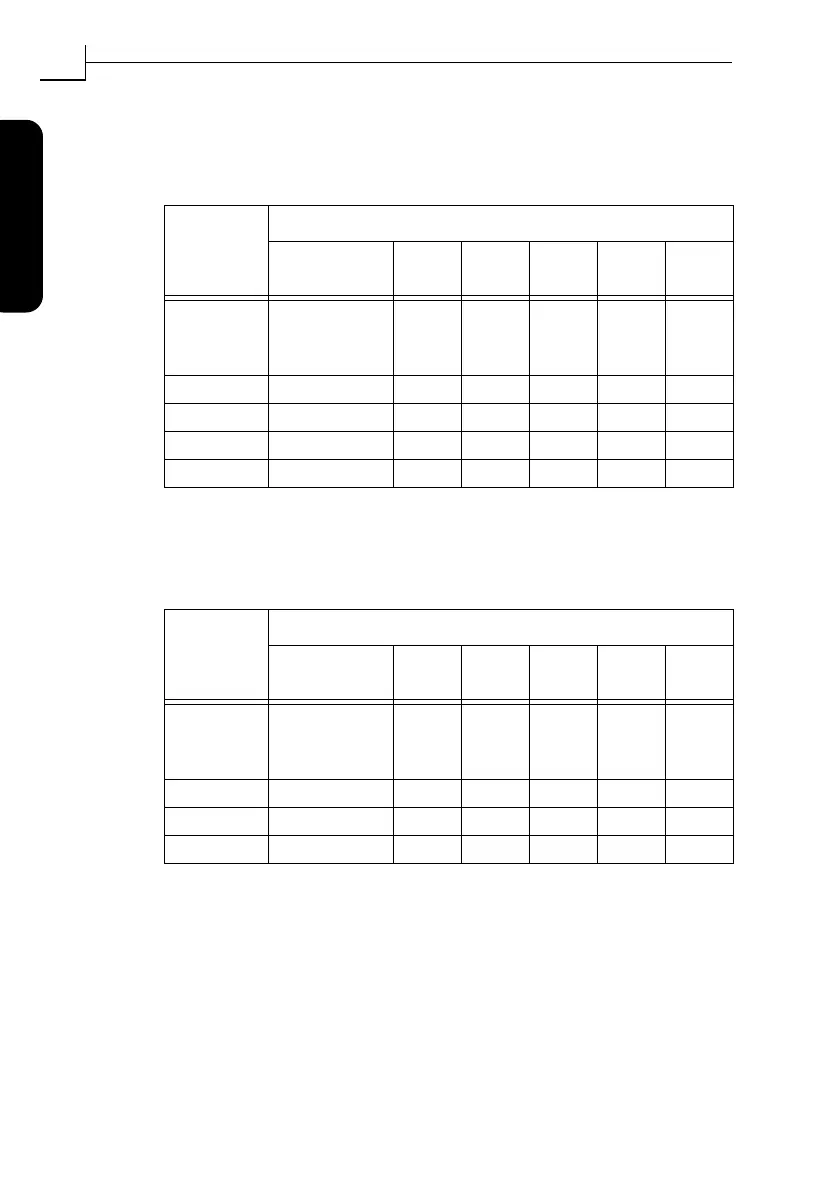
Table 3: Example zoom settings for true optical resolution when scanning
with the drum
Original
Width
Zoom Setting
Max
Resolution
1/2
Res.
1/3
Res.
1/4
Res.
1/6
Res.
1/12
Res.
60 mm
(trans. only)
= 1084%
542% 361% 271% 181% 90%
4" (110 mm) 620% 310% 207% 155% 103% 52%
220 mm (A4) 310% 155% 103% 78% 52% 26%
314 mm (A3) 217% 108% 72% 54% 36% 18%
Table 4: Example zoom settings for true optical resolution when scanning
with the ßatbed
5760
300
-----------
100%´
3251
300
-----------
100%´



 To Next Page