Imacon Flextight Progression UserÕs Guide
Hardware ReferenceÑFlextight Progression
Changing the Light Tubes
34
English
The Flatbed Reflective Tube
1. Unplug the scanner from your wall socket.
2. Swing down the lower-front panel by grabbing the opening for the
ßatbed working light (shown in Figure 2) and pulling forward.
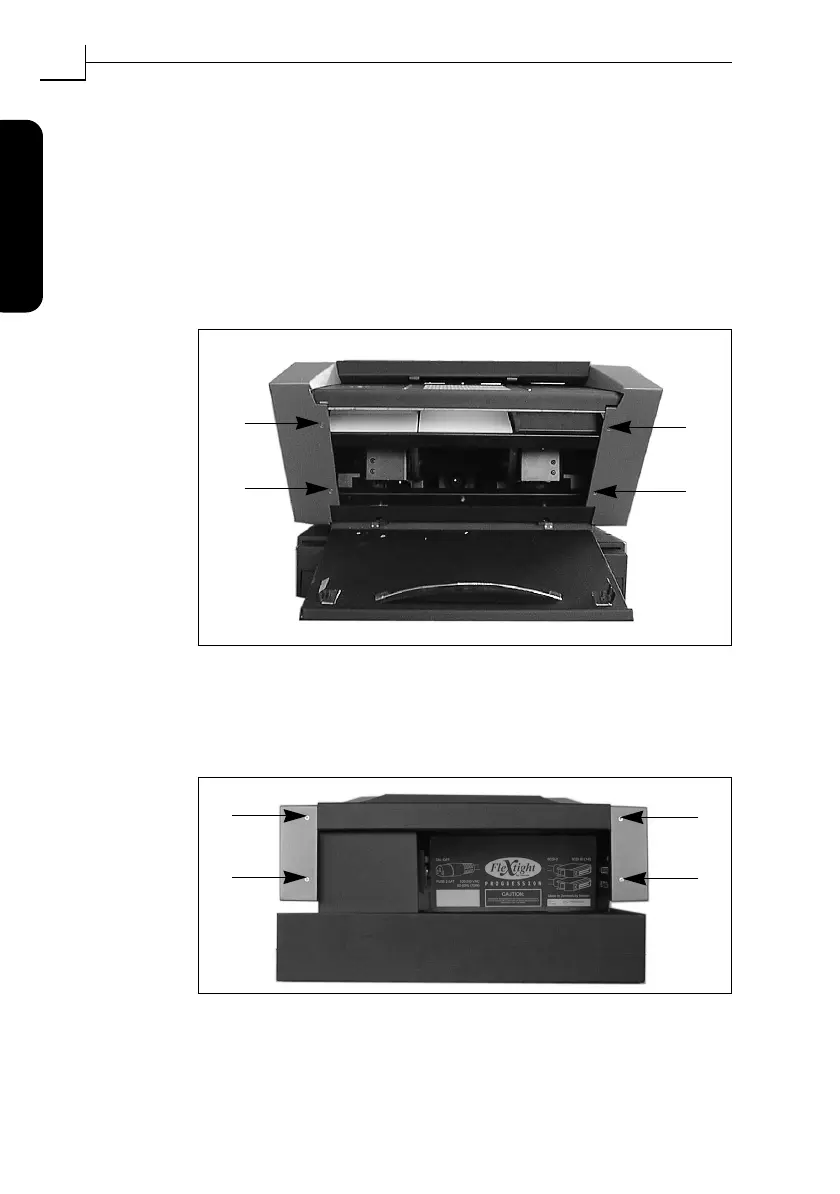
3. Get a 2.0mm allen key and remove the four allen screws that secure
the front sides of the side panels, as shown in Figure 10.
4. At the back of the scanner, remove the four allen screws that secure
the back sides of the side panels. This will free the side panels from
the scanner. Set the screws and panels aside.
Figure 10: Front screws for securing the side plates.
Figure 11: Back screws for securing the side plates.
2.
4.
1.
3.
2.
4.
1.
3.



 To Next Page