Number
of
cells
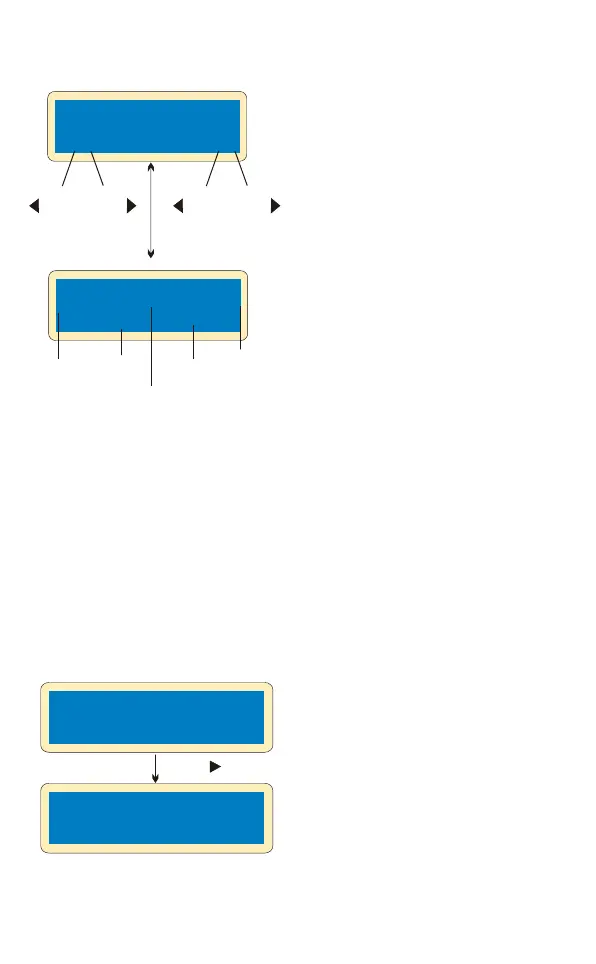
DEC
NiCd Sensitivity
D.Peak Default
LiPo DISCHARGE
1.0A 11.1V(3S)
Li3S 0.4A 12.59V
DSC 022:43 00682
-
Batt type
Stop
elapsed
time
INC
+
discharge
current
Battery
voltage
DEC
Start
Enter
-
‘>3 seconds’
INC
+
Discharged
capacity
Discharging of Lithium battery
The value of discharge current
on the left can not exceed 1C,
and the value on the right can
not be under the voltage
recommended by the
manufacturer to avoid deep
discharging. Press
START/ENTER for more than
3 seconds to start charging.
This shows the real-time
status of discharging, you can
press BATT TYPE/STOP key
to stop discharging.
The processor monitors voltage of each cell when the battery packs are
during its “storage” and “discharging” process. To achieve this feature,
plug each battery to the charger individually. If voltage of any cell is
abnormal, B6 will show error message and terminate the program forcibly.
So if there is battery damage or disconnection, you can see the error
message and press INC to know which cell is damaged.
BATTERY VOL ERR
CELL LOW VOL
4.14 4.16 4.09
2.18 0.00 0.00
INC
The processor detects voltage
of one cell is too low.
The 4th cell was damaged. The
value of voltage may be zero if
disconnection occurs.
Voltage balancing and monito ring in the dis charge
process


 To Next Page