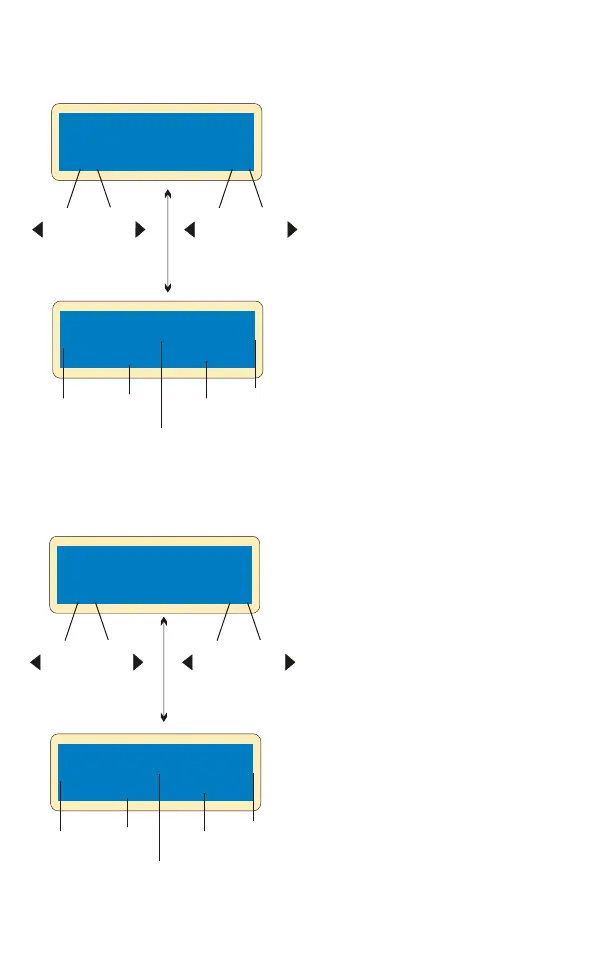
Battery
type
DEC
Pb CHARGE
4.0A 12.0V(6P)
Pb-6 4.0A 12.59V
CHG 022:43 00682
-
Batt type
Stop
Elapsed
time
INC
+
Charge
current
Battery
voltage
DEC
Start
Enter
-
‘>3 seconds’
INC
+
Charged
capacity
Battery
type
DEC
Pb DISCHARGE
1.0A 12.0V(6P)
Pb-6 0.4A 12.59V
DSC 022:43 00682
-
Batt type
Stop
Elapsed
time
INC
+
Discharge
current
Battery
voltage
DEC
Start
Enter
-
‘>3 seconds’
INC
+
Discharged
capacity
Set up the charge current on
the left and nominal voltage on
the right. Range of current is
0.1-5.0A, the voltage should
match the battery being
charged. Press
START/ENTER key for more
than 3 seconds to start
charging.
Set up the charge current on
the left and nominal voltage
on the right. Range of
discharge current is 0.1-
5.0A, the voltage should
match the battery being
charged. Press
START/ENTER key for more
than 3 seconds to start
charging.
The screen displays the
real-time discharging status.
Press START/ENTER key to
alter discharge current.
Press START/ENTER key
again to store the parameter
value you set. Press BATT
TYPE/STOP key to end the
program.
The screen displays the real-
time discharging status. Press
START/ENTER key to alter
discharge current. Press
START/ENTER key again to
store the parameter value you
set. Press BATT TYPE/STOP
key to end the program.
Charging of the Pb battery
Discharging of t he Pb batteryy


 To Next Page