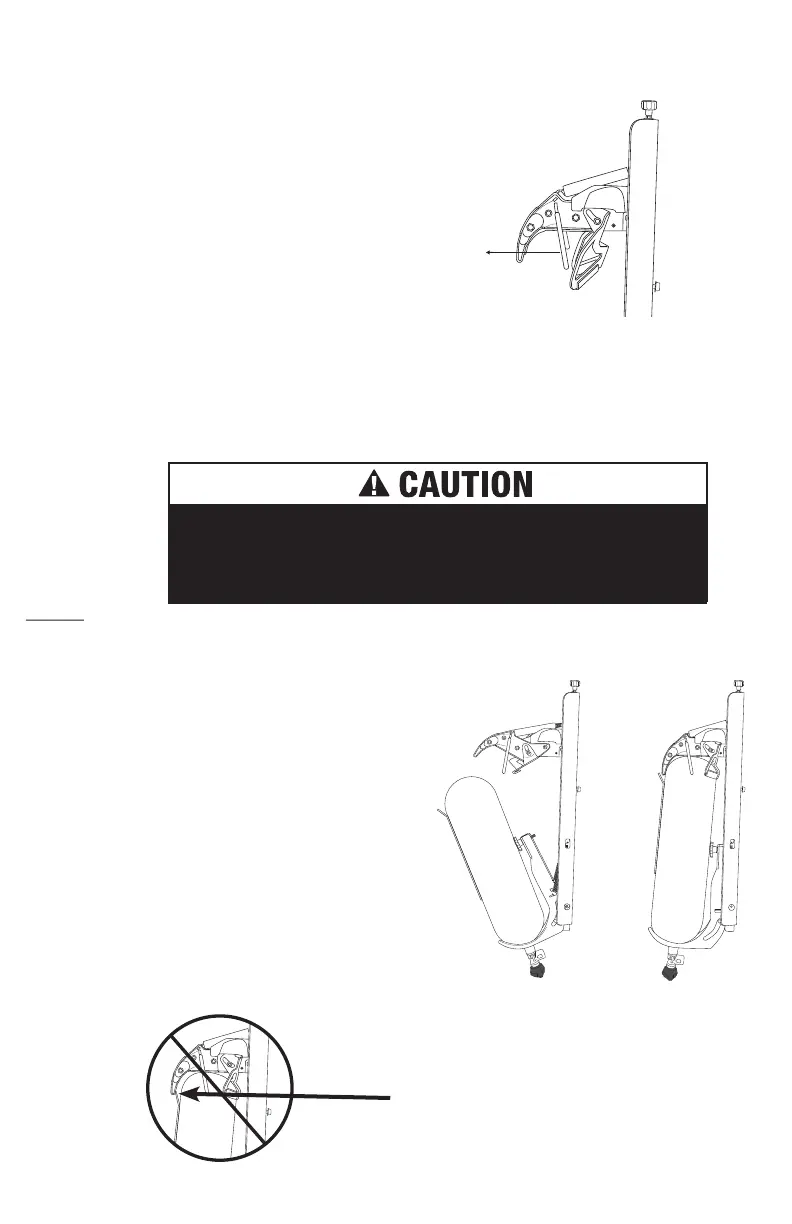
Step 3. Open the SmartDock
Grasp the yellow side of the “claw” on the Smart-
Dock head and pull it out while rotating it up. The
mechanism will be staged in its open position.
SmartDock claw assembly uses high spring force to open
and close. Use caution and avoid potential pinch points when
operating claw assembly manually.
Step 5. Insert Cylinder into
SmartDock
You are now ready to insert the SCBA
cylinder into the SmartDock and complete
the initial adjustment procedure.
a. Place SCBA cylinder valve into
SmartDock lower claw.
b. Push the top of the SCBA cylinder
into the open SmartDock head,
which will automatically close once
inserted far enough.
Note: Insertion will become easier after
final adjustments have been made.
Note: No part of the SCBA
pack (frame, hoses, etc.)
should be inside the claw.
Step 4. Lower Adjustment Knob
For 9 L bottles, leave the lower adjustment
knob in the as-shipped position (fully seated
against the lower claw).
8
SmartDock
®
Installation | User’s Guide
For 6.8 L bottles, adjust knob out approximately 25mm (1”).
For all other sizes, adjust the knob in or out as required to fully seat the lower claw.
Pull



 To Next Page