7
2.02
DIMENSION AND WEIGHT
A059-01 KIT SVS SV
LENGTH
320
380 430 480
WIDTH
380
440 460 500
HEIGHT
850
1080 1150 1150
WEIGHT
40 Kg
65 Kg 80 Kg 85 Kg
2.03
ELECTRICAL SUPPLY
VOLTAGE
230 V
PHASE NUMBERS
1
FREQUENCY
50 Hz
POWER
450-750 WATT
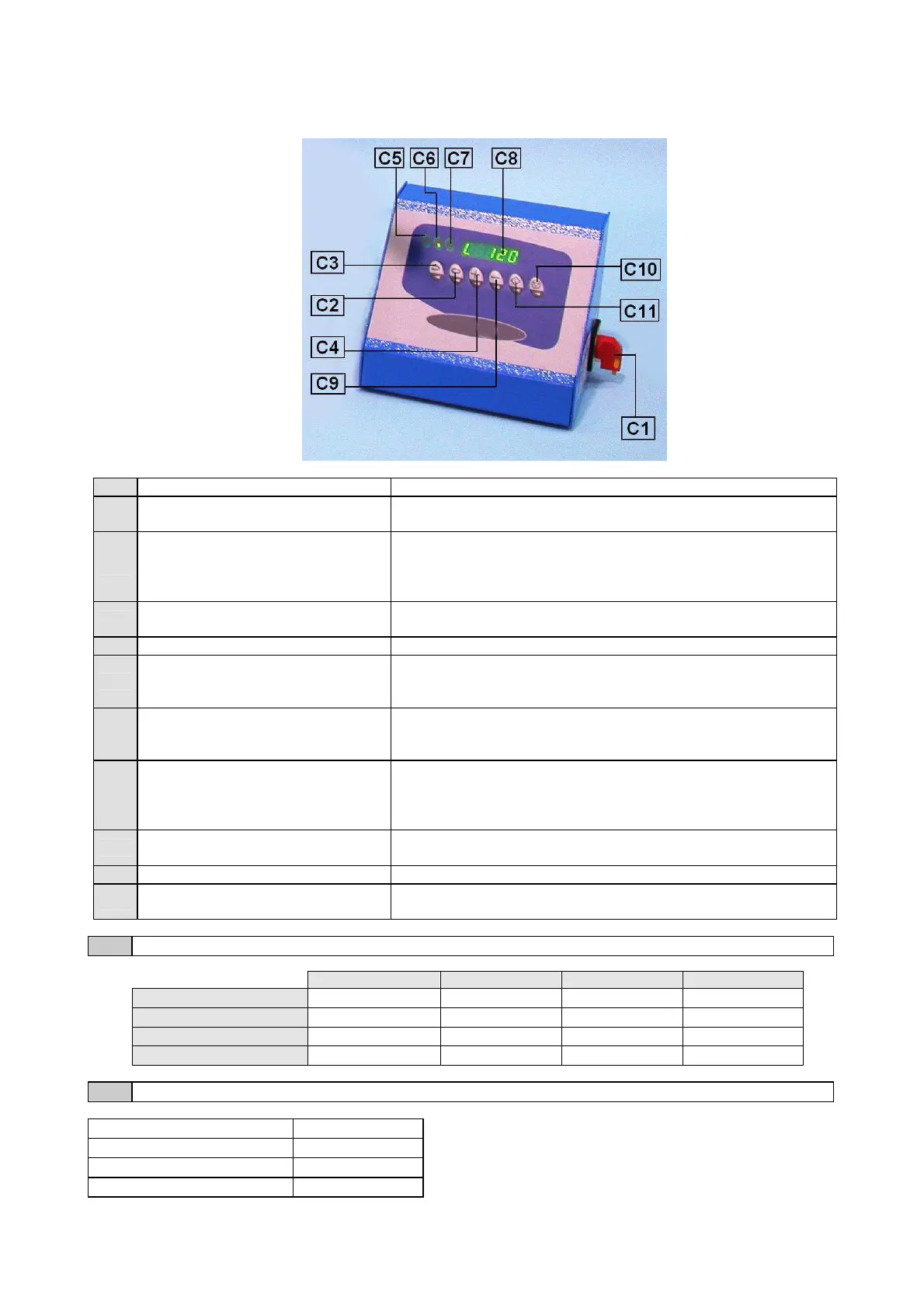
C1
MAIN SWITCH It allows switching on and off the machine.
C2
“SELECTION” BUTTON
By pressing this key it is possible to select one by one the
figures on the right of the numeric display (C8).
C3
“MODE’” BUTTON
By pressing this key it is possible to select the working mode of
the sieve shaker. This mode is shown by the first figure of the
numeric display (C8); See the Chapter “OPERATING MODE”
of this manual for further details.
C4
“INCREASE” BUTTON
By pressing this key it is possible to increase the figure shown on
the numeric display (C8) in that moment.
C5
LED “SIEVING WORKING” The lighting of this led means that the machine is vibrating.
C6
LED “CONTINUOUS SIEVING”
The lighting of this led means that the sieve shaker is vibrating
in the “continuous mode”. For further details, see Charter
“SETTING UP” of this manual.
C7
LED “DATA STORING”
The lighting of this led means that the data shown by the
disp
lay is being modified (C8). Once the data is stored, the led
stops lighting.
C8
NUMERIC DISPLAY
Using this display it is possible to see all the information
referred to the sieve shaker working procedures and also to
modify the operating parameters; See the Chapter “USE” of
this manual for further details.
C9
“DECREASE” BUTTON
By pressing this key it is possible to decrease the figure shown
by the numeric display in that moment (C8).
C10
“STOP” BUTTON By pressing this key, the sieving procedure is stopped.
C11
“START” BUTTON
By pressing this key, the sieving procedure is activated
according to the setting up made by the operator.
SV005 SV007 SV008


 To Next Page