30
5 SETUP AND OPERATION
5.1 CONTROLANDFUNCTIONS
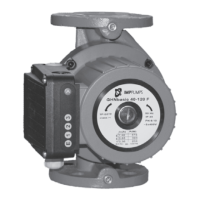
Thepumpcanbecontrolledbydisplaypanel,10‐stepswitch,analoginputs,modbusorEthernetconnection.
Displaypanelcontrolsandoverviewspumpmodes,parametersandon/offstatus,
10‐stepswitchallowsustochangerelayoutput,analoginputs/outputsandresettingthepumps
communicationconfiguration,
Analoginputsgiveuscontroloverthepump(start,stop,max.curve,min.curve,0‐10V,4–20mA,…),
Analogoutputsareusedforgettinganaloginformationaboutthepumpsperformance(errors,speed,
mode,flow,height),
Relayoutputsignalizespumpsstatus,
Ethernetconnectionsofferscontroloverallpumpfunctionsandsettings(pumpsvariables,digitalinputs,
erroroverview),
Modbusconnectiongivesustheoverviewofallparametersandsettings(pumpsvariables,analog
inputs/outputs,erroroverview).
Severalsignalswillinfluencethepumpoperation.Forthisreason,settingshavedifferentprioritiesasshowninthe
tablebelow.Iftwoormorefunctionsareactiveatthesametime,theonewithhighestprioritywilltake
precedence.
Priority
Pump control panel and
Ethernet settings
External signals
5
Modbus control
1 Stop(OFF)
2 Activenightmode
6
3 Max.speed(Hi)
4 Minimalcurve
5 Stop(RUNnotactive)
6 Max.speed (Hi)
7
Stop
7 Referencepoint
8 Referencepoint
9 Referencepoint
5
Allinputsarenotavailableineverymodeofoperation.
6
InnightmodetheexternalsignalsandModbusstopsignalbecomeactive.Duetothepossibilityofconfusionwe
donotrecommendusingthenightmodewhileusingexternalsignals.
7
NotavailableifusingModbuscommunication.


 To Next Page
 Loading...