Exago
Manual
10
Exago
Manual
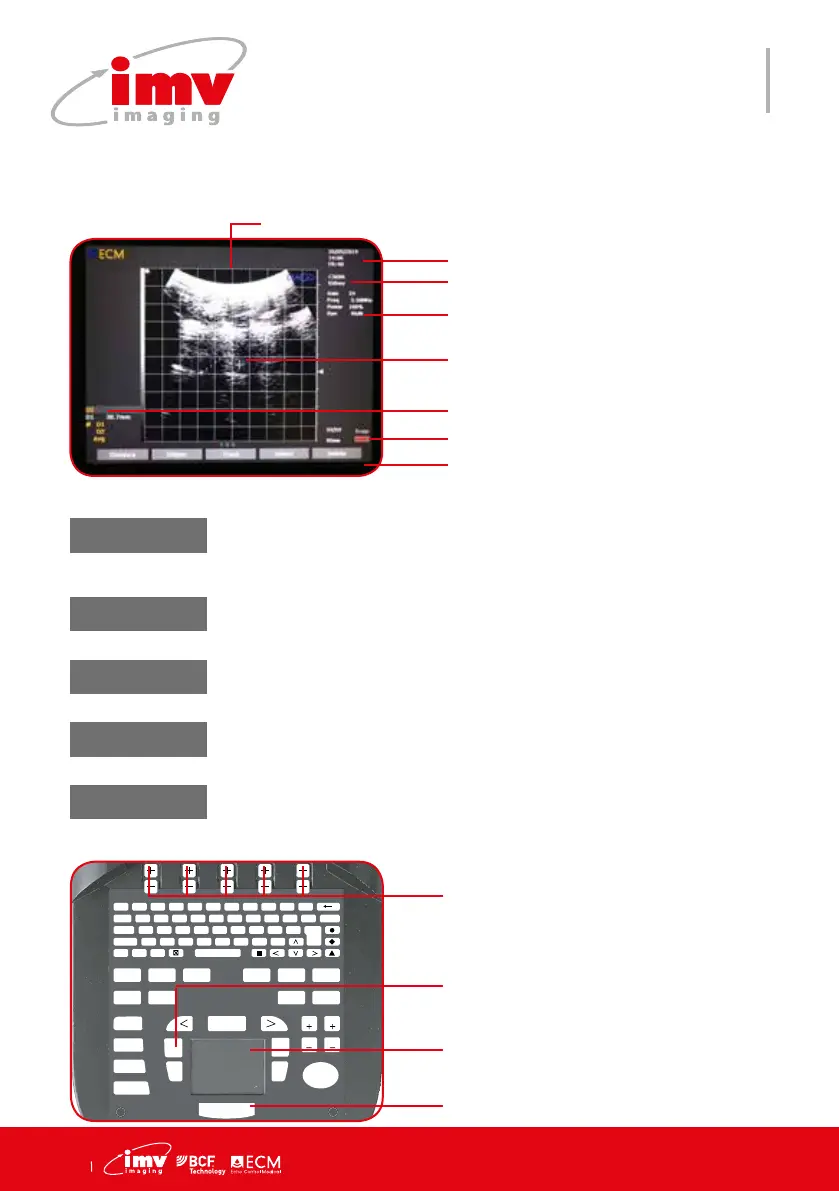
Contexual menu of the measure menu.
Freeze the system and access Measure menu. It will automati-
cally initiate a rst Distance measurement.
Probe
Labels displaying settings of the menu
Date, Time
Battery capacity
7.Measure menu
F 1
!
2
@
3
?
4
+
5
%
6
-
7
&
8
/
9
(
0
)
T
AB Q W E R T Y U I O P DELETE
CAPS A S D F G H J K L ENTER
S
HIFT
Z X C V B N M ;
T
EXT PICTO
A
RROW
PATIENT REPORT PROTOCOL PROBE ZOOM TGC
SETTINGS CLEAR
FREQUENCY
FOCUS
M CINELOOP
PWD
MEASURE REVIEW
CFM
B
SELECT
DEPTH
GAIN
DEPTH
GAIN
FREEZE
UPDATE STORE
Access measure menu and exit menu. .
Keys to change settings of the menu.
Use Touchpad to adjust caliper posi-
tioning and validation. Terminate the
measurement. Draw Trace countour.
Distance
Four distances can be acquired on the same image. Choose distan-
ce in sequence in Tools to display the next caliper measurement. Four
distances can be acquired on the same image.
Two ellipses can be measured on the same image.
Ellipse
Trace
If the trace is not closed, a straight line will be used to close it. It allows
surface/parameter calculation.
Select
Selected item and related measurements are highlited.
Delete
Delete selected measurements on screen.
Adjust the calipers positioning with
Touchpad and Select.
Press Select to go back to the previous
caliper adjustment.
Measurements are displayed on the
screen with identication and color code


 To Next Page