Exago
Manual
18
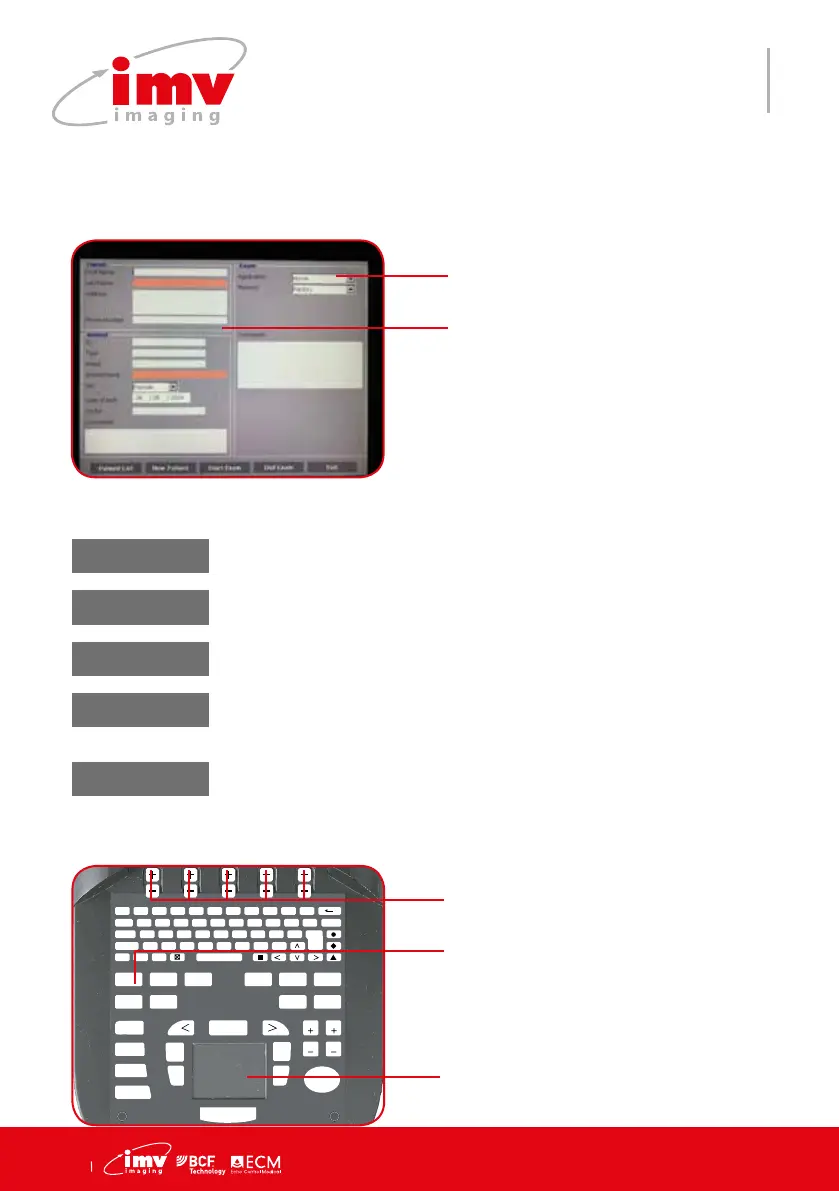
Access to the menu to review and store Patient data, examination information and Proto-
col selection.
Choose an application
Enter information about owner and
patient
13.Patient menu
F 1
!
2
@
3
?
4
+
5
%
6
-
7
&
8
/
9
(
0
)
T
AB Q W E R T Y U I O P DELETE
CAPS A S D F G H J K L ENTER
SHIFT Z X C V B N M ;
T
EXT PICTO
A
RROW
PATIENT REPORT PROTOCOL PROBE ZOOM TGC
SETTINGS CLEAR
FREQUENCY
FOCUS
M CINELOOP
PWD
MEASURE REVIEW
CFM
B
SELECT
DEPTH
GAIN
DEPTH
GAIN
FREEZE
UPDATE STORE
Keys to change settings of the menu.
Click to select an existing patient.
Access/Exit Patient menu.
Patient List
Review/Store patient data,
exams selection
Create a patient. To vali-
date patient press Exit
New Patient
Start Exam
Start examination and
open examination report
End Exam
Stop current examination
and close report
Exit
Exit from patient menu


 To Next Page