Exago
Manual
16
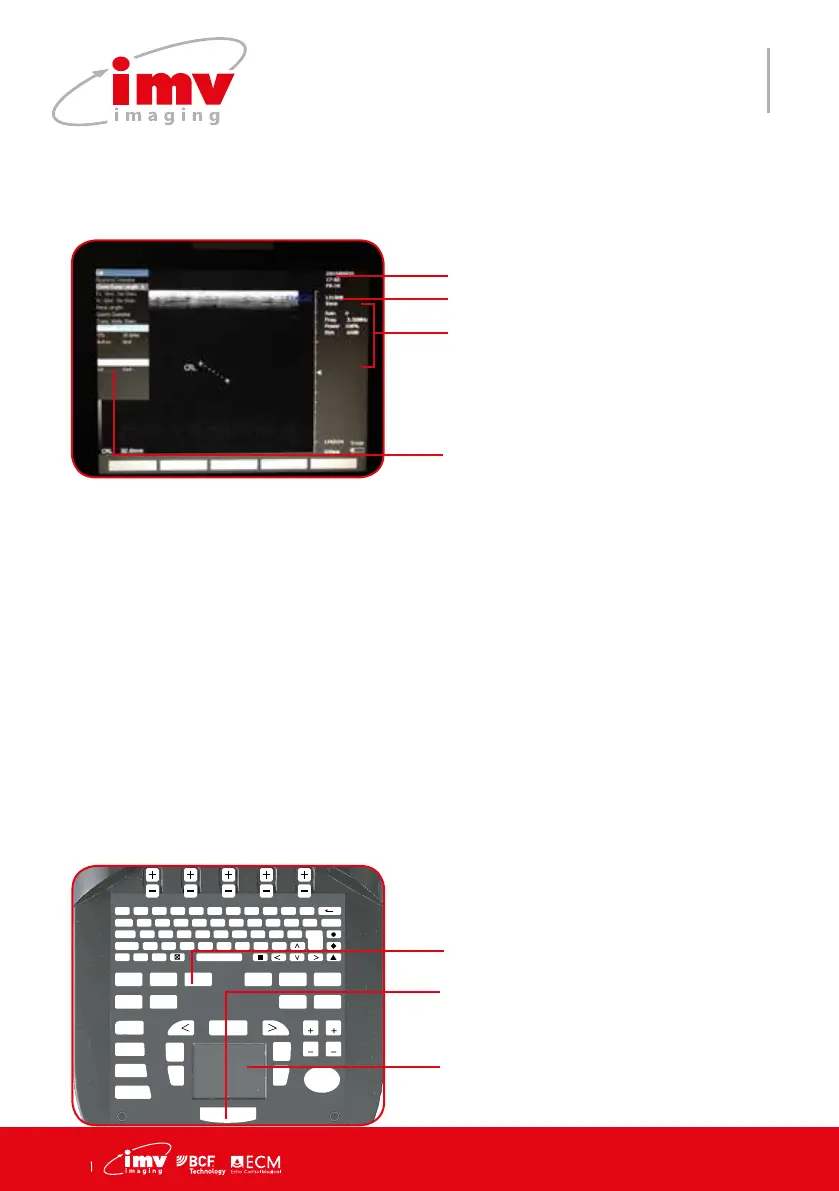
Protocol and current measurement results
will display on the left side of the image
((in weeks and days for gestation tables)
GA = Gestation age
The menu can be used during an examination or independently of an examination. Click
on Patient and select the application and protocol for the examination in “Exam Box.
Probe
Labels displaying settings of the
menu
Date, Time
11. Protocol menu
F 1
!
2
@
3
?
4
+
5
%
6
-
7
&
8
/
9
(
0
)
T
AB Q W E R T Y U I O P DELETE
CAPS A S D F G H J K L ENTER
SHIFT Z X C V B N M ;
T
EXT PICTO
A
RROW
PATIENT REPORT PROTOCOL PROBE ZOOM TGC
SETTINGS CLEAR
FREQUENCY
FOCUS
M CINELOOP
PWD
MEASURE REVIEW
CFM
B
SELECT
DEPTH
GAIN
DEPTH
GAIN
FREEZE
UPDATE STORE
Click on select to initiate the rst
caliper on the image and return the
previous caliper for adjustment.
Freeze the image and use Cursor to
scroll the protocol list
Scroll the protocol menu using Tou-
chpad. Validate the rst caliper and
activate the second caliper. Validate
the measurement.
Access/Exit protocol menu
In case of use during the examination with a patient le, rst create or select a patient,
application etc. Freeze the image, select measurement to be performed in the protocol
list using the Touchpad. Press Select.
To conrm storing of these results in the report, press Add. The number of validated and
added results for each measurements is indicated in the protocol list after each item.
When pressing Add after validation of the protocol measurement, this measurement is
included in the examination report.
In case of use without starting an examination, user can use protocol list to select the
measurements and information to be stored with corresponding image.


 To Next Page