Exago
Manual
6
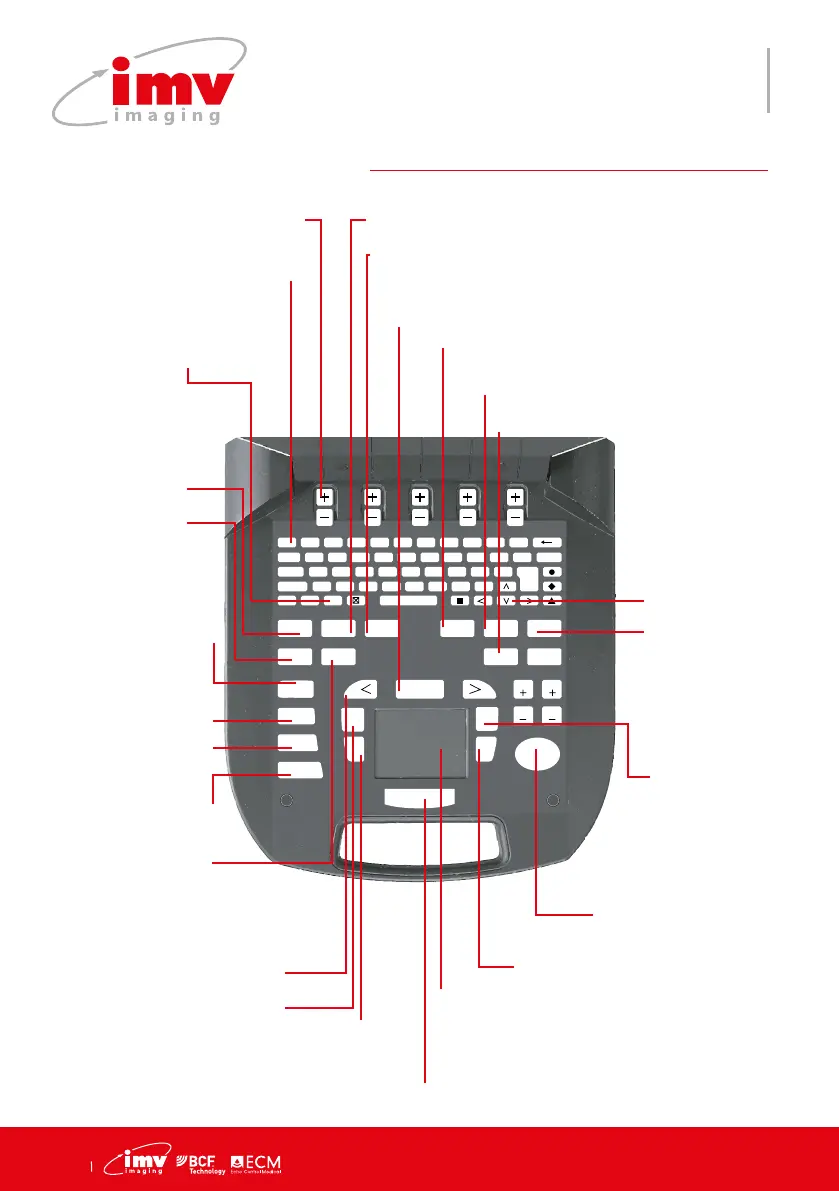
3.Keyboard functions
F 1
!
2
@
3
?
4
+
5
%
6
-
7
&
8
/
9
(
0
)
T
AB
Q W E R T Y U I O P D
ELETE
CAPS A S D F G H J K L ENTER
SHIFT Z X C V B N M ;
T
EXT PICTO
A
RROW
PATIENT
REPORT
PROTOCOL
PROBE
ZOOM
TGC
SETTINGS
CLEAR
FREQUENCY
FOCUS
M CINELOOP
PWD
MEASURE REVIEW
CFM
B
SELECT
DEPTH
GAIN
DEPTH
GAIN
FREEZE
UPDATE STORE
Keys to navigate through the
menu on screen
Shortcut to user dened an-
notation with (1-9 as free text)
Arrow in active imaging
mode or calipers in
Freeze. Use “ Clear” to
delete or Arrow in Freeze.
Scroll text lists,
move cursor
or adjust po-
sition of CFM/
PW box.
M Mode
Select to start M
mode. Update to
return to M Line
adjustment.
In Freeze mode move to
previous Cineloop image.
Current image index is
displayed on screen.
Measure menu.
Touchpad used for menu selection, mea-
surement cursors, validation of measure-
ments, line positioning in M mode etc.
Used to conrm selection items and activate. Active CFM/PW & M mode, zoom.
Store image
Review the
image/clips.
B Mode menu
CFM Mode menu
PWD Mode menu
When PW is activated from CFM, the “Up-
date” key allows to come back to the CFM
mode with the gate active.
Freeze and unfreeze
the system
Report menu
Protocol menu
Cine loop records or
allows to view clips
Access frequency
selection menu.
Probe menu.
Press select to display
zoomed image or exit zoom.
Patient menu.
Settings menu.
Use keys to
adjust focus.
Reset to
return to initial
TGC level.
Clear annotations,
arrows, biopsy
guide or noise
rejection.


 To Next Page