Exago
Manual
Exago
Manual
7
www.imv-imaging.com |
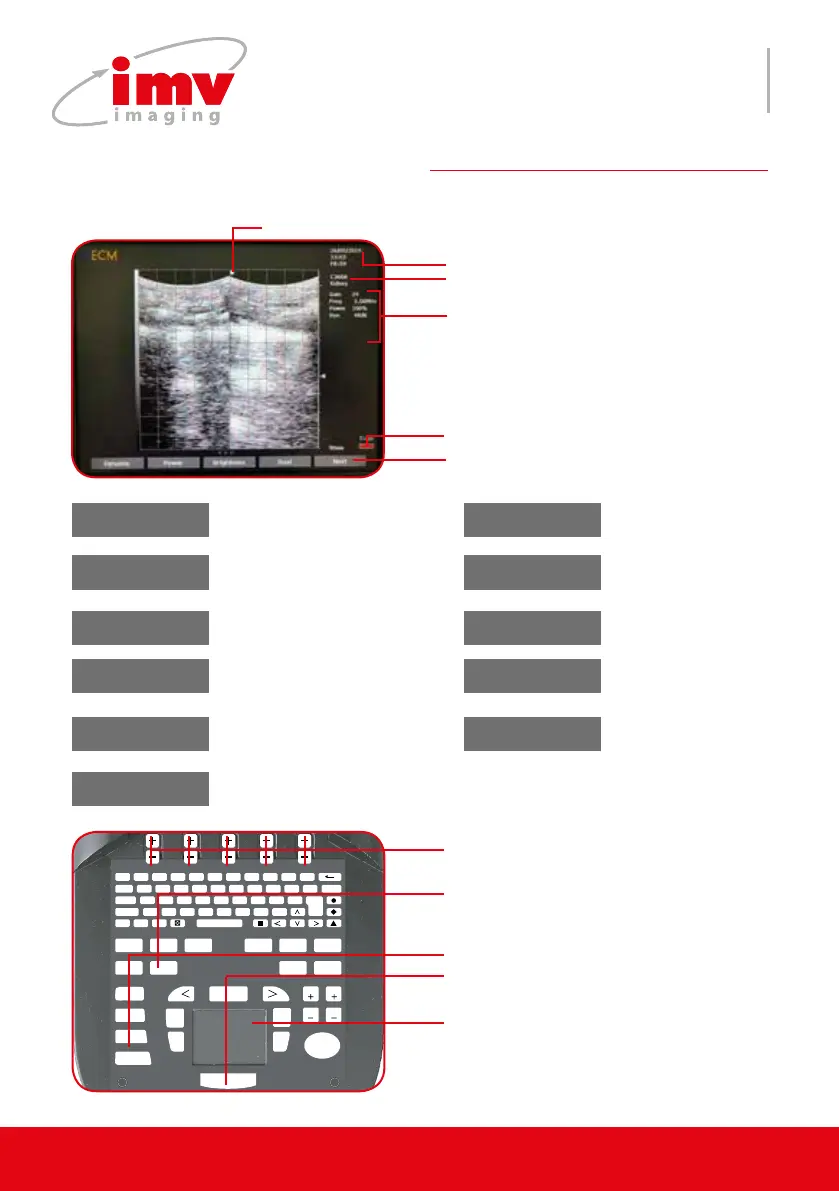
Use keys “Next/Previous to move
through the menu.
Dote indicates the active image and the direction of the image
in L/R, Up/Down.
Probe
Labels displaying settings of the
menu e.g
Dyn-Dynamic
Brigh-Brightness
Freq-Frequency
FAvg-Frame avearage
Date, Time
Battery capacity
4.B mode and menu
F 1
!
2
@
3
?
4
+
5
%
6
-
7
&
8
/
9
(
0
)
T
AB Q W E R T Y U I O P DELETE
CAPS A S D F G H J K L ENTER
SHIFT Z X C V B N M ;
T
EXT PICTO
A
RROW
PATIENT REPORT PROTOCOL PROBE ZOOM TGC
SETTINGS CLEAR
FREQUENCY
FOCUS
M CINELOOP
PWD
MEASURE REVIEW
CFM
B
SELECT
DEPTH
GAIN
DEPTH
GAIN
FREEZE
UPDATE STORE
B mode and menu, exit Dual mode
Switch between left and
right images in Dual mode
Keys to change settings of the contex-
tual menu.
Noise reject window positioning
adjustment
Exit Noise Rejector Biopsy
PowerDynamic
Dynamic Range of B
image.
Transmit Power.
Adjust Brightness.
Brightness Dual
L/R, U/D Frame Average
Noise Reject
Compare two images
in B mode.
Image orientation (Left/
Right or Up/Down).
Select: SLOW, SLMED,
MFAST, FAST values.
Signals will lter to provide
the cleaner image.
Exa Cross
Cross Beam function.
Used with linear pro-
be only.
Large image
Images use maximum
screen in B and Dual mode.
Smooth
Active in B and Dual
mode. Can be saved
in preset.
Biopsy*
Activate biopsy needle on the screen indi-
cating where the needle should travel.
* Before using this feature, test this function in a water tank before use on
a patient. The mechanical tolerance of the biopsy guide may exceed the
expected values and the guiding channel . Press Biopsy or Clear to remove it. Needle guide only works with recommended IMV Imaging guide
for probe. Check that biopsy guide and needle is properly attached to the probe.


 To Next Page