45
Cleaning and Maintenance
Removing Side Covers
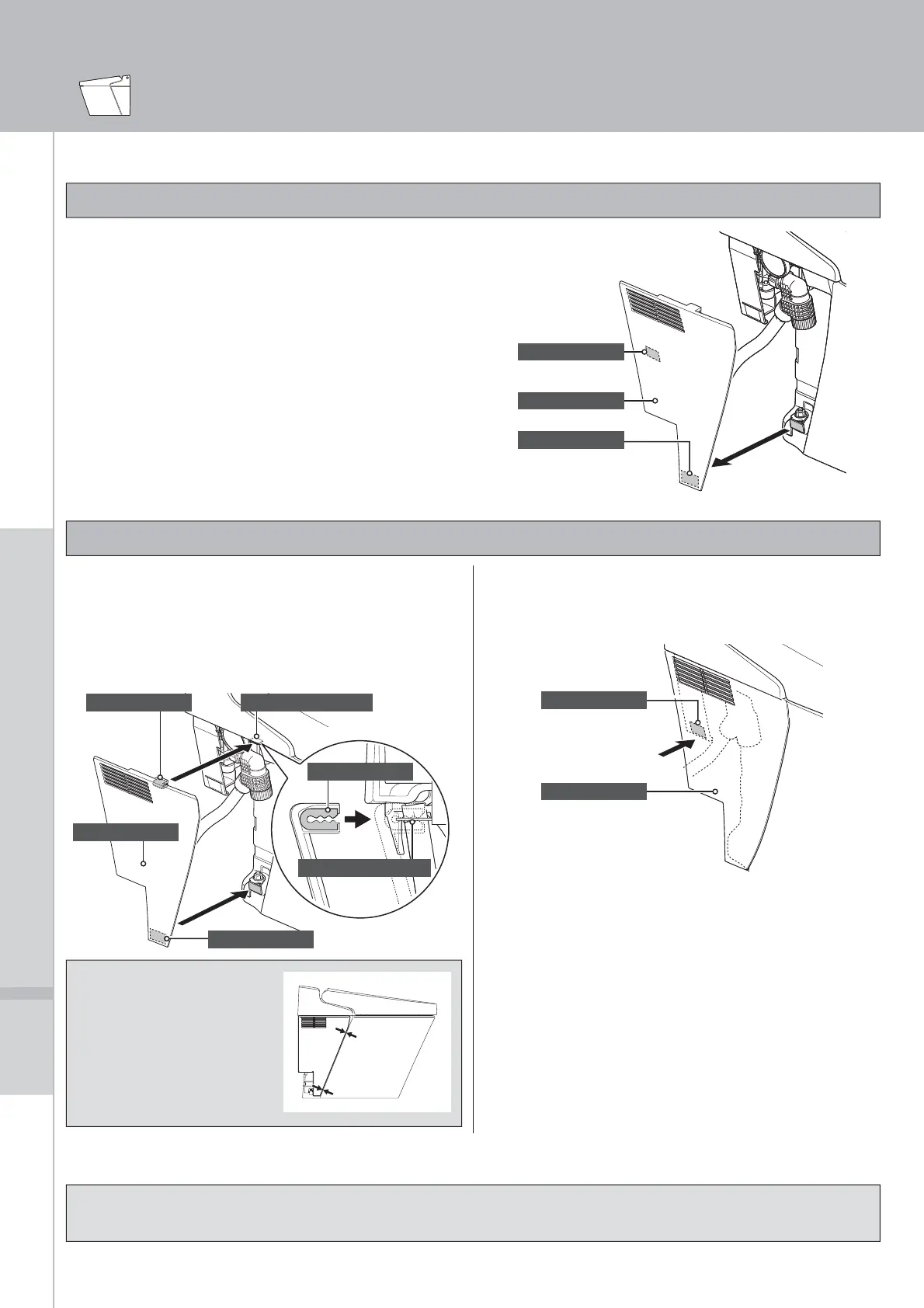
Side covers are easily removed. Remove the covers to clean the back of the toilet bowl and covered parts of the oor.
Removing Side Covers
Installing Side Covers
[CAUTION]
Do not apply too much force when attaching the side cover. Doing so may damage the part.
Insert the clip at the top of the side cover
into the clip holder on the toilet bowl.
Attach the cover to the velcro at the
bottom while ensuring the toilet bowl and
side cover are in alignment.
Side cover
Velcro
Clip
Clip
Clip holder
Clip holder
[CAUTION]
Attach the velcro while
ensuring the toilet bowl
and side cover are in
alignment.
Press on the center of the side cover
to make sure the velcro make a secure
connection.
Side cover
Velcro
Connect the power plug to an outlet.
Disconnect the power plug from the
outlet.
Slowly pull the bottom of the side cover
forward and then remove velcro.
Side cover
Velcro
Velcro



 To Next Page