13
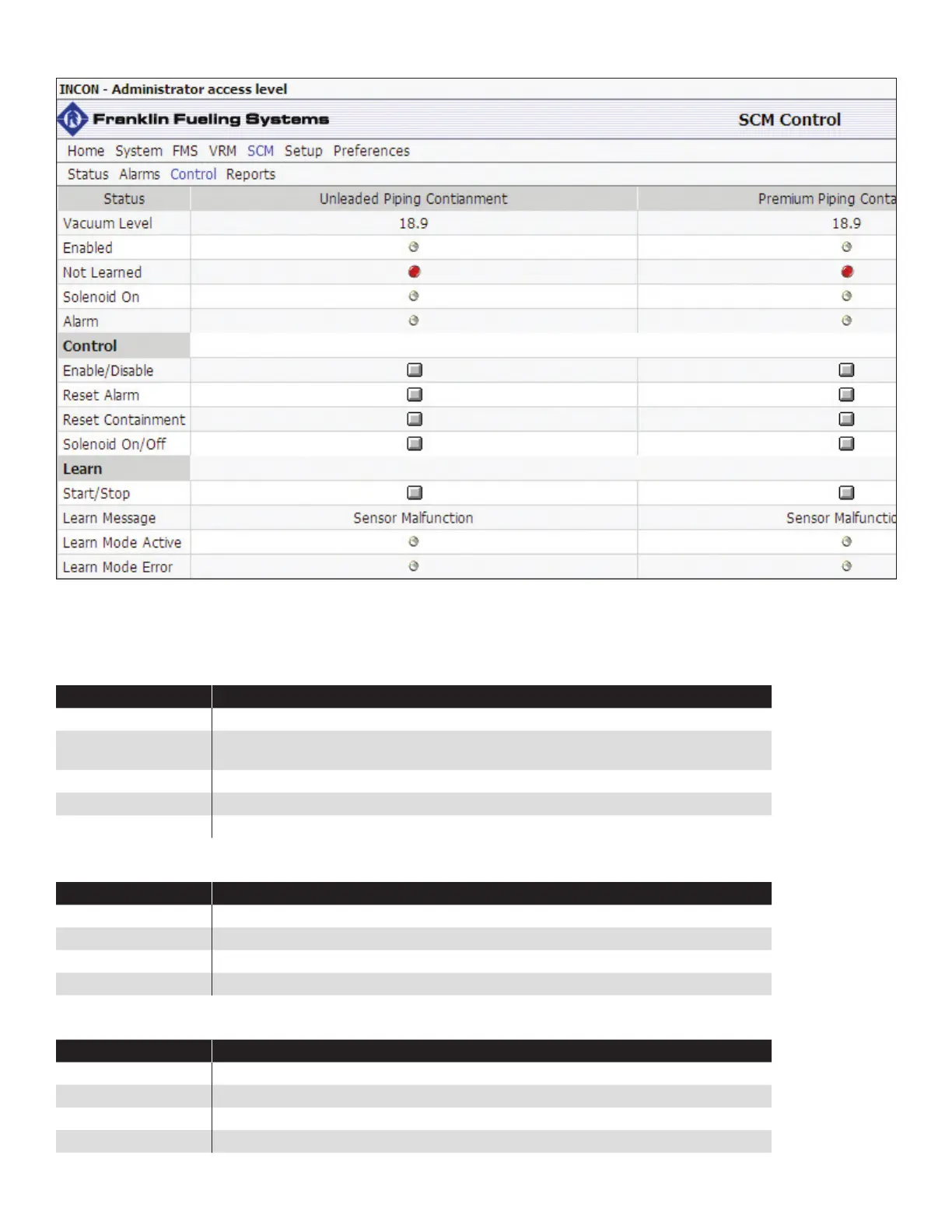
SCM Control Screen
The SCM Control screen will automatically update containment information. Administrator privileges will be necessary to
access the SCM Control screen. For instructions on FMS programming or on how to obtain an Administrator access level,
please refer to the T5 FMS Programming Guide (p/n 000-2142).
Status Indicator Table
Indicator Description
Alarm The containment is in an alarm condition.
Enabled The containment has been enabled by the user or by the application automatically (if the
Auto-Enable on Reset parameter is turned on in the SCM Setup).
Not Learned The containment has not been learned.
Solenoid On Indicates whether the normally closed SCCM solenoid is open or closed.
Vacuum Level A direct reading from the SCCM Vacuum Sensor.
Control Indicator Table
Indicator Description
Enable/Disable Manually enable or disable the containment.
Reset Alarm Manually reset an alarm on the containment.
Reset Containment Manually reset the testing cycle of the containment.
Solenoid On/Off Manually cycle the solenoid on or off.
Learn Indicator Table
Indicator Description
Learn Message The status of the learning process.
Learn Mode Active The containment is being learned.
Learn Mode Error An error has been detected during the learning process.
Start/Stop Start or stop the learning procedure.



 To Next Page