Index Basic Servicemanual v 3.0
37BOX 155 • S-954 23 GAMMELSTAD • SWEDEN • PHONE +46-920 203080 • TELEFAX +46-920 203085 • www.indexbraille.com • E-MAIL info@indexbraille.com
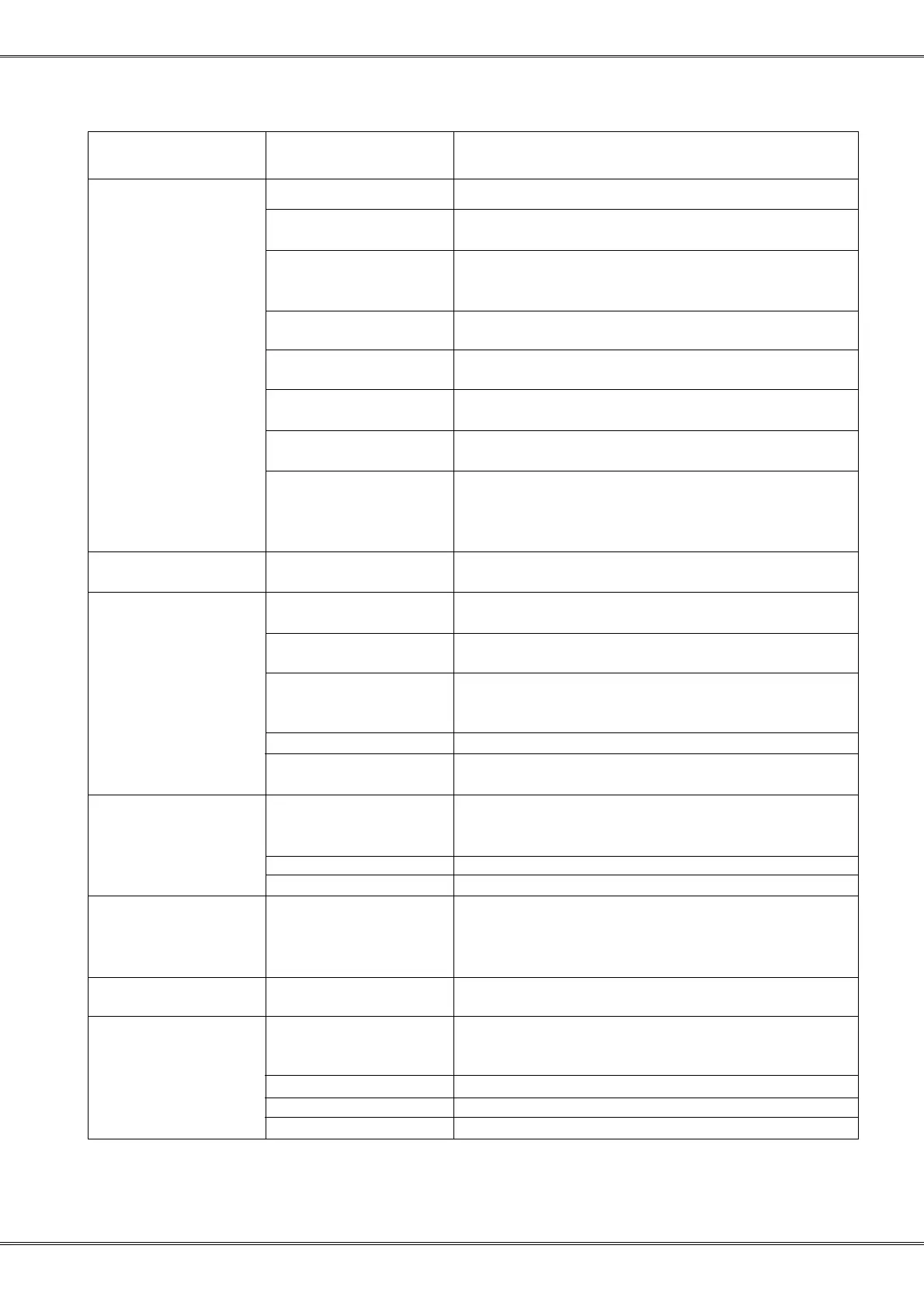
Fault detection
Fault Possible explanation Possible solution
Low dot quality Not fixed anvils Screws on anvils profile
220 V printer on 110 V Change to 100 Voltage. The printer set for 220 V
will work on 110 but with very bad dot quality
Negative hammer/ Clean anvils/hammer, check paper quality
Anvils filled with
paper
Anvils is worn out Change anvils, normally the positive will worn
out first.
Hammers is worn out Change hammers, normally the positive will worn
out first.
Hammers or power Run the test specified on page 22
transistors is bad
Not good combination Exchange to new anvils it the result is not
of hammers and anvils acceptable, change also the hammers
Faulty type of software If the mainboard is equipped with version 1 PAL
is installed. 2.xx or high- and Boot circuit and 10 Kohm on driving
er on a version 1 board transistors. Index can update the board to handle
2.xx and higher software.
No dots Not connected or bad Check cable
print head cable
Bad vertical Gear wheel not fixed to Clean the motor axle and gear wheel, than glue it
alignment the stepper motor with “Locktite 638”
Worn out or smashed Exchange the gearbar on the printing head
gear bar on printhead
Printer calculation Reduce the speed on option/print quality.
resolution limitation
maximum 0,3 mm.
Software bad adjusted Run the hammer program
Printinghead motor not See page 28
fixed
Squeezed first Software 3.00 and 3.01 Install 3.03 or higher
line or lines have reduced torque software
when starting motor
The axle is dirty Clean the axle with alcohol.
Gearbar is wornout Exchange the gearbar
Can not load Different versions of Install the new version of the program in Basic.
own braille table the program in the Then load the own tables into Basic.
printer and support See: Transfer your own table to a new version of
program the support program.
Can not load Version 1 board a) Load program 1.34 on V.1 board, (3.03 on V.2 board)
a new program b) Send the board to Index to be updated to a V.2 board
Keys have Everest software by Install the Basic program with “install new”.
different mistake loaded on Press: Off line+Power on. Run restore program.
functions Basic
Cable fault/twisted Check cable see page 26
Panel fault Check panel see page 26
Decoder circuit fault Exchange decoder circuit, UXX



 To Next Page