EasyManua.ls Logo

Industrial Data Systems IDS 422 - User Manual

Default Icon
63 pages
Print Icon
To Next Page IconTo Next Page
Loading...
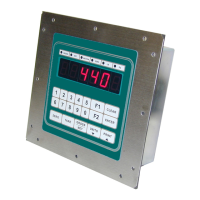
IDS 410/422
Weight Indicator
Installation/Calibration/Operation
Version 1C
07/01/2010
Telephone
Sales 714-921-9212
Out of State (USA) 800-854-3311
Technical Support 714-921-1353
FAX 714-399-0286
E-mail
sales@industrialdata.com
Postal address 3822 E. La Palma Ave. Anaheim Ca. 92807

Table of Contents

Questions and Answers

Summary

INSTALLATION AND SETUP

Installation Guide

Provides instructions for connecting the IDS 410/422 to the load cell, junction box, and printer.

Setup Guide

Setup & Quick Calibration Guide

Guides users through setting configuration parameters before calibration and lists mandatory parameters.

Calibrate the Weight Indicator

SET OPERATION PARAMETERS

Access Operation Parameters and Parameter Functions

Explains how to access and modify operational parameters using the keyboard interface.

Operation Parameters Reference Tables

Provides an overview of operation parameters, including names, default values, and password levels.

Scale Parameters

Lists scale parameters, their default values, maximum values, password levels, and fields for settings.

I;O PORT Parameters

Details parameters related to Serial Port 1 and Serial Port 2, including mode and baud rate settings.

PARAMETER FUNCTIONS

Serial I;O Ports

Printer Parameters

DIAGNOSTIC TESTS

Diagnostic Test 1: Serial Com Port 1 - Display Input Data

Tests Serial Com Port 1 by displaying received serial data, checking for correct baud rate.

Diagnostic Test 2: Serial Com Port 1 - Display Errors

Tests Serial Com Port 1 for framing and parity errors in the input data stream.

Diagnostic Test 3: Serial Com Port 1 - Transmit Data

Transmits test data out of Serial Com Port 1 to verify transmission functionality.

Diagnostic Test 4: Serial Com Port 2 - Display Input Data

Tests Serial Com Port 2 by displaying received serial data, checking for correct baud rate.

Diagnostic Test 5: Serial Com Port 2 - Display Errors

Tests Serial Com Port 2 for framing and parity errors in the input data stream.

Diagnostic Test 6: Serial Com Port 2 - Transmit Data

Transmits test data out of Serial Com Port 2 to verify transmission functionality.

Diagnostic Test 7: TTL I;O Test Inputs and Outputs

Tests all TTL inputs and outputs of the IDS 410/422 to verify their functionality.

Diagnostic Test 8: Test A;D

Displays filtered raw data from the A/D converter to determine optimum deadload and gain settings.

Diagnostic Test 9: Perform Internal Memory Test

Writes and reads data to memory to test for failed memory locations and ensure data integrity.

Diagnostic Test 10: Lamp Test

Turns on all LED displays and numeric display segments to check for illumination issues.

Diagnostic Test 11: Print the EAROM Configuration Table

Sends the EAROM configuration memory contents to the printer for documentation.

Function 72: Scale Basic Function Editor

Parameter 73: Mode of Operation

Function 80: Calibrate Multi-Point Linearization

Troubleshooting

Problems and probable cause

Provides a table of common problems encountered with the IDS 410/422 and their probable causes.

Error Messages

HARDWARE INSTALLATION AND WIRING

Industrial Data Systems IDS 422 Specifications

General IconGeneral
BrandIndustrial Data Systems
ModelIDS 422
CategoryAccessories
LanguageEnglish

Related product manuals