EasyManua.ls Logo

Industrial Data Systems IDS 440 - User Manual

Industrial Data Systems IDS 440
75 pages
Print Icon
To Next Page IconTo Next Page
Loading...
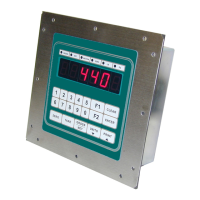
IDS 440
Weigh Scale Indicator
Installation/Calibration/Operation
Version 4.2 10/3/2001
Program S440012x
Industrial Data Systems, Inc.
590 W. Freedom Ave. Orange, CA 92865-2530
714-921-9212 Fax 714-998-8656
www.industrialdata.com

Table of Contents

Questions and Answers

  • N
    nguyenbrianAug 10, 2025
    What to do if Industrial Data Systems IDS 440 show “Err 13” error message (Printer Error)?
    • J
      Jillian OrtizAug 10, 2025
      The “Err 13” error message for Industrial Data Systems Accessories appears when parallel output is selected for printing, and the printer is either busy, experiencing a fault, or there's a cable issue. Check these aspects to resolve the problem.
  • R
    Robert PetersonAug 15, 2025
    What to do if Industrial Data Systems Accessories show “Er CtS” error message?
    • R
      Rose SchultzAug 15, 2025
      The “Er CtS” error message on your Industrial Data Systems Accessories indicates a cable connection problem. Check the CTS signal at TB1 pin 7; it must be high to transmit. Try a jumper to pin 8 of TB1. It could also mean the printer is not ready or busy, or the transmitter/receiver IC (U6 - MC145406) is damaged.
  • J
    Jill StephensAug 20, 2025
    Why is Industrial Data Systems IDS 440 input port 1 not working?
    • C
      Charles AlexanderAug 20, 2025
      If input port 1 on your Industrial Data Systems Accessories isn't working, the baud rate and format on serial port 1 might not match the host. Check for cable connection problems or invalid pin connections. Also, ensure the internal switch SW1 (CL/RS232) is correctly set for the input type. A damaged RS232 transmitter/receiver IC (U6 MC145406) or current loop receiver IC (U3 4N36) could also be the cause.
  • F
    fmcguireAug 26, 2025
    Why is Industrial Data Systems IDS 440 Accessories input port 2 not working?
    • M
      Meghan Marshall DDSAug 26, 2025
      If input port 2 on your Industrial Data Systems Accessories is not working, verify that the baud rate and format on serial port 2 match the host. Check for any cable connection issues or incorrect pin connections. Ensure the internal jumper JP3 (RS232/422/485) is properly set. A damaged RS232 transmitter/receiver IC (U6 MC145406) or a damaged RS422/485 transmitter/receiver IC (RS422 {U10 75176} RS485 {U14 75176}) could also be responsible.
  • J
    Jason MendezAug 30, 2025
    How to fix Industrial Data Systems IDS 440 continuous output not updating?
    • S
      Sean FergusonAug 30, 2025
      If the continuous output on your Industrial Data Systems Accessories isn't updating, here are a few things to check: * Make sure “TX CONTINUOUS” is enabled (configuration Parameter 28). * Check for cable connection problems or invalid pin connections. * Ensure the baud rate and format on serial port 2 match the receiver. * A damaged transmitter/receiver IC (U6 MC145406) could also be the problem.
  • A
    allenashleySep 4, 2025
    How to fix Industrial Data Systems IDS 440 Accessories printer not printing (serial RS232)?
    • A
      Amy GarciaSep 4, 2025
      If your Industrial Data Systems Accessories printer isn't printing via serial RS232, consider the following: * Check for cable connection problems or invalid pin connections. * Ensure the baud rate and format on serial port 1 match the printer's settings. * Verify the printer is ready and not busy; check the CTS signal TB1 pin 7 (it must be high to transmit; try jumpering pin 8 of TB1 to pin 7 of TB1 CTS/RTS). * A damaged transmitter/receiver IC (U6 MC145406) could also be the cause.

Industrial Data Systems IDS 440 Specifications

General IconGeneral
BrandIndustrial Data Systems
ModelIDS 440
CategoryAccessories
LanguageEnglish

Related product manuals