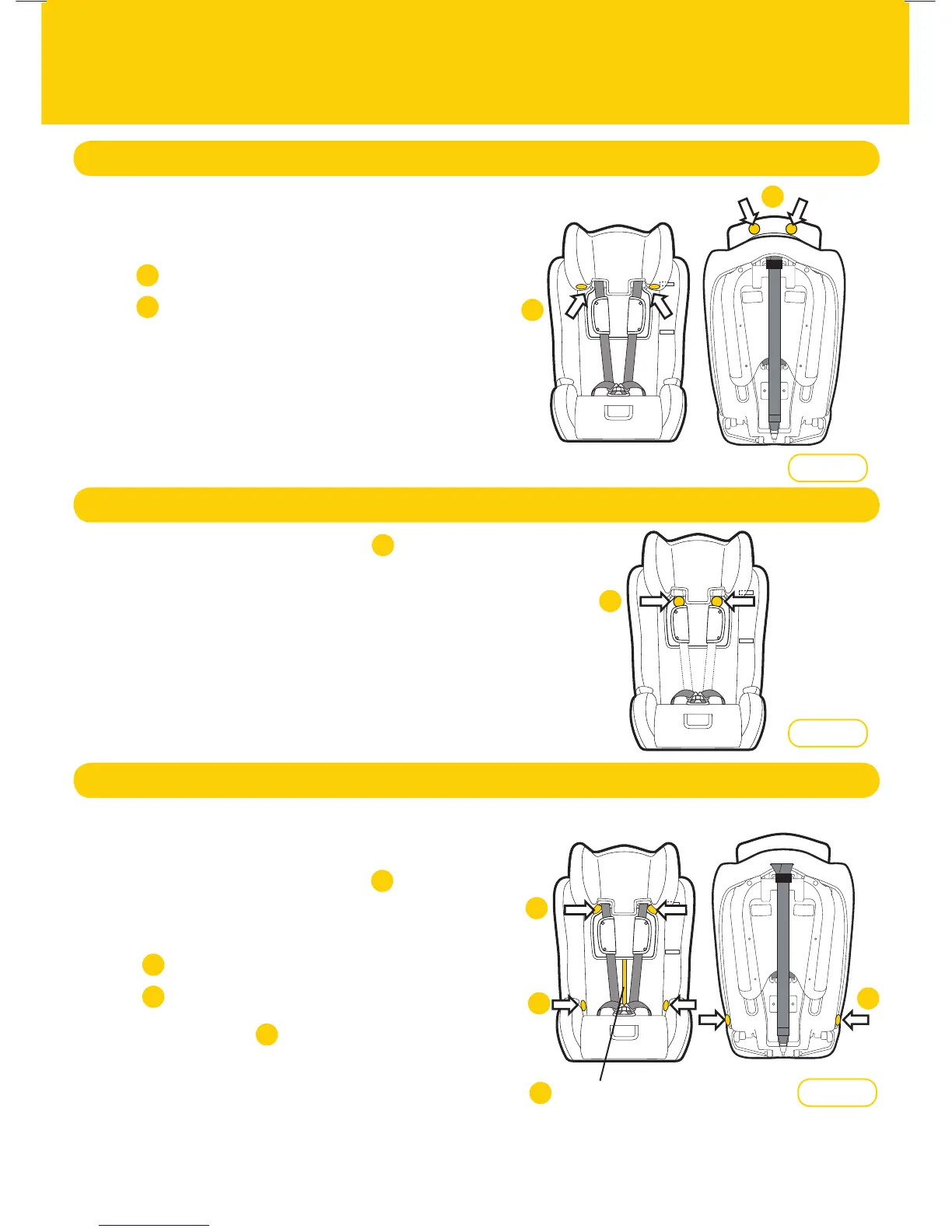
Remove Covers
Step 1:
Step 2:
Step 3:
Raise the headrest to highest position (refer Figure 1).
Unclip the press studs located;
underside of headrest
behind headrest
Remove cover
Headrest
Step 1:
Step 2:
Unclip the press studs location (refer Figure 2).
Slide cover off the plastic apron to remove.
Apron
Backrest
1
1
1
1
2
2
Figure 1
Figure 2
4
1
2
3
Figure 3
HOOK & LOOP
CONNECTOR
4
Step 1:
Step 2:
Step 3:
Step 4:
Raise the headrest to highest position to access
press studs.
Unclip the press studs location (refer Figure 3).
NOTE: press studs may be obscured by headrest.
Unclip the press studs located;
inside
outside
Disconnect the hook & loop connector located
below the headrest/apron and remove the cover
(refer Figure 3).
2
3
1
24






 To Next Page