Kappa Series Powered Subwoofer – Owner’s Manual
◆
21
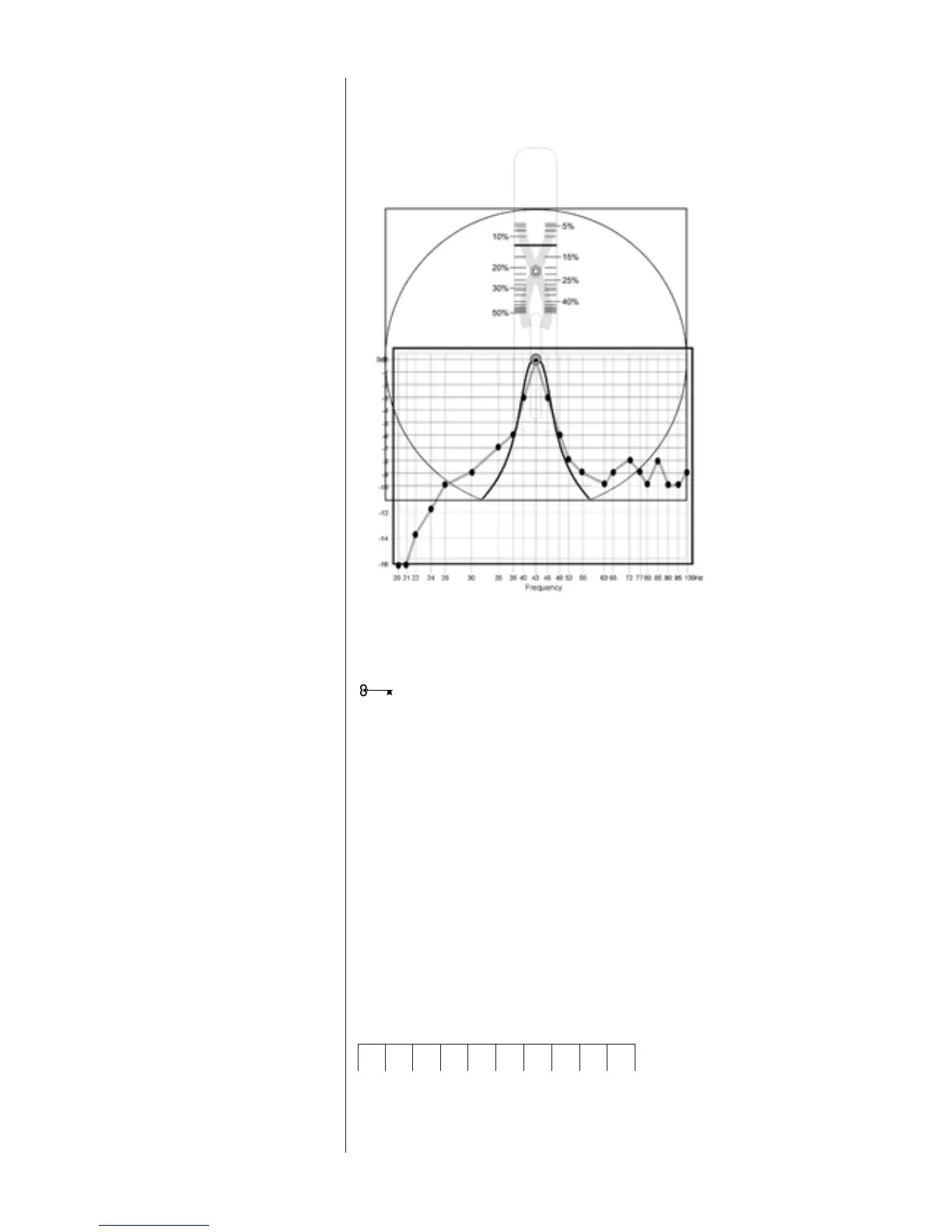
Figure 16
Selector adjusted for
the “best fit”
Apply pressure to the upper and lower left corners of the Selector using the thumb and
forefinger of your left hand. Now gently slide the tab up or down until the adjustable
slice most closely fits the response data. See Figure 16.
The pointer on the slider will indicate the correct width setting. Enter this number in the
Width field of the Measurement Template.
In our example, the width is 12.5%.
It is not realistic to expect a perfect fit. Acoustic measurements encompass the
behavior of not only the speakers but of the room and its contents as well. Reflected
energy, standing waves and ambient noise all add their part. Determining the best
width setting nearly always requires compromise.
This setting will define the amount (level) you want to reduce the peak, in decibels.
The R.A.B.O.S. level adjustment is limited to attenuation only, and is adjustable from
0 dB to -14 dB. After optimization, the R.A.B.O.S. equalizer will eliminate the largest
low-frequency peak; therefore, the broadband bass level can be increased without
overpowering the midrange frequencies. R.A.B.O.S. applies this compensation
automatically.
You will use the Width Selector as an aid in determining the correct level setting. Place
the Width Selector as described above and adjust it to the correct width. Observe the
first frequency point on the high-frequency side of the peak that no longer follows the
slope of the Width Selector. In this example this is 56Hz. Calculate the average level of
the readings from 56Hz up to 100Hz; that is, 10 data points in this example.
Level
56Hz 63Hz 66Hz 72Hz 77Hz 80Hz 85Hz 90Hz 95Hz 100Hz
-9 -10 -8 -9 -10 -9 -8 -10 -10 -9 -
92 ÷ 10 = -9.2




 To Next Page