Home
infobit
Conference System
iShare X
Page 65
infobit iShare X - Page 65
108 pages
Manual
Save Page as PDF
To Next Page
To Next Page
To Previous Page
To Previous Page
Loading...
65
/
108
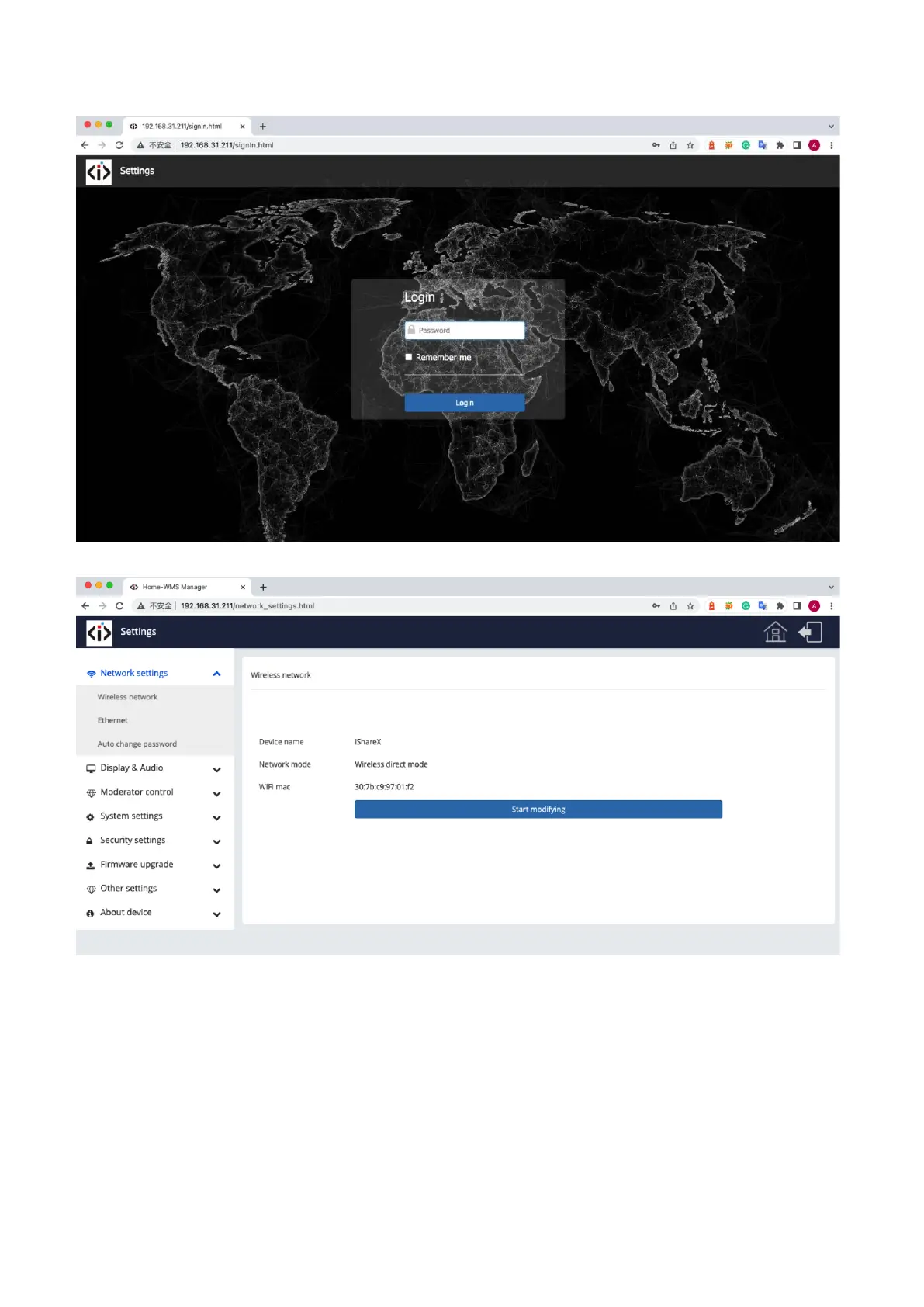
The
main
interface
of
Se
tti
ng
is
s
hown
as
below
,
including
Network
s
ettings,
Display
&
Audio,
Moderator
control,
System
settings, Security
settings, Firmware upgrade, O
ther setti
ngs, About device.
64
66
Table of Contents
Main Page
Table of Contents
3
Overview
6
Specification
8
Panel Layout
8
Hardware Interface
9
Ishare X400 Front Panel
9
Ishare X400 Rear Panel
11
Factory Reset
12
Dongle Front Panel
13
Software Interface
16
Home Screen
16
Installation
18
Installation Methods for the Base Unit
18
Wiring Diagram
19
Power Connection
19
Video Connection
20
Audio Connection
21
LAN Connection
22
Usage of USB Device
22
Quick-To-Start
24
Mobile Device: Wireless Connection
24
Enable Portable Hotspot
25
Enable LAN Connection
26
Pairing Transmitter with Base Unit
27
Mirroring
29
Microsoft Windows Pc/Laptop with Dongle
29
Microsoft Windows Pc/Laptop with Application
32
Options for Microsoft Windows PC / Laptop - Extended Screen
35
MAC os Pc/Laptop with Dongle
38
MAC os Pc/Laptop with Application
39
Operations for Apple Macos, Macbook - Extended Screen
42
Quad View Mirroring
43
Mobiles Devices
44
Miracast on Android Devices and WIN10 Pc/Laptop
47
Chromecast on PC
50
Preview Window
52
Whiteboard & Annotation
53
Whiteboard
54
Annotation
56
Strat Video Conferencing Via USB-Over-Wifi Technology
59
Start with USB Drive or PC Application
59
Start with HDMI Dongle or Type C Dongle
61
Web Setting Management Configuration
63
Network Settings
66
Wireless Network
66
Ethernet
75
Auto Change Password
76
Display & Audio
77
Hdmi
77
Audio
79
Airplay Screen Quality
80
Start Screen
81
Home Screen Background Image
81
Moderator Control
82
System Settings
84
Buttons
84
Date & Time
85
Auto Standby
85
Language
86
Reset
87
Configuration File
87
Series Port Setting
88
Telnet Switch
88
Security Settings
89
Security Level
89
Login Password
90
Connection Password
90
Firmware Upgrade
91
Firmware Update
91
Automatic Upgrading
91
Other Settings
92
Auto Create Launcher
92
Clear History after Meeting
92
About Device
93
Updating Ishare X
93
Check Current Firmware Information
94
Upgrading Firmware of Base Unit
97
Upgrading and Pairing of Dongle
98
Upgrading Launcher
99
Clean Left Files of Older Versions of Launcher Program in Laptop
101
WIFI Recommendation Setting
104
Check the WIFI Config on Base Unit
104
Check the WIFI RSSI on Dongle or Mobiles
104
Problem Shooting
104


 To Next Page