OR
3
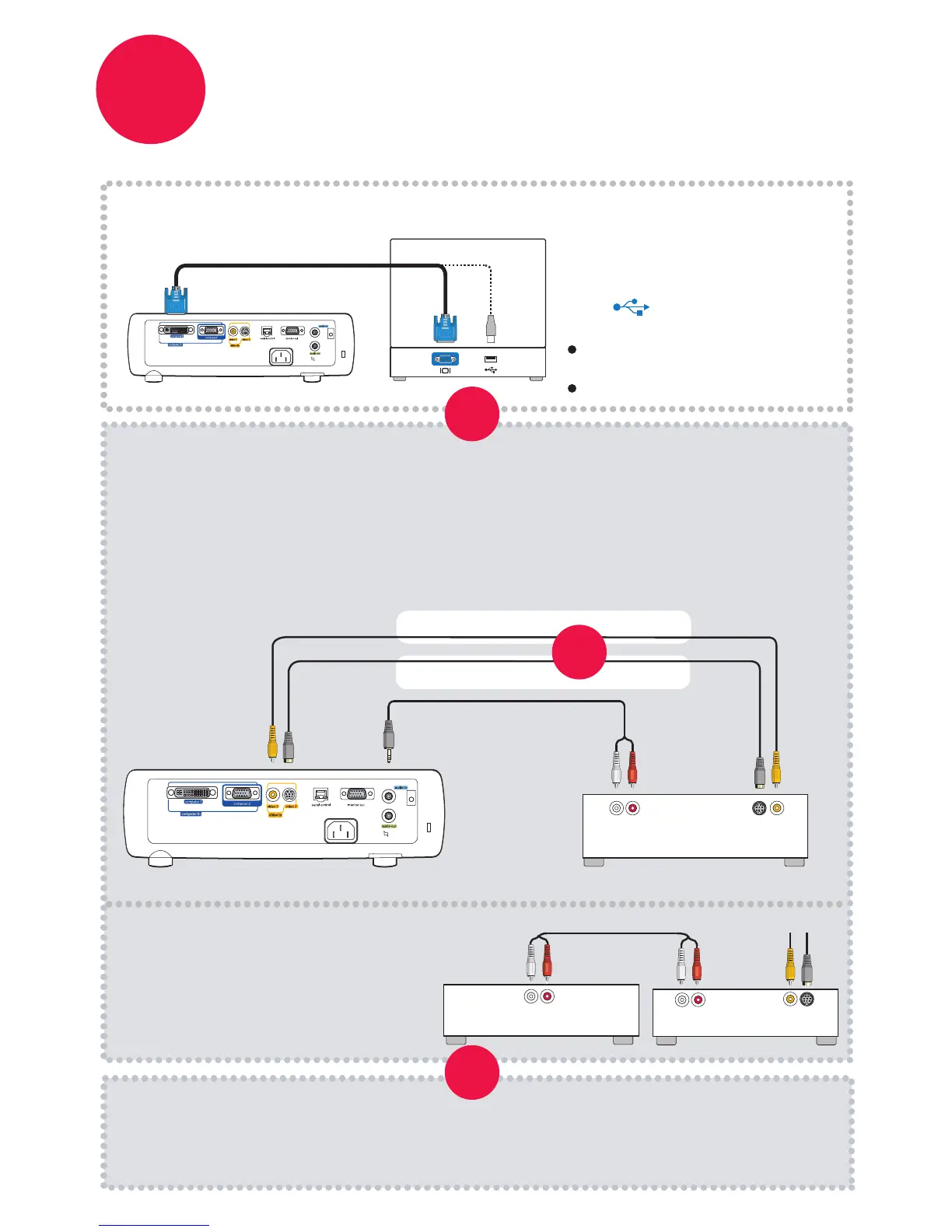
Mini-Plug Audio Y-Cable
Connect source
Color-coded connections make it easy.
You can connect more than one source if needed.
Connect to: Computer
Connect to: DVD or VCR* (using optional cables)
Computer Cable (included)
Computer
*Also for game console or cable box.
Connect video using either an S-Video or a Composite Video cable
Connect audio using a Mini-Plug to RCA Audio Y-Cable
1
2
Composite Video Cable
Video Cable
Good
Better
Want better sound?
Connect the source's audio output to a
receiver/amplifier or home theater
system with separate speakers.
S-
DVD or VCR
Audio Out
L R
OR
Video Out
USB connection only needed for:
Presentation control using
projector remote
Upgrading projector firmware
To Projector
RCA Audio Cable
DVD or VCR
Home Theater or Receiver
Audio In
L R
Audio Out
Video Out
L R
or
Got an Apple computer?
You may need an adapter. For more
information, see How-To Guides at
www.infocus.com/support/howto
OR
Connect to: Other kinds of sources
How-To Guides are available at www.infocus.com/support/howto
USB is optional
www.infocus.com/store part no. SP-SVIDEO-10M or SP-CPSTVID-5M
Available from A/V dealer or retailer



 To Next Page