28
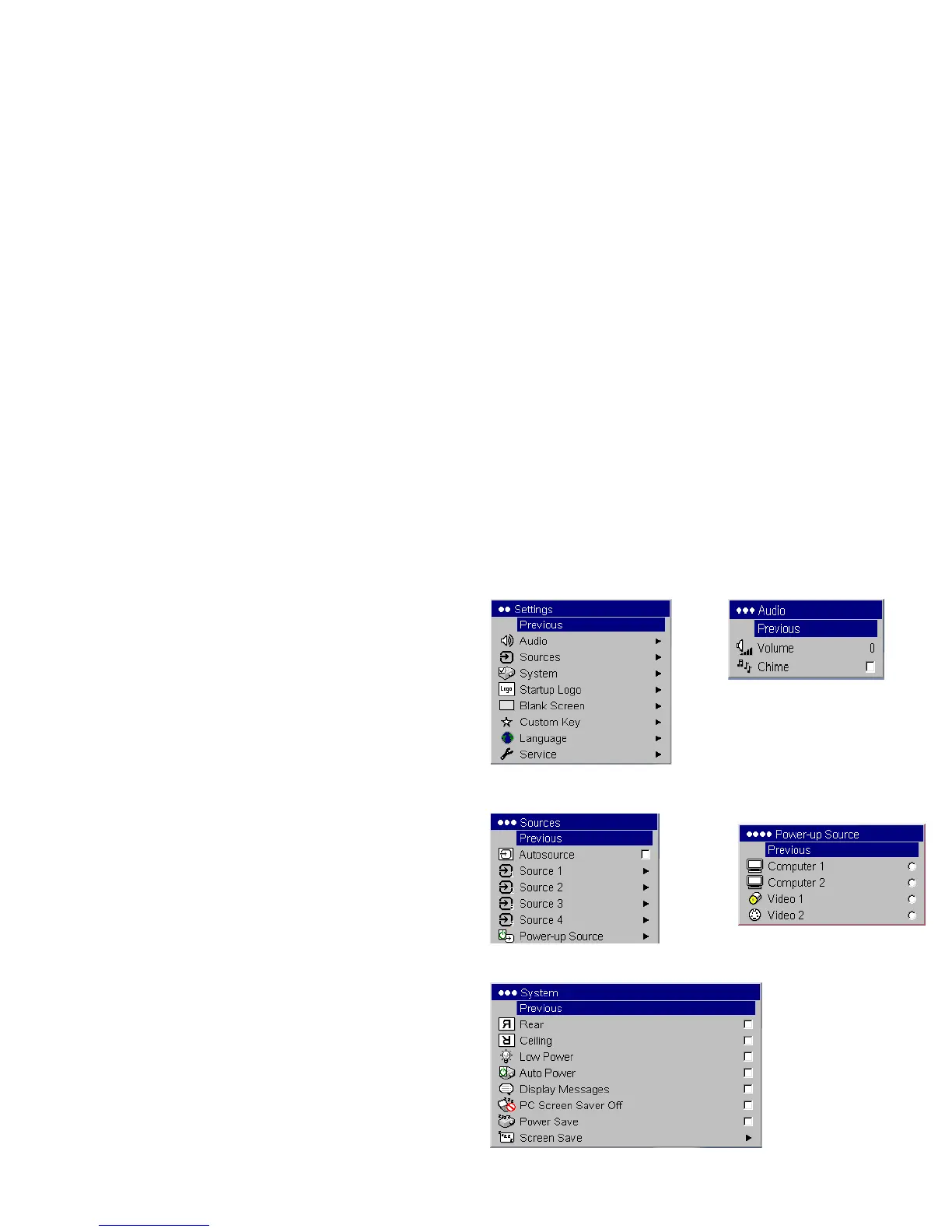
Settings menu
Audio: allows adjustments to the volume and balance, and turns the projec-
tor’s startup Chime on and off.
Sources: allows you to assign a particular input to a specific source key
when using an optional remote. Also allows selection of a default Power-up
Source and enables or disables Autosource.
Sources>Power-up Source: this determines which source the projector
checks first for active video during power-up.
Sources>Autosource: When Autosource is not checked, the projector
defaults to the source selected in Power-up Source. If no source is found, a
blank screen displays. When Autosource is checked, Power-up Source
determines which source the projector defaults to at startup. If no signal is
present, the projector checks the sources in order until a source is found or
until power down.
System>Rear: reverses the image so you can project from behind a translu-
cent screen.
Ceiling: turns the image upside down for ceiling-mounted projection.
Auto Power: When Auto Power is checked, the projector automatically
goes into the startup state after the projector is powered on. This allows con
-
trol of ceiling mounted projectors with a wall power switch.
Low Power: Turn this on to lower the light output of the lamp. This also
lowers the fan speed, making the projector quieter.
Display Messages: displays status messages (such as “Searching” or
“Mute”) in the lower-left corner of the screen.
Audio
Settings
Sources
Power-up
Source
System



 To Next Page