
 Need help?
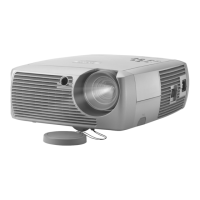
Do you have a question about the InFocus SP4805 and is the answer not in the manual?
Explains the 3.5mm mini-jack trigger providing a 12 volt DC output for various automated uses.
Details connecting VGA and USB ends of computer cables to the projector for display and control.
Connects the computer cable's M1-DA end to the projector and USB/VESA to the computer.
Details connecting component video cables for high-quality video output.
Explains connecting DVI cables for the highest quality video output.
Covers adjusting projector height, leveling foot, distance, zoom, and focus for optimal image.
Explains projector error codes indicated by LED colors and blinking patterns for diagnosis.
Provides steps to resolve issues if audio is not heard from the projector.
Guides on adjusting projector settings for optimal computer image display.
Provides steps to fine-tune projector settings for the best video image quality.
Details the procedure for replacing the projector lamp, including safety precautions.
 General
| Native Resolution | 854 x 480 |
|---|---|
| Brightness | 750 lumens |
| Contrast Ratio | 2000:1 |
| Lamp Life | 2000 hours |
| Weight | 3.6 kg |
| Projection Technology | DLP |
| Throw Ratio | 1.95 - 2.25:1 |
| Connectivity | S-Video, Composite Video, VGA |
| Projection Distance | 1.2 m - 12.0 m |
| Video Modes | 480i, 480p, 576i, 576p, 720p, 1080i |
| Data Modes | MAX 1600 x 1200 |
| Inputs | Composite Video, S-Video, VGA |
| Dimensions | 9.7 in. x 12.3 in. x 3.9 in. |





 To Next Page


