• 24 • • 25 •
Step 3
CAUTION
1. If the countdown does not start, do not add more blood to the glucose test strip.
Discard the glucose test strip and re-start testing.
2. If you do not conduct the test within 3 minutes, the glucose test meter will automatically
power off to save battery life. In this case, test procedure should start again from the
beginning.
3. You may get an inaccurate result if the blood sample is not completely filled.
GluNEO
®
Lite Test Meter only requires 0.5 ul sample volume.
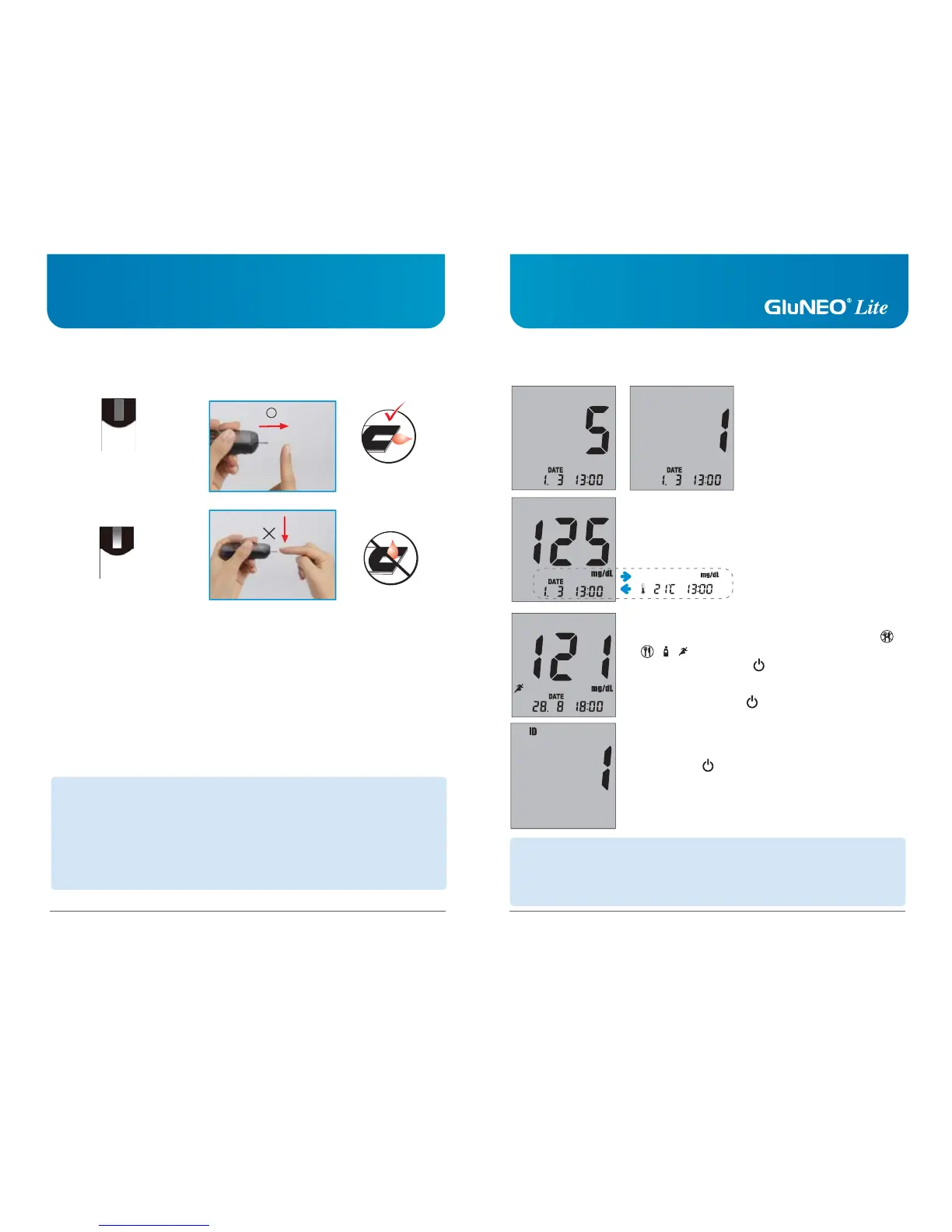
• Stick the edge of the test strip to the drop of blood.
• The blood will automatically be ‘drawn’ into the test strip channel.
• When your sample blood is enough, your meter will automatically count down.
• Apply your blood to the glucose test strip and do not take off your finger until you get the
beep sound. The test will automatically start.
• Please respect recommended quantity of blood sample. Too much blood may cause
malfunction of your meter by contaminating it.
• Correct
Completely Filled
• Incorrect
Poorly filled
• Applying Blood
Step 4
• If you selected to use the User ID option during set up, press
▲ and ▼ button to select the correct User ID, then press the
power button .
• Record the result value in your logbook.
When glucose test strip is removed, glucose test meter turns
off automatically.
• If you selected to use the User Activity option during set up,
press and release ▲ or ▼ button to select the activity ( ,
, , ) that correlates with your result, then press and
release the power button .
• If you do not select to use User Activity option during set up,
press the power button .
CAUTION
1. If the test result is out of the test range, “HI/Lo” message will be shown on the LCD
window.
2. Safely discard used glucose test strips and lancets in the proper place, according to the
local regulation.
• After the beeping sound, test
will begin automatically, and
your results will appear in 5
seconds. It should begin counting
down from 5 to 1 second on
the LCD display window. LCD
window will display the result
of your blood glucose level,
temperature and time.
Correct
Incorrect



 To Next Page