Maintenance Guide .
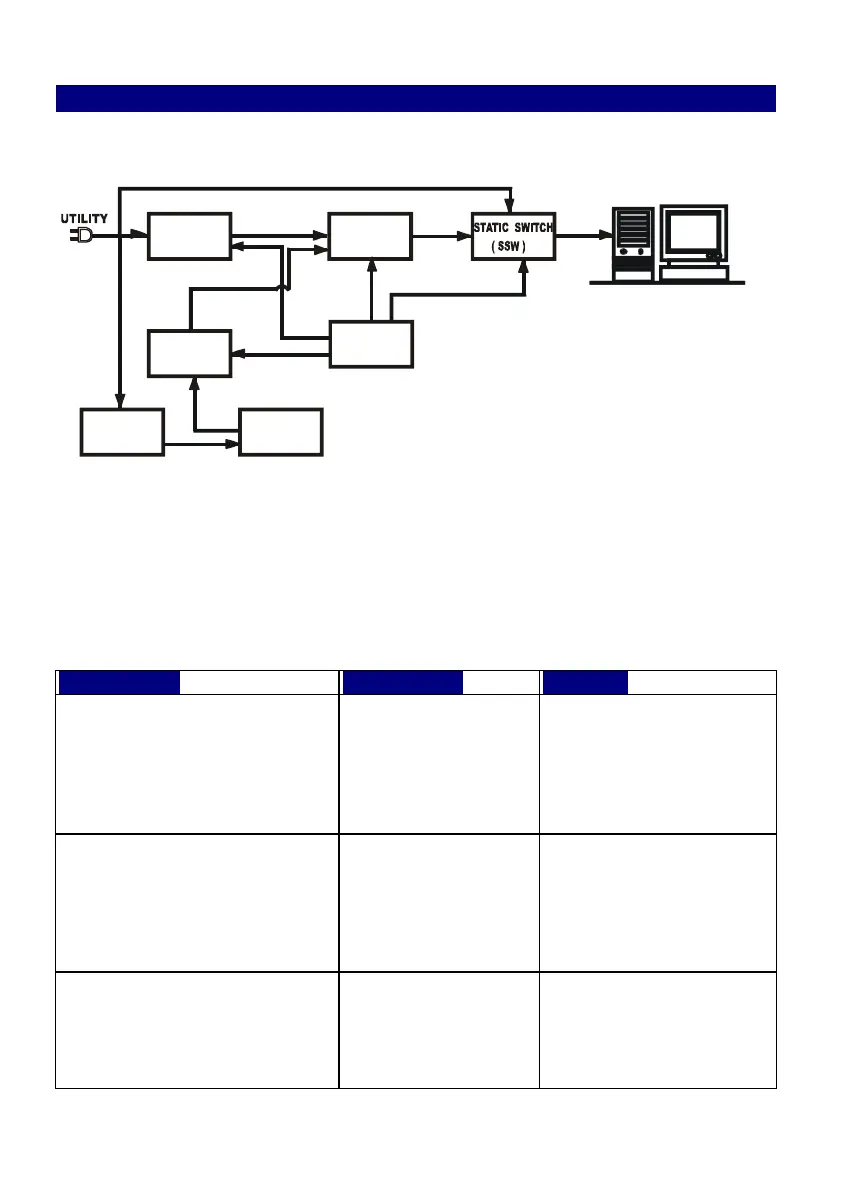
5.1. System Block
5.2 Trouble Shooting
When the UPS malfunctions during operation, you may check the list
Below for proper adjustment. Should the problem persists, please Contact
your local distributor for help.
Utility LED is not on and the
UPS is on battery mode, when
Utility is normal.
AC Input cord is
loose or AC Input
fuse is broken.
1.Connect the AC Input
cord to wall receptacle.
2.Replace the AC fuse
with same rating one.
3.If problem persists,
please call for service.
The UPS switches to battery
mode then back to Utility
mode, when connected device
is turned on. Or, the UPS
Switches back and forth
between battery and Utility.
3. Check if any
power strip is
connected
to the UPS.
4. Any damage of
Wall Receptacle.
1. Do not use power strip.
2. Replace the wall
receptacle.
UPS is overloaded.
Please remove some load
at the output end of the
UPS till the RED LED
extinguishes.
PFC
AC/DC
INVERTER
DC/AC
BOOST
DC/DC
CHARGER
BATTERY
Control
Circuit



 To Next Page